1. Spring Batch 介绍
在企业域环境中针对关键环境进行商业操作的时候,有许多应用程序需要进行批量处理。这些业务运营包括:
-
无需用户交互即可最有效地处理大量信息的自动化复杂处理。这些操作通常包括基于时间的事件 (例如,月末统计计算,通知或者消息通知)。
-
在非常大的数据集中重复处理复杂业务规则的定期应用(例如,保险利益确定或费率调整)。
-
整合从内部或者外部系统中收到的信息,这些信息通常要求格式,校验和事务范式处理到记录系统中。 批处理通常被用来针对企业每天产生超过亿万级别的数据量。
Spring Batch是一个轻量级的综合性批处理框架,可用于开发企业信息系统中那些至关重要的数据批量处理业务。 Spring Batch构建了人们期望的Spring Framework 特性(生产环境,基于 POJO 的开发和易于使用), 同时让开发者很容易的访问和使用企业级服务。Spring Batch 不是一个自动调度运行框架。在市面上已经有了很多企 业级和开源的自动运行框架(例如 Quartz,Tivoli, Control-M 等)。 Spring Batch 被设计与计划任务和调度程序一同协作完成任务,而不是替换调度程序。
Spring Batch 提供了可重用的功能,这些功能被用来对大量数据和记录进行处理,包括有日志/跟踪(logging/tracing), 事务管理(transaction management),作业处理状态(job processing statistics),作业重启(job restart), 作业跳过(job skip)和资源管理(resource management)。 此外还提供了许多高级服务和特性, 使之能够通过优化(optimization ) 和分片技术(partitioning techniques) 来实现极高容量和性能的批处理作业。 Spring Batch 能够简单(例如,将文件读入到数据库中或者运行一个存储过程)和复杂(例如,在数据库之间对海量数据进行移动或转换等) 情况下都能很好的工作。 可以在框架高度扩展的方式下执行大批量的作业来处理海量的信息。
1.1. 背景
在开源项目及其相关社区把大部分注意力集中在基于 web 和 微服务体系框架时框架中时,基于 Java 的批处理框架却无人问津, 尽管在企业 IT 环境中一直都有这种批处理的需求。但因为缺乏一个标准的、可重用的批处理框架导致在企业客户的 IT 系统中 存在着很多一次编写,一次使用的版本,以及很多不同的内部解决方案。
SpringSource (现被命名为 Pivotal) 和 Accenture(埃森哲)致力于通过合作来改善这种状况。 埃森哲在实现批处理架构上有着丰富的产业实践经验,SpringSource 有深入的技术开发积累, 背靠 Spring 框架提供的编程模型,意味着两者能够结合成为默契且强大的合作伙伴,创造出高质量的、市场认可的企业级 Java 解决方案, 填补这一重要的行业空白。两家公司都与许多通过开发基于Spring的批处理架构解决方案解决类似问题的客户合作。 这提供了一些有用的额外细节和实际约束,有助于确保解决方案可以应用于客户提出的现实问题。
埃森哲为Spring Batch项目贡献了以前专有的批处理体系结构框架,以及提供支持,增强功能和现有功能集的提交者资源。 埃森哲的贡献基于几十年来在使用最新几代平台构建批量架构方面的经验:COBOL / Mainframe,C / Unix以及现在的Java / Anywhere。
埃森哲与SpringSource之间的合作旨在促进软件处理方法,框架和工具的标准化, 在创建批处理应用程序时,企业用户可以始终如一地利用这些方法,框架和工具。希望为其企业IT环境提供标准的, 经过验证的解决方案的公司和政府机构可以从 Spring Batch 中受益。
1.2. 使用场景
一般的典型批处理程序:
-
从数据库,文件或队列中读取大量记录。
-
以某种方式处理数据。
-
以修改的形式写回数据。
Spring Batch自动执行此基本批处理迭代,提供处理类似事务的功能,通常在脱机环境中处理,无需任何用户交互。 批处理作业是大多数 IT 项目的一部分,Spring Batch 是唯一提供强大的企业级解决方案的开源框架。
业务场景
-
周期提交批处理任务
-
同时批处理进程:并非处理一个任务
-
分阶段的企业消息驱动处理
-
高并发批处理
-
失败后的手动或定时重启
-
按顺序处理任务依赖(使用工作流驱动的批处理插件)
-
部分处理:跳过记录(例如,回滚)
-
全批次事务:因为可能有小数据量的批处理或存在存储过程/脚本中
技术目标
-
批量的开发者使用 Spring 的编程模型:开发者能够更加专注于业务逻辑,让框架来解决基础的功能
-
在基础架构、批处理执行环境、批处理应用之间有明确的划分
-
以接口形式提供通用的核心服务,以便所有项目都能使用
-
提供简单的默认实现,以实现核心执行接口的“开箱即用”
-
通过在所有层中对 Spring 框架进行平衡配置,能够实现更加容易的配置,自定义和扩展服务。
-
所有存在的核心服务应该能够很容易的在不同系统架构层进行影响的情况进行替换或扩展。
-
提供一个简单的部署模块,使用 Maven 来进行编译的 JARs 架构,并与应用完全分离。
1.3. Spring Batch 体系结构
Spring Batch 设计的时候充分考虑了可扩展性和各类最终用户。 下图显示了 Spring Batch 的架构层次示意图,这种架构层次为最终用户开发者提供了很好的扩展性与易用性。
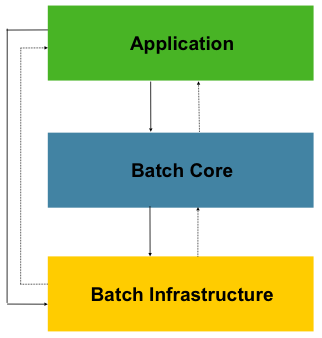
这个层级体系结构高亮显示了 Spring Batch 的 3 个主要组件:应用(Application),核心(Core)和 基础架构(Infrastructure)。
应用层包含了所有的批量作业和开发者使用 Spring Batch 写的所有自定义代码。批量核心层包含了所有运行和控制批量作业所需必要的运行时类。
同时还包括了有 JobLauncher, Job, 和 Step。应用层和核心层都构建在基础架构层之上。
基础架构层包含了有 读(readers)和 写(writers )以及服务(services)。例如有针对服务使用, RetryTemplate。
基础架构层的这些东西,这些能够被应用层开发(readers 和 writers,
例如 ItemReader 和 ItemWriter)和批量核心框架(例如,retry,这个是核心层自己的库)所使用。
简单的来说,基础架构层为应用层和批量核心层提供了所需要的的基础内容,是整个 Spring Batch 的基础。我们针对 Spring Batch 的开发绝大部分情况是在应用层完成的。
1.4. 一般批量处理的原则和使用指引
下面是一些关键的指导原则,可以在构批量处理解决方案可以参考。
-
请记住,通常批量处理体系结构将会影响在线应用的体系结构,同时反过来也是一样的。 在你为批量任务和在线应用进行设计架构和环境的时候请尽可能的使用公共的模块。
-
越简单越好,尽量在一个单独的批量应用中构建简单的批量处理,并避免复杂的逻辑结构。
-
尽量的保持存储的数据和进程存储在同一个地方(换句话说就是尽量将数据保存到你程序运行的地方)。
-
最小化系统资源的使用,尤其针对 I/O。尽量在内存中执行尽可能多的操作。
-
检查应用的 I/O(分析 SQL 语句)来避免不必要的的物理 I/O 使用。特别是以下四个常见的缺陷(flaws)需要避免:
-
在数据可以只读一次就可以缓存起来的情况下,针对每一个事务都来读取数据
-
多次读取/查询同一事务中已经读取过的数据
-
产生不必要的表格或者索引扫描
-
在 SQL 查询中不指定 WHERE 查询的值
-
-
在批量运行的时候不要将一件事情重复 2 次。例如,如果你需要针对你需要报表的数据汇总,请在处理每一条记录时使用增量来存储, 尽可能不要再去遍历一次同样的数据。
-
为批量进程在开始的时候就分配足够的内存,以避免在运行的时候再次分配内存。
-
总是将数据完整性假定为最坏情况。对数据进行适当的检查和数据校验以保持数据完整性(integrity)。
-
可能的话,请实现内部校验(checksums )。例如,针对文本文件,应该有一条结尾记录, 这个记录将会说明文件中的总记录数和关键字段的集合(aggregate)。
-
尽可能早地在模拟生产环境下使用真实的数据量,以便于进行计划和执行压力测试。
-
在大数据量的批量中,数据备份可能会非常复杂和充满挑战,尤其是你的系统要求不间断(24 - 7)运行的系统。 数据库备份通常在设计时就考虑好了,但是文件备份也应该提升到同样的重要程度。如果系统依赖于文本文件, 文件备份程序不仅要正确设置和形成文档,还要定期进行测试。
1.5. 批量处理策略
为了帮助设计和实现批量处理系统,基本的批量应用是通过块和模式来构建的, 同时也应该能够为程序开发人员和设计人员提供结构的样例和基础的批量处理程序。
当你开始设计一个批量作业任务的时候,商业逻辑应该被拆分一系列的步骤,而这些步骤又是可以通过下面的标准构件块来实现的:
-
转换应用程序(Conversion Applications): 针对每一个从外部系统导出或者提供的各种类型的文件, 我们都需要创建一个转换应用程序来讲这些类型的文件和数据转换为处理所需要的标准格式。 这个类型的批量应用程序可以是正规转换工具模块中的一部分,也可以是整个的转换工具模块(请查看:基本的批量服务(Basic Batch Services))。
-
校验应用程序(Validation Applications): 校验应用程序能够保证所有的输入和输出记录都是正确和一致的。 校验通常是基于头和尾进行校验的,校验码和校验算法通常是针对记录的交叉验证。
-
提取应用(Extract Applications): 这个应用程序通常被用来从数据库或者文本文件中读取一系列的记录, 并对记录的选择通常是基于预先确定的规则,然后将这些记录输出到输出文件中。
-
提取/更新应用(Extract/Update Applications): 这个应用程序通常被用来从数据库或者文本文件中读取记录, 并将每一条读取的输入记录更新到数据库或者输出数据库中。
-
处理和更新应用(Processing and Updating Applications): 这种程序对从提取或验证程序 传过来的输入事务记录进行处理。 这处理通常包括有读取数据库并且获得需要处理的数据,为输出处理更新数据库或创建记录。
-
输出和格式化应用(Output/Format Applications): 一个应用通过读取一个输入文件, 对输入文件的结构重新格式化为需要的标准格式,然后创建一个打印的输出文件,或将数据传输到其他的程序或者系统中。
更多的,一个基本的应用外壳应该也能够被针对商业逻辑来提供,这个外壳通常不能通过上面介绍的这些标准模块来完成。
另外的一个主要的构建块,每一个引用通常可以使用下面的一个或者多个标准工具步骤,例如:
-
分类(Sort): 一个程序可以读取输入文件后生成一个输出文件,在这个输出文件中可以对记录进行重新排序, 重新排序的是根据给定记录的关键字段进行重新排序的。分类通常使用标准的系统工具来执行。
-
拆分(Split):一个程序可以读取输入文件后,根据需要的字段值,将输入的文件拆分为多个文件进行输出。拆分通常使用标准的系统工具来执行。
-
合并(Merge):一个程序可以读取多个输入文件,然后将多个输入文件进行合并处理后生成为一个单一的输出文件。 合并可以自定义或者由参数驱动的(parameter-driven)系统实用程序来执行。
批量处理应用程序可以通过下面的输入数据类型来进行分类:
-
数据库驱动应用程序(Database-driven applications)可以通过从数据库中获得的行或值来进行驱动。
-
文件驱动应用程序(File-driven applications) 可以通过从文件中获得的数据来进行驱动。
-
消息驱动应用程序(Message-driven applications) 可以通过从消息队列中获得的数据来进行驱动。
所有批量处理系统的处理基础都是策略(strategy)。对处理策略进行选择产生影响的因素包括有:预估批量处理需要处理的数据量, 在线并发量,和另外一个批量处理系统的在线并发量, 可用的批量处理时间窗口(很多企业都希望系统是能够不间断运行的,基本上来说批量处理可能没有处理时间窗口)。
针对批量处理的标准处理选项包括有(按实现复杂度的递增顺序):
-
在一个批处理窗口中执行常规离线批处理
-
并发批量 / 在线处理
-
并发处理很多不同的批量处理或者有很多批量作业在同一时间运行
-
分区(Partitioning),就是在同一时间有很多示例在运行相同的批量作业
-
混合上面的一些需求
上面的一些选项或者所有选项能够被商业的任务调度所支持。
在下面的部分,我们将会针对上面的处理选项来对细节进行更多的说明。需要特别注意的是, 批量处理程序使用提交和锁定策略将会根据批量处理的不同而有所不同。作为最佳实践,在线锁策略应该使用相同的原则。 因此,在设计批处理整体架构时不能简单地拍脑袋决定,需要进行详细的分析和论证。
锁定策略可以仅仅使用常见的数据库锁或者你也可以在系统架构中使用其他的自定义锁定服务。 这个锁服务将会跟踪数据库的锁(例如在一个专用的数据库表(db-table)中存储必要的信息),然后在应用程序请求数据库操作时授予权限或拒绝。 重试逻辑应该也需要在系统架构中实现,以避免批量作业中的因资源锁定而导致批量任务被终止。
1. 批量处理作业窗口中的常规处理 针对运行在一个单独批处理窗口中的简单批量处理,更新的数据对在线用户或其他批处理来说并没有实时性要求, 也没有并发问题,在批处理运行完成后执行单次提交即可。
大多数情况下,一种更健壮的方法会更合适。要记住的是,批处理系统会随着时间的流逝而增长,包括复杂度和需要处理的数据量。 如果没有合适的锁定策略,系统仍然依赖于一个单一的提交点,则修改批处理程序会是一件痛苦的事情。 因此,即使是最简单的批处理系统, 也应该为重启-恢复(restart-recovery)选项考虑提交逻辑。针对下面的情况,批量处理就更加复杂了。
2. 并发批量 / 在线处理 批处理程序处理的数据如果会同时被在线用户实时更新,就不应该锁定在线用户需要的所有任何数据(不管是数据库还是文件), 即使只需要锁定几秒钟的时间。同时还应该每处理一批事务就提交一次数据库。这减少了其他程序不可用的数据数据量,也压缩了数据不可用的时间。
另一个可以使用的方案就是使用逻辑行基本的锁定实现来替代物理锁定。 通过使用乐观锁(Optimistic Locking )或悲观锁(Pessimistic Locking)模式。
-
乐观锁假设记录争用的可能性很低。这通常意味着并发批处理和在线处理所使用的每个数据表中都有一个时间戳列。 当程序读取一行进行处理时,同时也获得对应的时间戳。当程序处理完该行以后尝试更新时,在 update 操作的 WHERE 子句中使用原来的时间戳作为条件。 如果时间戳相匹配,则数据和时间戳都更新成功。如果时间戳不匹配,这表明在本程序上次获取和此次更新这段时间内已经有另一个程序修改了同一条记录,因此更新不会被执行。
-
悲观锁定策略假设记录争用的可能性很高,因此在检索时需要获得一个物理锁或逻辑锁。有一种悲观逻辑锁在数据表中使用一个专用的 lock-column 列。 当程序想要为更新目的而获取一行时,它在 lock column 上设置一个标志。如果为某一行设置了标志位,其他程序在试图获取同一行时将会逻辑上获取失败。 当设置标志的程序更新该行时,它也同时清除标志位,允许其他程序获取该行。 请注意,在初步获取和初次设置标志位这段时间内必须维护数据的完整性,比如使用数据库锁(例如,SELECT FOR UPDATE)。 还请注意,这种方法和物理锁都有相同的缺点,除了它在构建一个超时机制时比较容易管理。比如记录而用户去吃午餐了,则超时时间到了以后锁会被自动释放。
这些模式并不一定适用于批处理,但他们可以被用在并发批处理和在线处理的情况下(例如,数据库不支持行级锁)。作为一般规则,乐观锁更适合于在线应用, 而悲观锁更适合于批处理应用。只要使用了逻辑锁,那么所有访问逻辑锁保护的数据的程序都必须采用同样的方案。
请注意:这两种解决方案都只锁定(address locking)单条记录。但很多情况下我们需要锁定一组相关的记录。如果使用物理锁,你必须非常小心地管理这些以避免潜在的死锁。 如果使用逻辑锁,通常最好的解决办法是创建一个逻辑锁管理器,使管理器能理解你想要保护的逻辑记录分组(groups),并确保连贯和没有死锁(non-deadlocking)。 这种逻辑锁管理器通常使用其私有的表来进行锁管理、争用报告、超时机制 等等。
3. 并行处理 并行处理允许多个批量处理运行(run)/任务(job)同时并行地运行。以使批量处理总运行时间降到最低。 如果多个任务不使用相同的文件、数据表、索引空间时,批量处理这些不算什么问题。如果确实存在共享和竞争,那么这个服务就应该使用分区数据来实现。 另一种选择是使用控制表来构建一个架构模块以维护他们之间的相互依赖关系。控制表应该为每个共享资源分配一行记录,不管这些资源是否被某个程序所使用。 执行并行作业的批处理架构或程序随后将查询这个控制表,以确定是否可以访问所需的资源。
如果解决了数据访问的问题,并行处理就可以通过使用额外的线程来并行实现。在传统的大型主机环境中,并行作业类上通常被用来确保所有进程都有充足的 CPU 时间。 无论如何,解决方案必须足够强劲,以确保所有正在运行的进程都有足够的运行处理时间。
并行处理的其他关键问题还包括负载平衡以及一般系统资源的可用性(如文件、数据库缓冲池等)。请注意,控制表本身也可能很容易变成一个至关重要的资源(有可能发生严重竞争)。
4. 分区 分区技术允许多版本的大型批处理程序并发地(concurrently)运行。这样做的目的是减少超长批处理作业过程所需的时间。 可以成功分区的过程主要是那些可以拆分的输入文件 和/或 主要的数据库表被分区以允许程序使用不同的数据来运行。
此外,被分区的过程必须设计为只处理分配给他的数据集。分区架构与数据库设计和数据库分区策略是密切相关的。 请注意,数据库分区并不一定指数据库需要在物理上实现分区,尽管在大多数情况下这是明智的。 下面的图片展示了分区的方法:
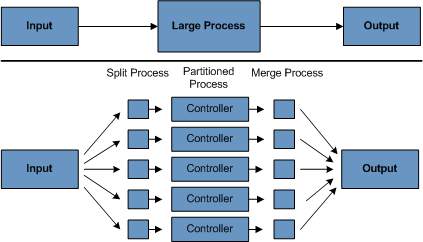
系统架构应该足够灵活,以允许动态配置分区的数量。自动控制和用户配置都应该纳入考虑范围。 自动配置可以根据参数来决定,例如输入文件大小 和/或 输入记录的数量。
4.1 分区方案 下面列出了一些可能的分区方案,至于具体选择哪种分区方案,要根据具体情况来确定:
1. 固定和均衡拆分记录集
这涉及到将输入的记录集合分解成均衡的部分(例如,拆分为 10 份,这样每部分是整个数据集的十分之一)。 每个拆分的部分稍后由一个批处理/提取程序实例来处理。
为了使用这种方案,需要在预处理时候就将记录集进行拆分。拆分的结果有一个最大值和最小值的位置,这两个值可以用作限制每个 批处理/提取程序处理部分的输入。
预处理可能有一个很大的开销,因为它必须计算并确定的每部分数据集的边界。
2. 通过关键字段(Key Column)拆分
这涉及到将输入记录按照某个关键字段来拆分,比如一个地区代码(location code),并将每个键分配给一个批处理实例。为了达到这个目标,也可以使用列值:
-
通过分区表来指派给一个批量处理实例。
-
通过值的一部分(例如 0000-0999,1000-1999等)分配给批处理实例。
在选项 1 下,添加新值意味着手动重新配置批处理/提取以确保将新值添加到特定实例。
在选项 2 下,这可确保通过批处理作业的实例覆盖所有值。但是,一个实例处理的值的数量取决于列值的分布(0000-0999范围内可能有大量位置,1000-1999范围内可能很少)。 在此选项下,数据范围应设计为考虑分区。
在这两个选项下,无法实现记录到批处理实例的最佳均匀分布。没有使用批处理实例数的动态配置。
3. 通过视图(Views)
这种方法基本上是根据键列来分解,但不同的是在数据库级进行分解。它涉及到将记录集分解成视图。这些视图将被批处理程序的各个实例在处理时使用。分解将通过数据分组来完成。
使用这个方法时,批处理的每个实例都必须为其配置一个特定的视图(而非主表)。当然,对于新添加的数据,这个新的数据分组必须被包含在某个视图中。 也没有自动配置功能,实例数量的变化将导致视图需要进行相应的改变。
4. 附加的处理识别器
这涉及到输入表一个附加的新列,它充当一个指示器。在预处理阶段,所有指示器都被标志为未处理。在批处理程序获取记录阶段,只会读取被标记为未处理的记录, 一旦他们被读取(并加锁),它们就被标记为正在处理状态。当记录处理完成,指示器将被更新为完成或错误。 批处理程序的多个实例不需要改变就可以开始,因为附加列确保每条纪录只被处理一次。 在“完成时,指标被标记为完成”的顺序中的一两句话。
使用该选项时,表上的I/O会动态地增长。在批量更新的程序中,这种影响被降低了,因为写操作是必定要进行的。
5. 提取表到无格式文件
这包括将表中的数据提取到一个文件中。然后可以将这个文件拆分成多个部分,作为批处理实例的输入。
使用这个选项时,将数据提取到文件中,并将文件拆分的额外开销,有可能抵消多分区处理(multi-partitioning)的效果。可以通过改变文件分割脚本来实现动态配置。
6. 使用哈希列(Hashing Column)
这个计划需要在数据库表中增加一个哈希列(key/index)来检索驱动(driver)记录。这个哈希列将有一个指示器来确定将由批处理程序的哪个实例处理某个特定的行。 例如,如果启动了三个批处理实例,那么 “A” 指示器将标记某行由实例 1 来处理,“B”将标记着将由实例 2 来处理,“C”将标记着将由实例 3 来处理,以此类推。
稍后用于检索记录的过程(procedure)程序,将有一个额外的 WHERE 子句来选择以一个特定指标标记的所有行。 这个表的插入(insert)需要附加的标记字段,默认值将是其中的某一个实例(例如“A”)。
一个简单的批处理程序将被用来更新不同实例之间的重新分配负载的指标。当添加足够多的新行时,这个批处理会被运行(在任何时间,除了在批处理窗口中)。
批处理应用程序的其他实例只需要像上面这样的批处理程序运行着以重新分配指标,以决定新实例的数量。
4.2 数据库和应用设计原则
如果一个支持多分区(multi-partitioned)的应用程序架构,基于数据库采用关键列(key column)分区方法拆成的多个表,则应该包含一个中心分区仓库来存储分区参数。 这种方式提供了灵活性,并保证了可维护性。这个中心仓库通常只由单个表组成,叫做分区表。
存储在分区表中的信息应该是是静态的,并且只能由 DBA 维护。每个多分区程序对应的单个分区有一行记录,组成这个表。 这个表应该包含这些列:程序 ID 编号,分区编号(分区的逻辑ID),一个分区对应的关键列(key column)的最小值,分区对应的关键列的最大值。
在程序启动时,应用程序架构(Control Processing Tasklet, 控制处理微线程)应该将程序 id 和分区号传递给该程序。
这些变量被用于读取分区表,来确定应用程序应该处理的数据范围(如果使用关键列的话)。另外分区号必须在整个处理过程中用来:
-
为了使合并程序正常工作,需要将分区号添加到输出文件/数据库更新
-
向框架的错误处理程序报告正常处理批处理日志和执行期间发生的所有错误
4.3 死锁最小化
当程序并行或分区运行时,会导致数据库资源的争用,还可能会发生死锁(Deadlocks)。其中的关键是数据库设计团队在进行数据库设计时必须考虑尽可能消除潜在的竞争情况。
还要确保设计数据库表的索引时考虑到性能以及死锁预防。
死锁或热点往往发生在管理或架构表上,如日志表、控制表、锁表(lock tables)。这些影响也应该纳入考虑。为了确定架构可能的瓶颈,一个真实的压力测试是至关重要的。
要最小化数据冲突的影响,架构应该提供一些服务,如附加到数据库或遇到死锁时的 等待-重试(wait-and-retry)间隔时间。 这意味着要有一个内置的机制来处理数据库返回码,而不是立即引发错误处理,需要等待一个预定的时间并重试执行数据库操作。
4.4 参数处理和校验
对程序开发人员来说,分区架构应该相对透明。框架以分区模式运行时应该执行的相关任务包括:
-
在程序启动之前获取分区参数
-
在程序启动之前验证分区参数
-
在启动时将参数传递给应用程序
验证(validation)要包含必要的检查,以确保:
-
应用程序已经足够涵盖整个数据的分区
-
在各个分区之间没有遗漏断代(gaps)
如果数据库是分区的,可能需要一些额外的验证来保证单个分区不会跨越数据库的片区。
体系架构应该考虑整合分区(partitions).包括以下关键问题:
-
在进入下一个任务步骤之前是否所有的分区都必须完成?
-
如果一个分区 Job 中止了要怎么处理?
2. Spring Batch 4.2 新特性
Spring Batch 4.2 添加了下面的新特性:
-
使用 Micrometer 来支持批量指标(batch metrics)
-
支持从 Apache Kafka topics 读取/写入(reading/writing) 数据
-
支持从 Apache Avro 资源中读取/写入(reading/writing) 数据
-
改进支持文档
2.1. 使用 Micrometer 的批量指标
本发行版本介绍了可以让你通过使用 Micrometer 来监控你的批量作业。在默认的情况下,Spring Batch 将会收集相关批量指标
(包括,作业时间,步骤的时间,读取和写入的项目,以及其他的相关信息),和将这些指标通过 spring.batch 前缀(prefix)注册到 Micrometer 的全局指标中。
这些指标可以发布到任何能够支持 Micrometer 的 监控系统(monitoring system)中。
有关这个新特性的更多细节,请参考 Monitoring and metrics 章节中的内容。
2.2. Apache Kafka item 读取/写入
本发行版本添加了一个新的 KafkaItemReader 和 KafkaItemWriter, 用来从 Kafka 的 topics 中读取和写入。
有关更多这个新组建的信息,请参考: Javadoc。
2.3. Apache Avro item 读取/写入
本发行版本添加了一个新的 AvroItemReader 和 AvroItemWriter, 用来从 Avro 资源中读取和写入。
有关更多这个新组建的信息,请参考: Javadoc.
3. The Domain Language of Batch
To any experienced batch architect, the overall concepts of batch processing used in
Spring Batch should be familiar and comfortable. There are "Jobs" and "Steps" and
developer-supplied processing units called ItemReader and ItemWriter. However,
because of the Spring patterns, operations, templates, callbacks, and idioms, there are
opportunities for the following:
-
Significant improvement in adherence to a clear separation of concerns.
-
Clearly delineated architectural layers and services provided as interfaces.
-
Simple and default implementations that allow for quick adoption and ease of use out-of-the-box.
-
Significantly enhanced extensibility.
The following diagram is a simplified version of the batch reference architecture that has been used for decades. It provides an overview of the components that make up the domain language of batch processing. This architecture framework is a blueprint that has been proven through decades of implementations on the last several generations of platforms (COBOL/Mainframe, C/Unix, and now Java/anywhere). JCL and COBOL developers are likely to be as comfortable with the concepts as C, C#, and Java developers. Spring Batch provides a physical implementation of the layers, components, and technical services commonly found in the robust, maintainable systems that are used to address the creation of simple to complex batch applications, with the infrastructure and extensions to address very complex processing needs.
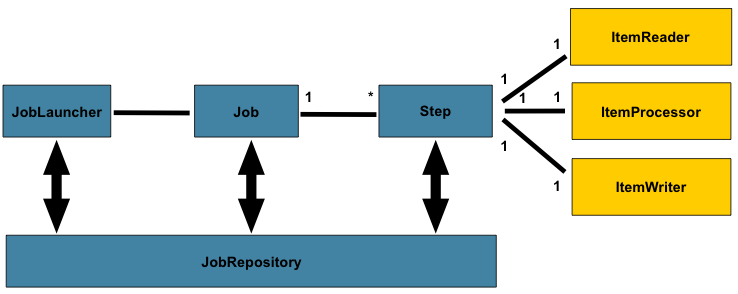
The preceding diagram highlights the key concepts that make up the domain language of
Spring Batch. A Job has one to many steps, each of which has exactly one ItemReader,
one ItemProcessor, and one ItemWriter. A job needs to be launched (with
JobLauncher), and metadata about the currently running process needs to be stored (in
JobRepository).
3.1. Job
This section describes stereotypes relating to the concept of a batch job. A Job is an
entity that encapsulates an entire batch process. As is common with other Spring
projects, a Job is wired together with either an XML configuration file or Java-based
configuration. This configuration may be referred to as the "job configuration". However,
Job is just the top of an overall hierarchy, as shown in the following diagram:
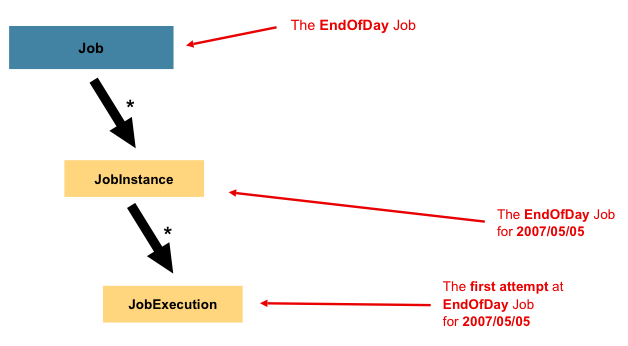
In Spring Batch, a Job is simply a container for Step instances. It combines multiple
steps that belong logically together in a flow and allows for configuration of properties
global to all steps, such as restartability. The job configuration contains:
-
The simple name of the job.
-
Definition and ordering of
Stepinstances. -
Whether or not the job is restartable.
A default simple implementation of the Job interface is provided by Spring Batch in the
form of the SimpleJob class, which creates some standard functionality on top of Job.
When using java based configuration, a collection of builders is made available for the
instantiation of a Job, as shown in the following example:
@Bean
public Job footballJob() {
    return this.jobBuilderFactory.get("footballJob")
                     .start(playerLoad())
                     .next(gameLoad())
                     .next(playerSummarization())
                     .end()
                     .build();
}
A default simple implementation of the Job interface is provided by Spring Batch in the
form of the SimpleJob class, which creates some standard functionality on top of Job.
However, the batch namespace abstracts away the need to instantiate it directly. Instead,
the <job> tag can be used as shown in the following example:
<job id="footballJob">
    <step id="playerload" next="gameLoad"/>
    <step id="gameLoad" next="playerSummarization"/>
    <step id="playerSummarization"/>
</job>
3.1.1. JobInstance
A JobInstance refers to the concept of a logical job run. Consider a batch job that
should be run once at the end of the day, such as the 'EndOfDay' Job from the preceding
diagram. There is one 'EndOfDay' job, but each individual run of the Job must be
tracked separately. In the case of this job, there is one logical JobInstance per day.
For example, there is a January 1st run, a January 2nd run, and so on. If the January 1st
run fails the first time and is run again the next day, it is still the January 1st run.
(Usually, this corresponds with the data it is processing as well, meaning the January
1st run processes data for January 1st). Therefore, each JobInstance can have multiple
executions (JobExecution is discussed in more detail later in this chapter), and only
one JobInstance corresponding to a particular Job and identifying JobParameters can
run at a given time.
The definition of a JobInstance has absolutely no bearing on the data the to be loaded.
It is entirely up to the ItemReader implementation to determine how data is loaded. For
example, in the EndOfDay scenario, there may be a column on the data that indicates the
'effective date' or 'schedule date' to which the data belongs. So, the January 1st run
would load only data from the 1st, and the January 2nd run would use only data from the
2nd. Because this determination is likely to be a business decision, it is left up to the
ItemReader to decide. However, using the same JobInstance determines whether or not
the 'state' (that is, the ExecutionContext, which is discussed later in this chapter)
from previous executions is used. Using a new JobInstance means 'start from the
beginning', and using an existing instance generally means 'start from where you left
off'.
3.1.2. JobParameters
Having discussed JobInstance and how it differs from Job, the natural question to ask
is: "How is one JobInstance distinguished from another?" The answer is:
JobParameters. A JobParameters object holds a set of parameters used to start a batch
job. They can be used for identification or even as reference data during the run, as
shown in the following image:
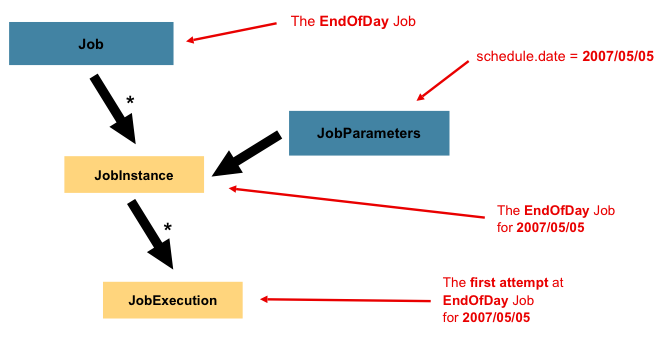
In the preceding example, where there are two instances, one for January 1st, and another
for January 2nd, there is really only one Job, but it has two JobParameter objects:
one that was started with a job parameter of 01-01-2017 and another that was started with
a parameter of 01-02-2017. Thus, the contract can be defined as: JobInstance = Job
+ identifying JobParameters. This allows a developer to effectively control how a
JobInstance is defined, since they control what parameters are passed in.
Not all job parameters are required to contribute to the identification of a
JobInstance. By default, they do so. However, the framework also allows the submission
of a Job with parameters that do not contribute to the identity of a JobInstance.
|
3.1.3. JobExecution
A JobExecution refers to the technical concept of a single attempt to run a Job. An
execution may end in failure or success, but the JobInstance corresponding to a given
execution is not considered to be complete unless the execution completes successfully.
Using the EndOfDay Job described previously as an example, consider a JobInstance for
01-01-2017 that failed the first time it was run. If it is run again with the same
identifying job parameters as the first run (01-01-2017), a new JobExecution is
created. However, there is still only one JobInstance.
A Job defines what a job is and how it is to be executed, and a JobInstance is a
purely organizational object to group executions together, primarily to enable correct
restart semantics. A JobExecution, however, is the primary storage mechanism for what
actually happened during a run and contains many more properties that must be controlled
and persisted, as shown in the following table:
Property |
Definition |
Status |
A |
startTime |
A |
endTime |
A |
exitStatus |
The |
createTime |
A |
lastUpdated |
A |
executionContext |
The "property bag" containing any user data that needs to be persisted between executions. |
failureExceptions |
The list of exceptions encountered during the execution of a |
These properties are important because they are persisted and can be used to completely determine the status of an execution. For example, if the EndOfDay job for 01-01 is executed at 9:00 PM and fails at 9:30, the following entries are made in the batch metadata tables:
JOB_INST_ID |
JOB_NAME |
1 |
EndOfDayJob |
JOB_EXECUTION_ID |
TYPE_CD |
KEY_NAME |
DATE_VAL |
IDENTIFYING |
1 |
DATE |
schedule.Date |
2017-01-01 |
TRUE |
JOB_EXEC_ID |
JOB_INST_ID |
START_TIME |
END_TIME |
STATUS |
1 |
1 |
2017-01-01 21:00 |
2017-01-01 21:30 |
FAILED |
| Column names may have been abbreviated or removed for the sake of clarity and formatting. |
Now that the job has failed, assume that it took the entire night for the problem to be
determined, so that the 'batch window' is now closed. Further assuming that the window
starts at 9:00 PM, the job is kicked off again for 01-01, starting where it left off and
completing successfully at 9:30. Because it is now the next day, the 01-02 job must be
run as well, and it is kicked off just afterwards at 9:31 and completes in its normal one
hour time at 10:30. There is no requirement that one JobInstance be kicked off after
another, unless there is potential for the two jobs to attempt to access the same data,
causing issues with locking at the database level. It is entirely up to the scheduler to
determine when a Job should be run. Since they are separate JobInstances, Spring
Batch makes no attempt to stop them from being run concurrently. (Attempting to run the
same JobInstance while another is already running results in a
JobExecutionAlreadyRunningException being thrown). There should now be an extra entry
in both the JobInstance and JobParameters tables and two extra entries in the
JobExecution table, as shown in the following tables:
JOB_INST_ID |
JOB_NAME |
1 |
EndOfDayJob |
2 |
EndOfDayJob |
JOB_EXECUTION_ID |
TYPE_CD |
KEY_NAME |
DATE_VAL |
IDENTIFYING |
1 |
DATE |
schedule.Date |
2017-01-01 00:00:00 |
TRUE |
2 |
DATE |
schedule.Date |
2017-01-01 00:00:00 |
TRUE |
3 |
DATE |
schedule.Date |
2017-01-02 00:00:00 |
TRUE |
JOB_EXEC_ID |
JOB_INST_ID |
START_TIME |
END_TIME |
STATUS |
1 |
1 |
2017-01-01 21:00 |
2017-01-01 21:30 |
FAILED |
2 |
1 |
2017-01-02 21:00 |
2017-01-02 21:30 |
COMPLETED |
3 |
2 |
2017-01-02 21:31 |
2017-01-02 22:29 |
COMPLETED |
| Column names may have been abbreviated or removed for the sake of clarity and formatting. |
3.2. Step
A Step is a domain object that encapsulates an independent, sequential phase of a batch
job. Therefore, every Job is composed entirely of one or more steps. A Step contains
all of the information necessary to define and control the actual batch processing. This
is a necessarily vague description because the contents of any given Step are at the
discretion of the developer writing a Job. A Step can be as simple or complex as the
developer desires. A simple Step might load data from a file into the database,
requiring little or no code (depending upon the implementations used). A more complex
Step may have complicated business rules that are applied as part of the processing. As
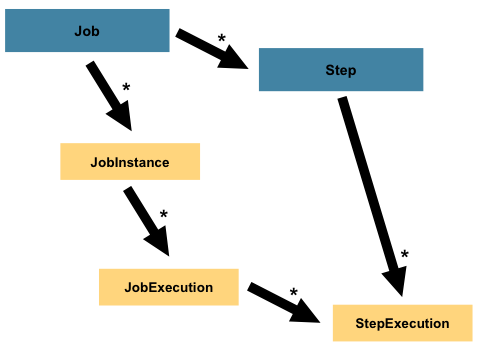
with a Job, a Step has an individual StepExecution that correlates with a unique
JobExecution, as shown in the following image:
3.2.1. StepExecution
A StepExecution represents a single attempt to execute a Step. A new StepExecution
is created each time a Step is run, similar to JobExecution. However, if a step fails
to execute because the step before it fails, no execution is persisted for it. A
StepExecution is created only when its Step is actually started.
Step executions are represented by objects of the StepExecution class. Each execution
contains a reference to its corresponding step and JobExecution and transaction related
data, such as commit and rollback counts and start and end times. Additionally, each step
execution contains an ExecutionContext, which contains any data a developer needs to
have persisted across batch runs, such as statistics or state information needed to
restart. The following table lists the properties for StepExecution:
Property |
Definition |
Status |
A |
startTime |
A |
endTime |
A |
exitStatus |
The |
executionContext |
The "property bag" containing any user data that needs to be persisted between executions. |
readCount |
The number of items that have been successfully read. |
writeCount |
The number of items that have been successfully written. |
commitCount |
The number of transactions that have been committed for this execution. |
rollbackCount |
The number of times the business transaction controlled by the |
readSkipCount |
The number of times |
processSkipCount |
The number of times |
filterCount |
The number of items that have been 'filtered' by the |
writeSkipCount |
The number of times |
3.3. ExecutionContext
An ExecutionContext represents a collection of key/value pairs that are persisted and
controlled by the framework in order to allow developers a place to store persistent
state that is scoped to a StepExecution object or a JobExecution object. For those
familiar with Quartz, it is very similar to JobDataMap. The best usage example is to
facilitate restart. Using flat file input as an example, while processing individual
lines, the framework periodically persists the ExecutionContext at commit points. Doing
so allows the ItemReader to store its state in case a fatal error occurs during the run
or even if the power goes out. All that is needed is to put the current number of lines
read into the context, as shown in the following example, and the framework will do the
rest:
executionContext.putLong(getKey(LINES_READ_COUNT), reader.getPosition());Using the EndOfDay example from the Job Stereotypes section as an example, assume there
is one step, 'loadData', that loads a file into the database. After the first failed run,
the metadata tables would look like the following example:
JOB_INST_ID |
JOB_NAME |
1 |
EndOfDayJob |
JOB_INST_ID |
TYPE_CD |
KEY_NAME |
DATE_VAL |
1 |
DATE |
schedule.Date |
2017-01-01 |
JOB_EXEC_ID |
JOB_INST_ID |
START_TIME |
END_TIME |
STATUS |
1 |
1 |
2017-01-01 21:00 |
2017-01-01 21:30 |
FAILED |
STEP_EXEC_ID |
JOB_EXEC_ID |
STEP_NAME |
START_TIME |
END_TIME |
STATUS |
1 |
1 |
loadData |
2017-01-01 21:00 |
2017-01-01 21:30 |
FAILED |
STEP_EXEC_ID |
SHORT_CONTEXT |
1 |
{piece.count=40321} |
In the preceding case, the Step ran for 30 minutes and processed 40,321 'pieces', which
would represent lines in a file in this scenario. This value is updated just before each
commit by the framework and can contain multiple rows corresponding to entries within the
ExecutionContext. Being notified before a commit requires one of the various
StepListener implementations (or an ItemStream), which are discussed in more detail
later in this guide. As with the previous example, it is assumed that the Job is
restarted the next day. When it is restarted, the values from the ExecutionContext of
the last run are reconstituted from the database. When the ItemReader is opened, it can
check to see if it has any stored state in the context and initialize itself from there,
as shown in the following example:
if (executionContext.containsKey(getKey(LINES_READ_COUNT))) {
    log.debug("Initializing for restart. Restart data is: " + executionContext);

    long lineCount = executionContext.getLong(getKey(LINES_READ_COUNT));

    LineReader reader = getReader();

    Object record = "";
    while (reader.getPosition() < lineCount && record != null) {
        record = readLine();
    }
}
In this case, after the above code runs, the current line is 40,322, allowing the Step
to start again from where it left off. The ExecutionContext can also be used for
statistics that need to be persisted about the run itself. For example, if a flat file
contains orders for processing that exist across multiple lines, it may be necessary to
store how many orders have been processed (which is much different from the number of
lines read), so that an email can be sent at the end of the Step with the total number
of orders processed in the body. The framework handles storing this for the developer, in
order to correctly scope it with an individual JobInstance. It can be very difficult to
know whether an existing ExecutionContext should be used or not. For example, using the
'EndOfDay' example from above, when the 01-01 run starts again for the second time, the
framework recognizes that it is the same JobInstance and on an individual Step basis,
pulls the ExecutionContext out of the database, and hands it (as part of the
StepExecution) to the Step itself. Conversely, for the 01-02 run, the framework
recognizes that it is a different instance, so an empty context must be handed to the
Step. There are many of these types of determinations that the framework makes for the
developer, to ensure the state is given to them at the correct time. It is also important
to note that exactly one ExecutionContext exists per StepExecution at any given time.
Clients of the ExecutionContext should be careful, because this creates a shared
keyspace. As a result, care should be taken when putting values in to ensure no data is
overwritten. However, the Step stores absolutely no data in the context, so there is no
way to adversely affect the framework.
It is also important to note that there is at least one ExecutionContext per
JobExecution and one for every StepExecution. For example, consider the following
code snippet:
ExecutionContext ecStep = stepExecution.getExecutionContext();
ExecutionContext ecJob = jobExecution.getExecutionContext();
//ecStep does not equal ecJob
As noted in the comment, ecStep does not equal ecJob. They are two different
ExecutionContexts. The one scoped to the Step is saved at every commit point in the
Step, whereas the one scoped to the Job is saved in between every Step execution.
3.4. JobRepository
JobRepository is the persistence mechanism for all of the Stereotypes mentioned above.
It provides CRUD operations for JobLauncher, Job, and Step implementations. When a
Job is first launched, a JobExecution is obtained from the repository, and, during
the course of execution, StepExecution and JobExecution implementations are persisted
by passing them to the repository.
The batch namespace provides support for configuring a JobRepository instance with the
<job-repository> tag, as shown in the following example:
<job-repository id="jobRepository"/>When using java configuration, @EnableBatchProcessing annotation provides a
JobRepository as one of the components automatically configured out of the box.
3.5. JobLauncher
JobLauncher represents a simple interface for launching a Job with a given set of
JobParameters, as shown in the following example:
public interface JobLauncher {

public JobExecution run(Job job, JobParameters jobParameters)
            throws JobExecutionAlreadyRunningException, JobRestartException,
                   JobInstanceAlreadyCompleteException, JobParametersInvalidException;
}
It is expected that implementations obtain a valid JobExecution from the
JobRepository and execute the Job.
3.6. Item Reader
ItemReader is an abstraction that represents the retrieval of input for a Step, one
item at a time. When the ItemReader has exhausted the items it can provide, it
indicates this by returning null. More details about the ItemReader interface and its
various implementations can be found in
Readers And Writers.
3.7. Item Writer
ItemWriter is an abstraction that represents the output of a Step, one batch or chunk
of items at a time. Generally, an ItemWriter has no knowledge of the input it should
receive next and knows only the item that was passed in its current invocation. More
details about the ItemWriter interface and its various implementations can be found in
Readers And Writers.
3.8. Item Processor
ItemProcessor is an abstraction that represents the business processing of an item.
While the ItemReader reads one item, and the ItemWriter writes them, the
ItemProcessor provides an access point to transform or apply other business processing.
If, while processing the item, it is determined that the item is not valid, returning
null indicates that the item should not be written out. More details about the
ItemProcessor interface can be found in
Readers And Writers.
3.9. Batch Namespace
Many of the domain concepts listed previously need to be configured in a Spring
ApplicationContext. While there are implementations of the interfaces above that can be
used in a standard bean definition, a namespace has been provided for ease of
configuration, as shown in the following example:
<beans:beans xmlns="http://www.springframework.org/schema/batch"
xmlns:beans="http://www.springframework.org/schema/beans"
xmlns:xsi="http://www.w3.org/2001/XMLSchema-instance"
xsi:schemaLocation="
   http://www.springframework.org/schema/beans
   https://www.springframework.org/schema/beans/spring-beans.xsd
   http://www.springframework.org/schema/batch
   https://www.springframework.org/schema/batch/spring-batch.xsd">

<job id="ioSampleJob">
    <step id="step1">
        <tasklet>
            <chunk reader="itemReader" writer="itemWriter" commit-interval="2"/>
        </tasklet>
    </step>
</job>

</beans:beans>
As long as the batch namespace has been declared, any of its elements can be used. More
information on configuring a Job can be found in Configuring and
Running a Job. More information on configuring a Step can be found in
Configuring a Step.
4. Configuring and Running a Job
In the domain section , the overall architecture design was discussed, using the following diagram as a guide:
While the Job object may seem like a simple
container for steps, there are many configuration options of which a
developer must be aware. Furthermore, there are many considerations for
how a Job will be run and how its meta-data will be
stored during that run. This chapter will explain the various configuration
options and runtime concerns of a Job.
4.1. Configuring a Job
There are multiple implementations of the Job interface, however
builders abstract away the difference in configuration.
@Bean
public Job footballJob() {
    return this.jobBuilderFactory.get("footballJob")
                     .start(playerLoad())
                     .next(gameLoad())
                     .next(playerSummarization())
                     .end()
                     .build();
}
A Job (and typically any Step within it) requires a JobRepository. The
configuration of the JobRepository is handled via the BatchConfigurer.
The above example illustrates a Job that consists of three Step instances. The job related
builders can also contain other elements that help with parallelisation (Split),
declarative flow control (Decision) and externalization of flow definitions (Flow).
There are multiple implementations of the Job interface, however, the namespace
abstracts away the differences in configuration. It has only three
required dependencies: a name, a JobRepository , and
a list of Step instances.
<job id="footballJob">
    <step id="playerload"          parent="s1" next="gameLoad"/>
    <step id="gameLoad"            parent="s2" next="playerSummarization"/>
    <step id="playerSummarization" parent="s3"/>
</job>
The examples here use a parent bean definition to create the steps; see the section on step configuration for more options declaring specific step details inline. The XML namespace defaults to referencing a repository with an id of 'jobRepository', which is a sensible default. However, this can be overridden explicitly:
<job id="footballJob" job-repository="specialRepository">
    <step id="playerload"          parent="s1" next="gameLoad"/>
    <step id="gameLoad"            parent="s3" next="playerSummarization"/>
    <step id="playerSummarization" parent="s3"/>
</job>
In addition to steps a job configuration can contain other elements
that help with parallelisation (<split>),
declarative flow control (<decision>) and
externalization of flow definitions
(<flow/>).
4.1.1. Restartability
One key issue when executing a batch job concerns the behavior of
a Job when it is restarted. The launching of a
Job is considered to be a 'restart' if a
JobExecution already exists for the particular
JobInstance. Ideally, all jobs should be able to
start up where they left off, but there are scenarios where this is not
possible. It is entirely up to the developer to ensure that a new JobInstance is created in this scenario. However, Spring Batch does provide some help. If a
Job should never be restarted, but should always
be run as part of a new JobInstance, then the
restartable property may be set to 'false':
<job id="footballJob" restartable="false">
    ...
</job>@Bean
public Job footballJob() {
return this.jobBuilderFactory.get("footballJob")
.preventRestart()
...
.build();
}To phrase it another way, setting restartable to false means "this
Job does not support being started again". Restarting a Job that is not
restartable will cause a JobRestartException to
be thrown:
Job job = new SimpleJob();
job.setRestartable(false);

JobParameters jobParameters = new JobParameters();

JobExecution firstExecution = jobRepository.createJobExecution(job, jobParameters);
jobRepository.saveOrUpdate(firstExecution);

try {
    jobRepository.createJobExecution(job, jobParameters);
    fail();
}
catch (JobRestartException e) {
    // expected
}
This snippet of JUnit code shows how attempting to create a
JobExecution the first time for a non restartable
job will cause no issues. However, the second
attempt will throw a JobRestartException.
4.1.2. Intercepting Job Execution
During the course of the execution of a
Job, it may be useful to be notified of various
events in its lifecycle so that custom code may be executed. The
SimpleJob allows for this by calling a
JobListener at the appropriate time:
public interface JobExecutionListener {

    void beforeJob(JobExecution jobExecution);

    void afterJob(JobExecution jobExecution);

}
JobListeners can be added to a
SimpleJob via the listeners element on the
job:
<job id="footballJob">
    <step id="playerload"          parent="s1" next="gameLoad"/>
    <step id="gameLoad"            parent="s2" next="playerSummarization"/>
    <step id="playerSummarization" parent="s3"/>
    <listeners>
        <listener ref="sampleListener"/>
    </listeners>
</job>@Bean
public Job footballJob() {
return this.jobBuilderFactory.get("footballJob")
.listener(sampleListener())
...
.build();
}It should be noted that afterJob will be
called regardless of the success or failure of the
Job. If success or failure needs to be determined
it can be obtained from the JobExecution:
public void afterJob(JobExecution jobExecution){
    if( jobExecution.getStatus() == BatchStatus.COMPLETED ){
        //job success
    }
    else if(jobExecution.getStatus() == BatchStatus.FAILED){
        //job failure
    }
}
The annotations corresponding to this interface are:
-
@BeforeJob -
@AfterJob
4.1.3. Inheriting from a Parent Job
If a group of Jobs share similar, but not
identical, configurations, then it may be helpful to define a "parent"
Job from which the concrete
Jobs may inherit properties. Similar to class
inheritance in Java, the "child" Job will combine
its elements and attributes with the parent’s.
In the following example, "baseJob" is an abstract
Job definition that defines only a list of
listeners. The Job "job1" is a concrete
definition that inherits the list of listeners from "baseJob" and merges
it with its own list of listeners to produce a
Job with two listeners and one
Step, "step1".
<job id="baseJob" abstract="true">
    <listeners>
        <listener ref="listenerOne"/>
    <listeners>
</job>

<job id="job1" parent="baseJob">
    <step id="step1" parent="standaloneStep"/>

    <listeners merge="true">
        <listener ref="listenerTwo"/>
    <listeners>
</job>
Please see the section on Inheriting from a Parent Step for more detailed information.
4.1.4. JobParametersValidator
A job declared in the XML namespace or using any subclass of
AbstractJob can optionally declare a validator for the job parameters at
runtime. This is useful when for instance you need to assert that a job
is started with all its mandatory parameters. There is a
DefaultJobParametersValidator that can be used to constrain combinations
of simple mandatory and optional parameters, and for more complex
constraints you can implement the interface yourself.
The configuration of a validator is supported through the XML namespace through a child element of the job, e.g:
<job id="job1" parent="baseJob3">
    <step id="step1" parent="standaloneStep"/>
    <validator ref="parametersValidator"/>
</job>
The validator can be specified as a reference (as above) or as a nested bean definition in the beans namespace.
The configuration of a validator is supported through the java builders, e.g:
@Bean
public Job job1() {
    return this.jobBuilderFactory.get("job1")
                     .validator(parametersValidator())
                     ...
                     .build();
}
4.2. Java Config
Spring 3 brought the ability to configure applications via java in addition to XML.
As of Spring Batch 2.2.0, batch jobs can be configured using the same
java config. There are two components for the java based configuration:
the @EnableBatchProcessing annotation and two builders.
The @EnableBatchProcessing works similarly to the other
@Enable* annotations in the Spring family. In this case,
@EnableBatchProcessing provides a base configuration for
building batch jobs. Within this base configuration, an instance of
StepScope is created in addition to a number of beans made
available to be autowired:
-
JobRepository- bean name "jobRepository" -
JobLauncher- bean name "jobLauncher" -
JobRegistry- bean name "jobRegistry" -
PlatformTransactionManager- bean name "transactionManager" -
JobBuilderFactory- bean name "jobBuilders" -
StepBuilderFactory- bean name "stepBuilders"
The core interface for this configuration is the BatchConfigurer.
The default implementation provides the beans mentioned above and requires a
DataSource as a bean within the context to be provided. This data
source will be used by the JobRepository. You can customize any of these beans
by creating a custom implementation of the BatchConfigurer interface.
Typically, extending the DefaultBatchConfigurer (which is provided if a
BatchConfigurer is not found) and overriding the required getter is sufficient.
However, implementing your own from scratch may be required. The following
example shows how to provide a custom transaction manager:
@Bean
public BatchConfigurer batchConfigurer() {
	return new DefaultBatchConfigurer() {
		@Override
		public PlatformTransactionManager getTransactionManager() {
			return new MyTransactionManager();
		}
	};
}|
Only one configuration class needs to have the
|
With the base configuration in place, a user can use the provided builder factories
to configure a job. Below is an example of a two step job configured via the
JobBuilderFactory and the StepBuilderFactory.
@Configuration
@EnableBatchProcessing
@Import(DataSourceConfiguration.class)
public class AppConfig {

    @Autowired
    private JobBuilderFactory jobs;

    @Autowired
    private StepBuilderFactory steps;

    @Bean
    public Job job(@Qualifier("step1") Step step1, @Qualifier("step2") Step step2) {
        return jobs.get("myJob").start(step1).next(step2).build();
    }

    @Bean
    protected Step step1(ItemReader<Person> reader,
                         ItemProcessor<Person, Person> processor,
                         ItemWriter<Person> writer) {
        return steps.get("step1")
            .<Person, Person> chunk(10)
            .reader(reader)
            .processor(processor)
            .writer(writer)
            .build();
    }

    @Bean
    protected Step step2(Tasklet tasklet) {
        return steps.get("step2")
            .tasklet(tasklet)
            .build();
    }
}
4.3. Configuring a JobRepository
When using @EnableBatchProcessing, a JobRepository is provided out of the box for you.
This section addresses configuring your own.
As described in earlier, the JobRepository is used for basic CRUD operations of the various persisted
domain objects within Spring Batch, such as
JobExecution and
StepExecution. It is required by many of the major
framework features, such as the JobLauncher,
Job, and Step.
The batch
namespace abstracts away many of the implementation details of the
JobRepository implementations and their
collaborators. However, there are still a few configuration options
available:
<job-repository id="jobRepository"
    data-source="dataSource"
    transaction-manager="transactionManager"
    isolation-level-for-create="SERIALIZABLE"
    table-prefix="BATCH_"
	max-varchar-length="1000"/>
None of the configuration options listed above are required except
the id. If they are not set, the defaults shown above will be used. They
are shown above for awareness purposes. The
max-varchar-length defaults to 2500, which is the
length of the long VARCHAR columns in the sample schema scripts
When using java configuration, a JobRepository is provided for you. A JDBC based one is
provided out of the box if a DataSource is provided, the Map based one if not. However
you can customize the configuration of the JobRepository via an implementation of the
BatchConfigurer interface.
...
// This would reside in your BatchConfigurer implementation
@Override
protected JobRepository createJobRepository() throws Exception {
    JobRepositoryFactoryBean factory = new JobRepositoryFactoryBean();
    factory.setDataSource(dataSource);
    factory.setTransactionManager(transactionManager);
    factory.setIsolationLevelForCreate("ISOLATION_SERIALIZABLE");
    factory.setTablePrefix("BATCH_");
    factory.setMaxVarCharLength(1000);
    return factory.getObject();
}
...
None of the configuration options listed above are required except
the dataSource and transactionManager. If they are not set, the defaults shown above
will be used. They are shown above for awareness purposes. The
max varchar length defaults to 2500, which is the
length of the long VARCHAR columns in the
sample schema scripts
4.3.1. Transaction Configuration for the JobRepository
If the namespace or the provided FactoryBean is used, transactional advice will be
automatically created around the repository. This is to ensure that the
batch meta data, including state that is necessary for restarts after a
failure, is persisted correctly. The behavior of the framework is not
well defined if the repository methods are not transactional. The
isolation level in the create* method attributes is
specified separately to ensure that when jobs are launched, if two
processes are trying to launch the same job at the same time, only one
will succeed. The default isolation level for that method is
SERIALIZABLE, which is quite aggressive: READ_COMMITTED would work just
as well; READ_UNCOMMITTED would be fine if two processes are not likely
to collide in this way. However, since a call to the
create* method is quite short, it is unlikely
that the SERIALIZED will cause problems, as long as the database
platform supports it. However, this can be overridden:
<job-repository id="jobRepository"
isolation-level-for-create="REPEATABLE_READ" />// This would reside in your BatchConfigurer implementation
@Override
protected JobRepository createJobRepository() throws Exception {
JobRepositoryFactoryBean factory = new JobRepositoryFactoryBean();
factory.setDataSource(dataSource);
factory.setTransactionManager(transactionManager);
factory.setIsolationLevelForCreate("ISOLATION_REPEATABLE_READ");
return factory.getObject();
}If the namespace or factory beans aren’t used then it is also essential to configure the transactional behavior of the repository using AOP:
<aop:config>
    <aop:advisor
           pointcut="execution(* org.springframework.batch.core..*Repository+.*(..))"/>
    <advice-ref="txAdvice" />
</aop:config>

<tx:advice id="txAdvice" transaction-manager="transactionManager">
    <tx:attributes>
        <tx:method name="*" />
    </tx:attributes>
</tx:advice>
This fragment can be used as is, with almost no changes. Remember also to include the appropriate namespace declarations and to make sure spring-tx and spring-aop (or the whole of spring) are on the classpath.
@Bean
public TransactionProxyFactoryBean baseProxy() {
	TransactionProxyFactoryBean transactionProxyFactoryBean = new TransactionProxyFactoryBean();
	Properties transactionAttributes = new Properties();
	transactionAttributes.setProperty("*", "PROPAGATION_REQUIRED");
	transactionProxyFactoryBean.setTransactionAttributes(transactionAttributes);
	transactionProxyFactoryBean.setTarget(jobRepository());
	transactionProxyFactoryBean.setTransactionManager(transactionManager());
	return transactionProxyFactoryBean;
}
4.3.2. Changing the Table Prefix
Another modifiable property of the
JobRepository is the table prefix of the
meta-data tables. By default they are all prefaced with BATCH_.
BATCH_JOB_EXECUTION and BATCH_STEP_EXECUTION are two examples. However,
there are potential reasons to modify this prefix. If the schema names
needs to be prepended to the table names, or if more than one set of
meta data tables is needed within the same schema, then the table prefix
will need to be changed:
<job-repository id="jobRepository"
table-prefix="SYSTEM.TEST_" />// This would reside in your BatchConfigurer implementation
@Override
protected JobRepository createJobRepository() throws Exception {
JobRepositoryFactoryBean factory = new JobRepositoryFactoryBean();
factory.setDataSource(dataSource);
factory.setTransactionManager(transactionManager);
factory.setTablePrefix("SYSTEM.TEST_");
return factory.getObject();
}Given the above changes, every query to the meta data tables will be prefixed with "SYSTEM.TEST_". BATCH_JOB_EXECUTION will be referred to as SYSTEM.TEST_JOB_EXECUTION.
|
Only the table prefix is configurable. The table and column names are not. |
4.3.3. In-Memory Repository
There are scenarios in which you may not want to persist your domain objects to the database. One reason may be speed; storing domain objects at each commit point takes extra time. Another reason may be that you just don’t need to persist status for a particular job. For this reason, Spring batch provides an in-memory Map version of the job repository:
<bean id="jobRepository"
  class="org.springframework.batch.core.repository.support.MapJobRepositoryFactoryBean">
    <property name="transactionManager" ref="transactionManager"/>
</bean>// This would reside in your BatchConfigurer implementation
@Override
protected JobRepository createJobRepository() throws Exception {
MapJobRepositoryFactoryBean factory = new MapJobRepositoryFactoryBean();
factory.setTransactionManager(transactionManager);
return factory.getObject();
}Note that the in-memory repository is volatile and so does not
allow restart between JVM instances. It also cannot guarantee that two
job instances with the same parameters are launched simultaneously, and
is not suitable for use in a multi-threaded Job, or a locally
partitioned Step. So use the database version of the repository wherever
you need those features.
However it does require a transaction manager to be defined
because there are rollback semantics within the repository, and because
the business logic might still be transactional (e.g. RDBMS access). For
testing purposes many people find the
ResourcelessTransactionManager useful.
4.3.4. Non-standard Database Types in a Repository
If you are using a database platform that is not in the list of
supported platforms, you may be able to use one of the supported types,
if the SQL variant is close enough. To do this you can use the raw
JobRepositoryFactoryBean instead of the namespace
shortcut and use it to set the database type to the closest
match:
<bean id="jobRepository" class="org...JobRepositoryFactoryBean">
    <property name="databaseType" value="db2"/>
    <property name="dataSource" ref="dataSource"/>
</bean>// This would reside in your BatchConfigurer implementation
@Override
protected JobRepository createJobRepository() throws Exception {
JobRepositoryFactoryBean factory = new JobRepositoryFactoryBean();
factory.setDataSource(dataSource);
factory.setDatabaseType("db2");
factory.setTransactionManager(transactionManager);
return factory.getObject();
}(The JobRepositoryFactoryBean tries to
auto-detect the database type from the DataSource
if it is not specified.) The major differences between platforms are
mainly accounted for by the strategy for incrementing primary keys, so
often it might be necessary to override the
incrementerFactory as well (using one of the standard
implementations from the Spring Framework).
If even that doesn’t work, or you are not using an RDBMS, then the
only option may be to implement the various Dao
interfaces that the SimpleJobRepository depends
on and wire one up manually in the normal Spring way.
4.4. Configuring a JobLauncher
When using @EnableBatchProcessing, a JobRegistry is provided out of the box for you.
This section addresses configuring your own.
The most basic implementation of the
JobLauncher interface is the
SimpleJobLauncher. Its only required dependency is
a JobRepository, in order to obtain an
execution:
<bean id="jobLauncher"
      class="org.springframework.batch.core.launch.support.SimpleJobLauncher">
    <property name="jobRepository" ref="jobRepository" />
</bean>...
// This would reside in your BatchConfigurer implementation
@Override
protected JobLauncher createJobLauncher() throws Exception {
SimpleJobLauncher jobLauncher = new SimpleJobLauncher();
jobLauncher.setJobRepository(jobRepository);
jobLauncher.afterPropertiesSet();
return jobLauncher;
}
...Once a JobExecution is
obtained, it is passed to the execute method of
Job, ultimately returning the
JobExecution to the caller:
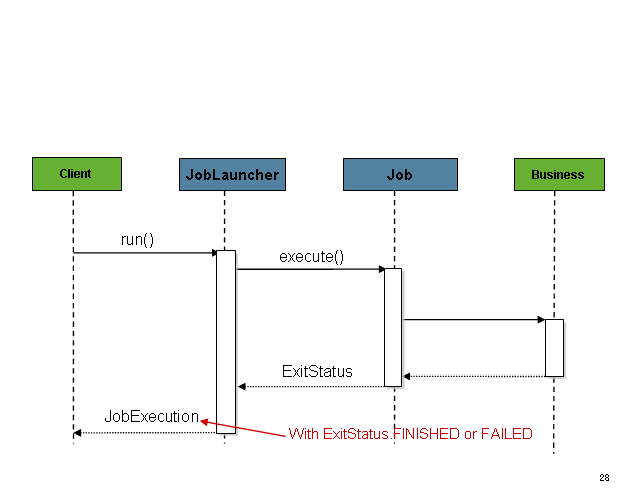
The sequence is straightforward and works well when launched from a
scheduler. However, issues arise when trying to launch from an HTTP
request. In this scenario, the launching needs to be done asynchronously
so that the SimpleJobLauncher returns immediately
to its caller. This is because it is not good practice to keep an HTTP
request open for the amount of time needed by long running processes such
as batch. An example sequence is below:
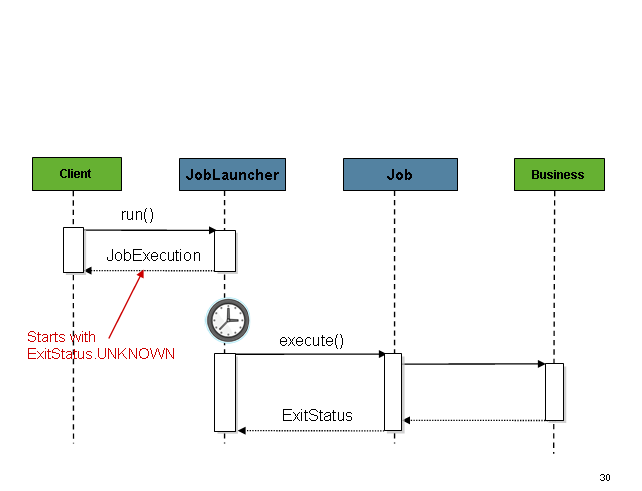
The SimpleJobLauncher can easily be
configured to allow for this scenario by configuring a
TaskExecutor:
<bean id="jobLauncher"
      class="org.springframework.batch.core.launch.support.SimpleJobLauncher">
    <property name="jobRepository" ref="jobRepository" />
    <property name="taskExecutor">
        <bean class="org.springframework.core.task.SimpleAsyncTaskExecutor" />
    </property>
</bean>@Bean
public JobLauncher jobLauncher() {
SimpleJobLauncher jobLauncher = new SimpleJobLauncher();
jobLauncher.setJobRepository(jobRepository());
jobLauncher.setTaskExecutor(new SimpleAsyncTaskExecutor());
jobLauncher.afterPropertiesSet();
return jobLauncher;
}Any implementation of the spring TaskExecutor
interface can be used to control how jobs are asynchronously
executed.
4.5. Running a Job
At a minimum, launching a batch job requires two things: the
Job to be launched and a
JobLauncher. Both can be contained within the same
context or different contexts. For example, if launching a job from the
command line, a new JVM will be instantiated for each Job, and thus every
job will have its own JobLauncher. However, if
running from within a web container within the scope of an
HttpRequest, there will usually be one
JobLauncher, configured for asynchronous job
launching, that multiple requests will invoke to launch their jobs.
4.5.1. Running Jobs from the Command Line
For users that want to run their jobs from an enterprise scheduler, the command line is the primary interface. This is because most schedulers (with the exception of Quartz unless using the NativeJob) work directly with operating system processes, primarily kicked off with shell scripts. There are many ways to launch a Java process besides a shell script, such as Perl, Ruby, or even 'build tools' such as ant or maven. However, because most people are familiar with shell scripts, this example will focus on them.
The CommandLineJobRunner
Because the script launching the job must kick off a Java
Virtual Machine, there needs to be a class with a main method to act
as the primary entry point. Spring Batch provides an implementation
that serves just this purpose:
CommandLineJobRunner. It’s important to note
that this is just one way to bootstrap your application, but there are
many ways to launch a Java process, and this class should in no way be
viewed as definitive. The CommandLineJobRunner
performs four tasks:
-
Load the appropriate
ApplicationContext -
Parse command line arguments into
JobParameters -
Locate the appropriate job based on arguments
-
Use the
JobLauncherprovided in the application context to launch the job.
All of these tasks are accomplished using only the arguments passed in. The following are required arguments:
jobPath |
The location of the XML file that will be used to
create an |
jobName |
The name of the job to be run. |
These arguments must be passed in with the path first and the
name second. All arguments after these are considered to be
JobParameters and must be in the format of 'name=value':
<bash$ java CommandLineJobRunner endOfDayJob.xml endOfDay schedule.date(date)=2007/05/05<bash$ java CommandLineJobRunner io.spring.EndOfDayJobConfiguration endOfDay schedule.date(date)=2007/05/05In most cases you would want to use a manifest to declare your
main class in a jar, but for simplicity, the class was used directly.
This example is using the same 'EndOfDay' example from the domainLanguageOfBatch. The first argument is
'endOfDayJob.xml', which is the Spring
ApplicationContext containing the
Job. The second argument, 'endOfDay' represents
the job name. The final argument, 'schedule.date(date)=2007/05/05'
will be converted into JobParameters. An
example of the XML configuration is below:
<job id="endOfDay">
    <step id="step1" parent="simpleStep" />
</job>

<!-- Launcher details removed for clarity -->
<beans:bean id="jobLauncher"
         class="org.springframework.batch.core.launch.support.SimpleJobLauncher" />
In most cases you would want to use a manifest to declare your main class in a jar, but for simplicity, the class was used directly. This example is using the same 'EndOfDay' example from the domainLanguageOfBatch. The first argument is 'io.spring.EndOfDayJobConfiguration', which is the fully qualified class name to the configuration class containing the Job. The second argument, 'endOfDay' represents the job name. The final argument, 'schedule.date(date)=2007/05/05' will be converted into JobParameters. An example of the java configuration is below:
@Configuration
@EnableBatchProcessing
public class EndOfDayJobConfiguration {

    @Autowired
    private JobBuilderFactory jobBuilderFactory;

    @Autowired
    private StepBuilderFactory stepBuilderFactory;

    @Bean
    public Job endOfDay() {
        return this.jobBuilderFactory.get("endOfDay")
    				.start(step1())
    				.build();
    }

    @Bean
    public Step step1() {
        return this.stepBuilderFactory.get("step1")
    				.tasklet((contribution, chunkContext) -> null)
    				.build();
    }
}
This example is overly simplistic, since there are many more
requirements to a run a batch job in Spring Batch in general, but it
serves to show the two main requirements of the
CommandLineJobRunner:
Job and
JobLauncher
ExitCodes
When launching a batch job from the command-line, an enterprise
scheduler is often used. Most schedulers are fairly dumb and work only
at the process level. This means that they only know about some
operating system process such as a shell script that they’re invoking.
In this scenario, the only way to communicate back to the scheduler
about the success or failure of a job is through return codes. A
return code is a number that is returned to a scheduler by the process
that indicates the result of the run. In the simplest case: 0 is
success and 1 is failure. However, there may be more complex
scenarios: If job A returns 4 kick off job B, and if it returns 5 kick
off job C. This type of behavior is configured at the scheduler level,
but it is important that a processing framework such as Spring Batch
provide a way to return a numeric representation of the 'Exit Code'
for a particular batch job. In Spring Batch this is encapsulated
within an ExitStatus, which is covered in more
detail in Chapter 5. For the purposes of discussing exit codes, the
only important thing to know is that an
ExitStatus has an exit code property that is
set by the framework (or the developer) and is returned as part of the
JobExecution returned from the
JobLauncher. The
CommandLineJobRunner converts this string value
to a number using the ExitCodeMapper
interface:
public interface ExitCodeMapper {

    public int intValue(String exitCode);

}
The essential contract of an
ExitCodeMapper is that, given a string exit
code, a number representation will be returned. The default
implementation used by the job runner is the SimpleJvmExitCodeMapper
that returns 0 for completion, 1 for generic errors, and 2 for any job
runner errors such as not being able to find a
Job in the provided context. If anything more
complex than the 3 values above is needed, then a custom
implementation of the ExitCodeMapper interface
must be supplied. Because the
CommandLineJobRunner is the class that creates
an ApplicationContext, and thus cannot be
'wired together', any values that need to be overwritten must be
autowired. This means that if an implementation of
ExitCodeMapper is found within the BeanFactory,
it will be injected into the runner after the context is created. All
that needs to be done to provide your own
ExitCodeMapper is to declare the implementation
as a root level bean and ensure that it is part of the
ApplicationContext that is loaded by the
runner.
4.5.2. Running Jobs from within a Web Container
Historically, offline processing such as batch jobs have been
launched from the command-line, as described above. However, there are
many cases where launching from an HttpRequest is
a better option. Many such use cases include reporting, ad-hoc job
running, and web application support. Because a batch job by definition
is long running, the most important concern is ensuring to launch the
job asynchronously:
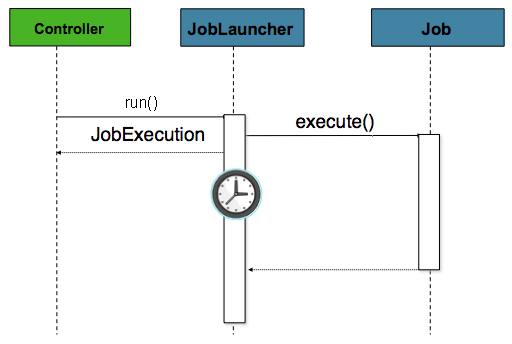
The controller in this case is a Spring MVC controller. More
information on Spring MVC can be found here: https://docs.spring.io/spring/docs/current/spring-framework-reference/web.html#mvc.
The controller launches a Job using a
JobLauncher that has been configured to launch
asynchronously, which
immediately returns a JobExecution. The
Job will likely still be running, however, this
nonblocking behaviour allows the controller to return immediately, which
is required when handling an HttpRequest. An
example is below:
@Controller
public class JobLauncherController {

    @Autowired
    JobLauncher jobLauncher;

    @Autowired
    Job job;

    @RequestMapping("/jobLauncher.html")
    public void handle() throws Exception{
        jobLauncher.run(job, new JobParameters());
    }
}
4.6. Advanced Meta-Data Usage
So far, both the JobLauncher and JobRepository interfaces have been
discussed. Together, they represent simple launching of a job, and basic
CRUD operations of batch domain objects:
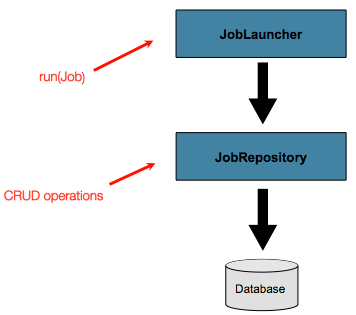
A JobLauncher uses the
JobRepository to create new
JobExecution objects and run them.
Job and Step implementations
later use the same JobRepository for basic updates
of the same executions during the running of a Job.
The basic operations suffice for simple scenarios, but in a large batch
environment with hundreds of batch jobs and complex scheduling
requirements, more advanced access of the meta data is required:
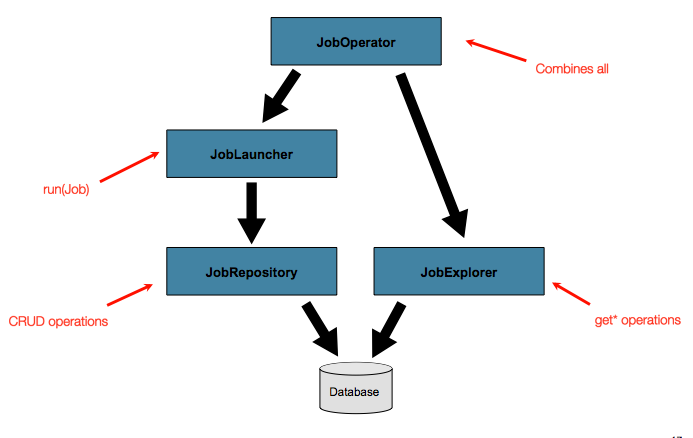
The JobExplorer and
JobOperator interfaces, which will be discussed
below, add additional functionality for querying and controlling the meta
data.
4.6.1. Querying the Repository
The most basic need before any advanced features is the ability to
query the repository for existing executions. This functionality is
provided by the JobExplorer interface:
public interface JobExplorer {

    List<JobInstance> getJobInstances(String jobName, int start, int count);

    JobExecution getJobExecution(Long executionId);

    StepExecution getStepExecution(Long jobExecutionId, Long stepExecutionId);

    JobInstance getJobInstance(Long instanceId);

    List<JobExecution> getJobExecutions(JobInstance jobInstance);

    Set<JobExecution> findRunningJobExecutions(String jobName);
}
As is evident from the method signatures above,
JobExplorer is a read-only version of the
JobRepository, and like the
JobRepository, it can be easily configured via a
factory bean:
<bean id="jobExplorer" class="org.spr...JobExplorerFactoryBean"
p:dataSource-ref="dataSource" />...
// This would reside in your BatchConfigurer implementation
@Override
public JobExplorer getJobExplorer() throws Exception {
JobExplorerFactoryBean factoryBean = new JobExplorerFactoryBean();
factoryBean.setDataSource(this.dataSource);
return factoryBean.getObject();
}
...Earlier in this chapter, it was mentioned that the table prefix of the
JobRepository can be modified to allow for
different versions or schemas. Because the
JobExplorer is working with the same tables, it
too needs the ability to set a prefix:
<bean id="jobExplorer" class="org.spr...JobExplorerFactoryBean"
p:tablePrefix="SYSTEM."/>...
// This would reside in your BatchConfigurer implementation
@Override
public JobExplorer getJobExplorer() throws Exception {
JobExplorerFactoryBean factoryBean = new JobExplorerFactoryBean();
factoryBean.setDataSource(this.dataSource);
factoryBean.setTablePrefix("SYSTEM.");
return factoryBean.getObject();
}
...4.6.2. JobRegistry
A JobRegistry (and its parent interface JobLocator) is not
mandatory, but it can be useful if you want to keep track of which jobs
are available in the context. It is also useful for collecting jobs
centrally in an application context when they have been created
elsewhere (e.g. in child contexts). Custom JobRegistry implementations
can also be used to manipulate the names and other properties of the
jobs that are registered. There is only one implementation provided by
the framework and this is based on a simple map from job name to job
instance.
<bean id="jobRegistry" class="org.springframework.batch.core.configuration.support.MapJobRegistry" />When using @EnableBatchProcessing, a JobRegistry is provided out of the box for you.
If you want to configure your own:
...
// This is already provided via the @EnableBatchProcessing but can be customized via
// overriding the getter in the SimpleBatchConfiguration
@Override
@Bean
public JobRegistry jobRegistry() throws Exception {
	return new MapJobRegistry();
}
...
There are two ways to populate a JobRegistry automatically: using
a bean post processor and using a registrar lifecycle component. These
two mechanisms are described in the following sections.
JobRegistryBeanPostProcessor
This is a bean post-processor that can register all jobs as they are created:
<bean id="jobRegistryBeanPostProcessor" class="org.spr...JobRegistryBeanPostProcessor">
    <property name="jobRegistry" ref="jobRegistry"/>
</bean>@Bean
public JobRegistryBeanPostProcessor jobRegistryBeanPostProcessor() {
JobRegistryBeanPostProcessor postProcessor = new JobRegistryBeanPostProcessor();
postProcessor.setJobRegistry(jobRegistry());
return postProcessor;
}Although it is not strictly necessary, the post-processor in the example has been given an id so that it can be included in child contexts (e.g. as a parent bean definition) and cause all jobs created there to also be registered automatically.
AutomaticJobRegistrar
This is a lifecycle component that creates child contexts and
registers jobs from those contexts as they are created. One advantage
of doing this is that, while the job names in the child contexts still
have to be globally unique in the registry, their dependencies can
have "natural" names. So for example, you can create a set of XML
configuration files each having only one Job,
but all having different definitions of an
ItemReader with the same bean name, e.g.
"reader". If all those files were imported into the same context, the
reader definitions would clash and override one another, but with the
automatic registrar this is avoided. This makes it easier to
integrate jobs contributed from separate modules of an
application.
<bean class="org.spr...AutomaticJobRegistrar">
   <property name="applicationContextFactories">
      <bean class="org.spr...ClasspathXmlApplicationContextsFactoryBean">
         <property name="resources" value="classpath*:/config/job*.xml" />
      </bean>
   </property>
   <property name="jobLoader">
      <bean class="org.spr...DefaultJobLoader">
         <property name="jobRegistry" ref="jobRegistry" />
      </bean>
   </property>
</bean>@Bean
public AutomaticJobRegistrar registrar() {
AutomaticJobRegistrar registrar = new AutomaticJobRegistrar();
registrar.setJobLoader(jobLoader());
registrar.setApplicationContextFactories(applicationContextFactories());
registrar.afterPropertiesSet();
return registrar;
}The registrar has two mandatory properties, one is an array of
ApplicationContextFactory (here created from a
convenient factory bean), and the other is a
JobLoader. The JobLoader
is responsible for managing the lifecycle of the child contexts and
registering jobs in the JobRegistry.
The ApplicationContextFactory is
responsible for creating the child context and the most common usage
would be as above using a
ClassPathXmlApplicationContextFactory. One of
the features of this factory is that by default it copies some of the
configuration down from the parent context to the child. So for
instance you don’t have to re-define the
PropertyPlaceholderConfigurer or AOP
configuration in the child, if it should be the same as the
parent.
The AutomaticJobRegistrar can be used in
conjunction with a JobRegistryBeanPostProcessor
if desired (as long as the DefaultJobLoader is
used as well). For instance this might be desirable if there are jobs
defined in the main parent context as well as in the child
locations.
4.6.3. JobOperator
As previously discussed, the JobRepository
provides CRUD operations on the meta-data, and the
JobExplorer provides read-only operations on the
meta-data. However, those operations are most useful when used together
to perform common monitoring tasks such as stopping, restarting, or
summarizing a Job, as is commonly done by batch operators. Spring Batch
provides these types of operations via the
JobOperator interface:
public interface JobOperator {

    List<Long> getExecutions(long instanceId) throws NoSuchJobInstanceException;

    List<Long> getJobInstances(String jobName, int start, int count)
          throws NoSuchJobException;

    Set<Long> getRunningExecutions(String jobName) throws NoSuchJobException;

    String getParameters(long executionId) throws NoSuchJobExecutionException;

    Long start(String jobName, String parameters)
          throws NoSuchJobException, JobInstanceAlreadyExistsException;

    Long restart(long executionId)
          throws JobInstanceAlreadyCompleteException, NoSuchJobExecutionException,
                  NoSuchJobException, JobRestartException;

    Long startNextInstance(String jobName)
          throws NoSuchJobException, JobParametersNotFoundException, JobRestartException,
                 JobExecutionAlreadyRunningException, JobInstanceAlreadyCompleteException;

    boolean stop(long executionId)
          throws NoSuchJobExecutionException, JobExecutionNotRunningException;

    String getSummary(long executionId) throws NoSuchJobExecutionException;

    Map<Long, String> getStepExecutionSummaries(long executionId)
          throws NoSuchJobExecutionException;

    Set<String> getJobNames();

}
The above operations represent methods from many different
interfaces, such as JobLauncher,
JobRepository,
JobExplorer, and
JobRegistry. For this reason, the provided
implementation of JobOperator,
SimpleJobOperator, has many dependencies:
<bean id="jobOperator" class="org.spr...SimpleJobOperator">
    <property name="jobExplorer">
        <bean class="org.spr...JobExplorerFactoryBean">
            <property name="dataSource" ref="dataSource" />
        </bean>
    </property>
    <property name="jobRepository" ref="jobRepository" />
    <property name="jobRegistry" ref="jobRegistry" />
    <property name="jobLauncher" ref="jobLauncher" />
</bean>
/**
* All injected dependencies for this bean are provided by the @EnableBatchProcessing
* infrastructure out of the box.
*/
@Bean
public SimpleJobOperator jobOperator(JobExplorer jobExplorer,
JobRepository jobRepository,
JobRegistry jobRegistry) {
SimpleJobOperator jobOperator = new SimpleJobOperator();
jobOperator.setJobExplorer(jobExplorer);
jobOperator.setJobRepository(jobRepository);
jobOperator.setJobRegistry(jobRegistry);
jobOperator.setJobLauncher(jobLauncher);
return jobOperator;
}|
If you set the table prefix on the job repository, don’t forget to set it on the job explorer as well. |
4.6.4. JobParametersIncrementer
Most of the methods on JobOperator are
self-explanatory, and more detailed explanations can be found on the
javadoc of the interface. However, the
startNextInstance method is worth noting. This
method will always start a new instance of a Job.
This can be extremely useful if there are serious issues in a
JobExecution and the Job
needs to be started over again from the beginning. Unlike
JobLauncher though, which requires a new
JobParameters object that will trigger a new
JobInstance if the parameters are different from
any previous set of parameters, the
startNextInstance method will use the
JobParametersIncrementer tied to the
Job to force the Job to a
new instance:
public interface JobParametersIncrementer {

    JobParameters getNext(JobParameters parameters);

}
The contract of JobParametersIncrementer is
that, given a JobParameters
object, it will return the 'next' JobParameters
object by incrementing any necessary values it may contain. This
strategy is useful because the framework has no way of knowing what
changes to the JobParameters make it the 'next'
instance. For example, if the only value in
JobParameters is a date, and the next instance
should be created, should that value be incremented by one day? Or one
week (if the job is weekly for instance)? The same can be said for any
numerical values that help to identify the Job,
as shown below:
public class SampleIncrementer implements JobParametersIncrementer {

    public JobParameters getNext(JobParameters parameters) {
        if (parameters==null || parameters.isEmpty()) {
            return new JobParametersBuilder().addLong("run.id", 1L).toJobParameters();
        }
        long id = parameters.getLong("run.id",1L) + 1;
        return new JobParametersBuilder().addLong("run.id", id).toJobParameters();
    }
}
In this example, the value with a key of 'run.id' is used to
discriminate between JobInstances. If the
JobParameters passed in is null, it can be
assumed that the Job has never been run before
and thus its initial state can be returned. However, if not, the old
value is obtained, incremented by one, and returned.
An incrementer can
be associated with Job via the 'incrementer'
attribute in the namespace:
<job id="footballJob" incrementer="sampleIncrementer">
    ...
</job>
An incrementer can be associated with a 'Job' via the incrementer method provided in the
builders:
@Bean
public Job footballJob() {
    return this.jobBuilderFactory.get("footballJob")
    				 .incrementer(sampleIncrementer())
    				 ...
                     .build();
}
4.6.5. Stopping a Job
One of the most common use cases of
JobOperator is gracefully stopping a
Job:
Set<Long> executions = jobOperator.getRunningExecutions("sampleJob");
jobOperator.stop(executions.iterator().next());
The shutdown is not immediate, since there is no way to force
immediate shutdown, especially if the execution is currently in
developer code that the framework has no control over, such as a
business service. However, as soon as control is returned back to the
framework, it will set the status of the current
StepExecution to
BatchStatus.STOPPED, save it, then do the same
for the JobExecution before finishing.
4.6.6. Aborting a Job
A job execution which is FAILED can be
restarted (if the Job is restartable). A job execution whose status is
ABANDONED will not be restarted by the framework.
The ABANDONED status is also used in step
executions to mark them as skippable in a restarted job execution: if a
job is executing and encounters a step that has been marked
ABANDONED in the previous failed job execution, it
will move on to the next step (as determined by the job flow definition
and the step execution exit status).
If the process died ("kill -9" or server
failure) the job is, of course, not running, but the JobRepository has
no way of knowing because no-one told it before the process died. You
have to tell it manually that you know that the execution either failed
or should be considered aborted (change its status to
FAILED or ABANDONED) - it’s
a business decision and there is no way to automate it. Only change the
status to FAILED if it is not restartable, or if
you know the restart data is valid. There is a utility in Spring Batch
Admin JobService to abort a job execution.
5. Configuring a Step
As discussed in the domain chapter, a Step is a
domain object that encapsulates an independent, sequential phase of a batch job and
contains all of the information necessary to define and control the actual batch
processing. This is a necessarily vague description because the contents of any given
Step are at the discretion of the developer writing a Job. A Step can be as simple
or complex as the developer desires. A simple Step might load data from a file into the
database, requiring little or no code (depending upon the implementations used). A more
complex Step might have complicated business rules that are applied as part of the
processing, as shown in the following image:
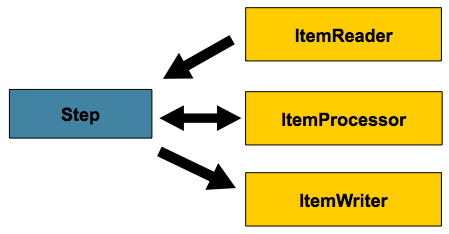
5.1. Chunk-oriented Processing
Spring Batch uses a 'Chunk-oriented' processing style within its most common
implementation. Chunk oriented processing refers to reading the data one at a time and
creating 'chunks' that are written out within a transaction boundary. One item is read in
from an ItemReader, handed to an ItemProcessor, and aggregated. Once the number of
items read equals the commit interval, the entire chunk is written out by the
ItemWriter, and then the transaction is committed. The following image shows the
process:
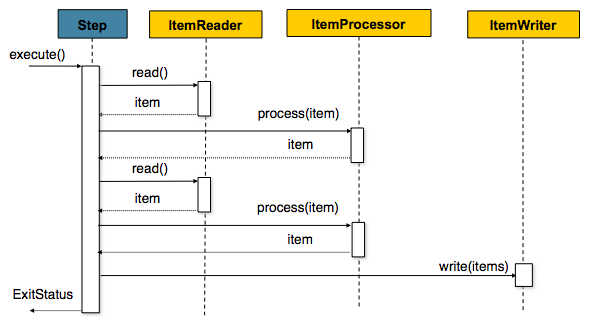
The following code shows the same concepts shown:
List items = new Arraylist();
for(int i = 0; i < commitInterval; i++){
    Object item = itemReader.read()
    Object processedItem = itemProcessor.process(item);
    items.add(processedItem);
}
itemWriter.write(items);
5.1.1. Configuring a Step
Despite the relatively short list of required dependencies for a Step, it is an
extremely complex class that can potentially contain many collaborators.
In order to ease configuration, the Spring Batch namespace can be used, as shown in the following example:
<job id="sampleJob" job-repository="jobRepository">
    <step id="step1">
        <tasklet transaction-manager="transactionManager">
            <chunk reader="itemReader" writer="itemWriter" commit-interval="10"/>
        </tasklet>
    </step>
</job>
When using java configuration, the Spring Batch builders can be used, as shown in the following example:
/**
 * Note the JobRepository is typically autowired in and not needed to be explicitly
 * configured
 */
@Bean
public Job sampleJob(JobRepository jobRepository, Step sampleStep) {
    return this.jobBuilderFactory.get("sampleJob")
    			.repository(jobRepository)
                .start(sampleStep)
                .build();
}

/**
 * Note the TransactionManager is typically autowired in and not needed to be explicitly
 * configured
 */
@Bean
public Step sampleStep(PlatformTransactionManager transactionManager) {
	return this.stepBuilderFactory.get("sampleStep")
				.transactionManager(transactionManager)
				.<String, String>chunk(10)
				.reader(itemReader())
				.writer(itemWriter())
				.build();
}
The configuration above includes the only required dependencies to create a item-oriented step:
-
reader: TheItemReaderthat provides items for processing. -
writer: TheItemWriterthat processes the items provided by theItemReader.
-
transaction-manager: Spring’sPlatformTransactionManagerthat begins and commits transactions during processing.
-
transactionManager: Spring’sPlatformTransactionManagerthat begins and commits transactions during processing.
-
job-repository: TheJobRepositorythat periodically stores theStepExecutionandExecutionContextduring processing (just before committing). For an in-line <step/> (one defined within a <job/>), it is an attribute on the <job/> element. For a standalone step, it is defined as an attribute of the <tasklet/>.
-
repository: TheJobRepositorythat periodically stores theStepExecutionandExecutionContextduring processing (just before committing).
-
commit-interval: The number of items to be processed before the transaction is committed.
-
chunk: Indicates that this is an item based step and the number of items to be processed before the transaction is committed.
It should be noted that job-repository defaults to jobRepository and
transaction-manager defaults to transactionManger. Also, the ItemProcessor is
optional, since the item could be directly passed from the reader to the writer.
It should be noted that repository defaults to jobRepository and transactionManager
defaults to transactionManger (all provided through the infrastructure from
@EnableBatchProcessing). Also, the ItemProcessor is optional, since the item could be
directly passed from the reader to the writer.
5.1.2. Inheriting from a Parent Step
If a group of Steps share similar configurations, then it may be helpful to define a
"parent" Step from which the concrete Steps may inherit properties. Similar to class
inheritance in Java, the "child" Step combines its elements and attributes with the
parent’s. The child also overrides any of the parent’s Steps.
In the following example, the Step, "concreteStep1", inherits from "parentStep". It is
instantiated with 'itemReader', 'itemProcessor', 'itemWriter', startLimit=5, and
allowStartIfComplete=true. Additionally, the commitInterval is '5', since it is
overridden by the "concreteStep1" Step, as shown in the following example:
<step id="parentStep">
    <tasklet allow-start-if-complete="true">
        <chunk reader="itemReader" writer="itemWriter" commit-interval="10"/>
    </tasklet>
</step>

<step id="concreteStep1" parent="parentStep">
    <tasklet start-limit="5">
        <chunk processor="itemProcessor" commit-interval="5"/>
    </tasklet>
</step>
The id attribute is still required on the step within the job element. This is for two
reasons:
-
The
idis used as the step name when persisting theStepExecution. If the same standalone step is referenced in more than one step in the job, an error occurs.
-
When creating job flows, as described later in this chapter, the
nextattribute should be referring to the step in the flow, not the standalone step.
Abstract Step
Sometimes, it may be necessary to define a parent Step that is not a complete Step
configuration. If, for instance, the reader, writer, and tasklet attributes are
left off of a Step configuration, then initialization fails. If a parent must be
defined without these properties, then the abstract attribute should be used. An
abstract Step is only extended, never instantiated.
In the following example, the Step abstractParentStep would not be instantiated if it
were not declared to be abstract. The Step, "concreteStep2", has 'itemReader',
'itemWriter', and commit-interval=10.
<step id="abstractParentStep" abstract="true">
    <tasklet>
        <chunk commit-interval="10"/>
    </tasklet>
</step>

<step id="concreteStep2" parent="abstractParentStep">
    <tasklet>
        <chunk reader="itemReader" writer="itemWriter"/>
    </tasklet>
</step>
Merging Lists
Some of the configurable elements on Steps are lists, such as the <listeners/> element.
If both the parent and child Steps declare a <listeners/> element, then the
child’s list overrides the parent’s. In order to allow a child to add additional
listeners to the list defined by the parent, every list element has a merge attribute.
If the element specifies that merge="true", then the child’s list is combined with the
parent’s instead of overriding it.
In the following example, the Step "concreteStep3", is created with two listeners:
listenerOne and listenerTwo:
<step id="listenersParentStep" abstract="true">
    <listeners>
        <listener ref="listenerOne"/>
    <listeners>
</step>

<step id="concreteStep3" parent="listenersParentStep">
    <tasklet>
        <chunk reader="itemReader" writer="itemWriter" commit-interval="5"/>
    </tasklet>
    <listeners merge="true">
        <listener ref="listenerTwo"/>
    <listeners>
</step>
5.1.3. The Commit Interval
As mentioned previously, a step reads in and writes out items, periodically committing
using the supplied PlatformTransactionManager. With a commit-interval of 1, it
commits after writing each individual item. This is less than ideal in many situations,
since beginning and committing a transaction is expensive. Ideally, it is preferable to
process as many items as possible in each transaction, which is completely dependent upon
the type of data being processed and the resources with which the step is interacting.
For this reason, the number of items that are processed within a commit can be
configured. The following example shows a step whose tasklet has a commit-interval
value of 10.
<job id="sampleJob">
    <step id="step1">
        <tasklet>
            <chunk reader="itemReader" writer="itemWriter" commit-interval="10"/>
        </tasklet>
    </step>
</job>@Bean
public Job sampleJob() {
return this.jobBuilderFactory.get("sampleJob")
.start(step1())
.end()
.build();
}
@Bean
public Step step1() {
return this.stepBuilderFactory.get("step1")
.<String, String>chunk(10)
.reader(itemReader())
.writer(itemWriter())
.build();
}In the preceding example, 10 items are processed within each transaction. At the
beginning of processing, a transaction is begun. Also, each time read is called on the
ItemReader, a counter is incremented. When it reaches 10, the list of aggregated items
is passed to the ItemWriter, and the transaction is committed.
5.1.4. Configuring a Step for Restart
In the "Configuring and Running a Job" section , restarting a
Job was discussed. Restart has numerous impacts on steps, and, consequently, may
require some specific configuration.
Setting a Start Limit
There are many scenarios where you may want to control the number of times a Step may
be started. For example, a particular Step might need to be configured so that it only
runs once because it invalidates some resource that must be fixed manually before it can
be run again. This is configurable on the step level, since different steps may have
different requirements. A Step that may only be executed once can exist as part of the
same Job as a Step that can be run infinitely. The following code fragment shows an
example of a start limit configuration:
<step id="step1">
    <tasklet start-limit="1">
        <chunk reader="itemReader" writer="itemWriter" commit-interval="10"/>
    </tasklet>
</step>@Bean
public Step step1() {
return this.stepBuilderFactory.get("step1")
.<String, String>chunk(10)
.reader(itemReader())
.writer(itemWriter())
.startLimit(1)
.build();
}The step above can be run only once. Attempting to run it again causes a
StartLimitExceededException to be thrown. Note that the default value for the
start-limit is Integer.MAX_VALUE.
Restarting a Completed Step
In the case of a restartable job, there may be one or more steps that should always be
run, regardless of whether or not they were successful the first time. An example might
be a validation step or a Step that cleans up resources before processing. During
normal processing of a restarted job, any step with a status of 'COMPLETED', meaning it
has already been completed successfully, is skipped. Setting allow-start-if-complete to
"true" overrides this so that the step always runs, as shown in the following example:
<step id="step1">
    <tasklet allow-start-if-complete="true">
        <chunk reader="itemReader" writer="itemWriter" commit-interval="10"/>
    </tasklet>
</step>@Bean
public Step step1() {
return this.stepBuilderFactory.get("step1")
.<String, String>chunk(10)
.reader(itemReader())
.writer(itemWriter())
.allowStartIfComplete(true)
.build();
}Step Restart Configuration Example
The following example shows how to configure a job to have steps that can be restarted:
<job id="footballJob" restartable="true">
    <step id="playerload" next="gameLoad">
        <tasklet>
            <chunk reader="playerFileItemReader" writer="playerWriter"
                   commit-interval="10" />
        </tasklet>
    </step>
    <step id="gameLoad" next="playerSummarization">
        <tasklet allow-start-if-complete="true">
            <chunk reader="gameFileItemReader" writer="gameWriter"
                   commit-interval="10"/>
        </tasklet>
    </step>
    <step id="playerSummarization">
        <tasklet start-limit="2">
            <chunk reader="playerSummarizationSource" writer="summaryWriter"
                   commit-interval="10"/>
        </tasklet>
    </step>
</job>@Bean
public Job footballJob() {
return this.jobBuilderFactory.get("footballJob")
.start(playerLoad())
.next(gameLoad())
.next(playerSummarization())
.end()
.build();
}
@Bean
public Step playerLoad() {
return this.stepBuilderFactory.get("playerLoad")
.<String, String>chunk(10)
.reader(playerFileItemReader())
.writer(playerWriter())
.build();
}
@Bean
public Step gameLoad() {
return this.stepBuilderFactory.get("gameLoad")
.allowStartIfComplete(true)
.<String, String>chunk(10)
.reader(gameFileItemReader())
.writer(gameWriter())
.build();
}
@Bean
public Step playerSummarization() {
return this.stepBuilderFactor.get("playerSummarization")
.startLimit(2)
.<String, String>chunk(10)
.reader(playerSummarizationSource())
.writer(summaryWriter())
.build();
}The preceding example configuration is for a job that loads in information about football
games and summarizes them. It contains three steps: playerLoad, gameLoad, and
playerSummarization. The playerLoad step loads player information from a flat file,
while the gameLoad step does the same for games. The final step,
playerSummarization, then summarizes the statistics for each player, based upon the
provided games. It is assumed that the file loaded by playerLoad must be loaded only
once, but that gameLoad can load any games found within a particular directory,
deleting them after they have been successfully loaded into the database. As a result,
the playerLoad step contains no additional configuration. It can be started any number
of times, and, if complete, is skipped. The gameLoad step, however, needs to be run
every time in case extra files have been added since it last ran. It has
'allow-start-if-complete' set to 'true' in order to always be started. (It is assumed
that the database tables games are loaded into has a process indicator on it, to ensure
new games can be properly found by the summarization step). The summarization step,
which is the most important in the job, is configured to have a start limit of 2. This
is useful because if the step continually fails, a new exit code is returned to the
operators that control job execution, and it can not start again until manual
intervention has taken place.
|
This job provides an example for this document and is not the same as the |
The remainder of this section describes what happens for each of the three runs of the
footballJob example.
Run 1:
-
playerLoadruns and completes successfully, adding 400 players to the 'PLAYERS' table. -
gameLoadruns and processes 11 files worth of game data, loading their contents into the 'GAMES' table. -
playerSummarizationbegins processing and fails after 5 minutes.
Run 2:
-
playerLoaddoes not run, since it has already completed successfully, andallow-start-if-completeis 'false' (the default). -
gameLoadruns again and processes another 2 files, loading their contents into the 'GAMES' table as well (with a process indicator indicating they have yet to be processed). -
playerSummarizationbegins processing of all remaining game data (filtering using the process indicator) and fails again after 30 minutes.
Run 3:
-
playerLoaddoes not run, since it has already completed successfully, andallow-start-if-completeis 'false' (the default). -
gameLoadruns again and processes another 2 files, loading their contents into the 'GAMES' table as well (with a process indicator indicating they have yet to be processed). -
playerSummarizationis not started and the job is immediately killed, since this is the third execution ofplayerSummarization, and its limit is only 2. Either the limit must be raised or theJobmust be executed as a newJobInstance.
5.1.5. Configuring Skip Logic
There are many scenarios where errors encountered while processing should not result in
Step failure, but should be skipped instead. This is usually a decision that must be
made by someone who understands the data itself and what meaning it has. Financial data,
for example, may not be skippable because it results in money being transferred, which
needs to be completely accurate. Loading a list of vendors, on the other hand, might
allow for skips. If a vendor is not loaded because it was formatted incorrectly or was
missing necessary information, then there probably are not issues. Usually, these bad
records are logged as well, which is covered later when discussing listeners.
The following example shows an example of using a skip limit:
<step id="step1">
   <tasklet>
      <chunk reader="flatFileItemReader" writer="itemWriter"
             commit-interval="10" skip-limit="10">
         <skippable-exception-classes>
            <include class="org.springframework.batch.item.file.FlatFileParseException"/>
         </skippable-exception-classes>
      </chunk>
   </tasklet>
</step>@Bean
public Step step1() {
return this.stepBuilderFactory.get("step1")
.<String, String>chunk(10)
.reader(flatFileItemReader())
.writer(itemWriter())
.faultTolerant()
.skipLimit(10)
.skip(FlatFileParseException.class)
.build();
}In the preceding example, a FlatFileItemReader is used. If, at any point, a
FlatFileParseException is thrown, the item is skipped and counted against the total
skip limit of 10. Separate counts are made of skips on read, process, and write inside
the step execution, but the limit applies across all skips. Once the skip limit is
reached, the next exception found causes the step to fail. In other words, the eleventh
skip triggers the exception, not the tenth.
One problem with the preceding example is that any other exception besides a
FlatFileParseException causes the Job to fail. In certain scenarios, this may be the
correct behavior. However, in other scenarios, it may be easier to identify which
exceptions should cause failure and skip everything else, as shown in the following
example:
<step id="step1">
    <tasklet>
        <chunk reader="flatFileItemReader" writer="itemWriter"
               commit-interval="10" skip-limit="10">
            <skippable-exception-classes>
                <include class="java.lang.Exception"/>
                <exclude class="java.io.FileNotFoundException"/>
            </skippable-exception-classes>
        </chunk>
    </tasklet>
</step>@Bean
public Step step1() {
return this.stepBuilderFactory.get("step1")
.<String, String>chunk(10)
.reader(flatFileItemReader())
.writer(itemWriter())
.faultTolerant()
.skipLimit(10)
.skip(Exception.class)
.noSkip(FileNotFoundException.class)
.build();
}By identifying java.lang.Exception as a skippable exception class, the configuration
indicates that all Exceptions are skippable. However, by 'excluding'
java.io.FileNotFoundException, the configuration refines the list of skippable
exception classes to be all Exceptions except FileNotFoundException. Any excluded
exception classes is fatal if encountered (that is, they are not skipped).
For any exception encountered, the skippability is determined by the nearest superclass in the class hierarchy. Any unclassified exception is treated as 'fatal'.
The order of the <include/> and <exclude/> elements does not matter.
The order of the skip and noSkip calls does not matter.
5.1.6. Configuring Retry Logic
In most cases, you want an exception to cause either a skip or a Step failure. However,
not all exceptions are deterministic. If a FlatFileParseException is encountered while
reading, it is always thrown for that record. Resetting the ItemReader does not help.
However, for other exceptions, such as a DeadlockLoserDataAccessException, which
indicates that the current process has attempted to update a record that another process
holds a lock on, waiting and trying again might result in success. In this case, retry
should be configured as follows:
<step id="step1">
   <tasklet>
      <chunk reader="itemReader" writer="itemWriter"
             commit-interval="2" retry-limit="3">
         <retryable-exception-classes>
            <include class="org.springframework.dao.DeadlockLoserDataAccessException"/>
         </retryable-exception-classes>
      </chunk>
   </tasklet>
</step>
@Bean
public Step step1() {
return this.stepBuilderFactory.get("step1")
.<String, String>chunk(2)
.reader(itemReader())
.writer(itemWriter())
.faultTolerant()
.retryLimit(3)
.retry(DeadlockLoserDataAccessException.class)
.build();
}The Step allows a limit for the number of times an individual item can be retried and a
list of exceptions that are 'retryable'. More details on how retry works can be found in
retry.
5.1.7. Controlling Rollback
By default, regardless of retry or skip, any exceptions thrown from the ItemWriter
cause the transaction controlled by the Step to rollback. If skip is configured as
described earlier, exceptions thrown from the ItemReader do not cause a rollback.
However, there are many scenarios in which exceptions thrown from the ItemWriter should
not cause a rollback, because no action has taken place to invalidate the transaction.
For this reason, the Step can be configured with a list of exceptions that should not
cause rollback, as shown in the following example:
<step id="step1">
   <tasklet>
      <chunk reader="itemReader" writer="itemWriter" commit-interval="2"/>
      <no-rollback-exception-classes>
         <include class="org.springframework.batch.item.validator.ValidationException"/>
      </no-rollback-exception-classes>
   </tasklet>
</step>@Bean
public Step step1() {
return this.stepBuilderFactory.get("step1")
.<String, String>chunk(2)
.reader(itemReader())
.writer(itemWriter())
.faultTolerant()
.noRollback(ValidationException.class)
.build();
}Transactional Readers
The basic contract of the ItemReader is that it is forward only. The step buffers
reader input, so that in the case of a rollback, the items do not need to be re-read
from the reader. However, there are certain scenarios in which the reader is built on
top of a transactional resource, such as a JMS queue. In this case, since the queue is
tied to the transaction that is rolled back, the messages that have been pulled from the
queue are put back on. For this reason, the step can be configured to not buffer the
items, as shown in the following example:
<step id="step1">
    <tasklet>
        <chunk reader="itemReader" writer="itemWriter" commit-interval="2"
               is-reader-transactional-queue="true"/>
    </tasklet>
</step>@Bean
public Step step1() {
return this.stepBuilderFactory.get("step1")
.<String, String>chunk(2)
.reader(itemReader())
.writer(itemWriter())
.readerIsTransactionalQueue()
.build();
}5.1.8. Transaction Attributes
Transaction attributes can be used to control the isolation, propagation, and
timeout settings. More information on setting transaction attributes can be found in
the
Spring
core documentation. The following example sets the isolation, propagation, and
timeout transaction attributes:
<step id="step1">
    <tasklet>
        <chunk reader="itemReader" writer="itemWriter" commit-interval="2"/>
        <transaction-attributes isolation="DEFAULT"
                                propagation="REQUIRED"
                                timeout="30"/>
    </tasklet>
</step>@Bean
public Step step1() {
DefaultTransactionAttribute attribute = new DefaultTransactionAttribute();
attribute.setPropagationBehavior(Propagation.REQUIRED.value());
attribute.setIsolationLevel(Isolation.DEFAULT.value());
attribute.setTimeout(30);
return this.stepBuilderFactory.get("step1")
.<String, String>chunk(2)
.reader(itemReader())
.writer(itemWriter())
.transactionAttribute(attribute)
.build();
}5.1.9. Registering ItemStream with a Step
The step has to take care of ItemStream callbacks at the necessary points in its
lifecycle (For more information on the ItemStream interface, see
ItemStream). This is vital if a step fails and might
need to be restarted, because the ItemStream interface is where the step gets the
information it needs about persistent state between executions.
If the ItemReader, ItemProcessor, or ItemWriter itself implements the ItemStream
interface, then these are registered automatically. Any other streams need to be
registered separately. This is often the case where indirect dependencies, such as
delegates, are injected into the reader and writer. A stream can be registered on the
Step through the 'streams' element, as illustrated in the following example:
<step id="step1">
    <tasklet>
        <chunk reader="itemReader" writer="compositeWriter" commit-interval="2">
            <streams>
                <stream ref="fileItemWriter1"/>
                <stream ref="fileItemWriter2"/>
            </streams>
        </chunk>
    </tasklet>
</step>

<beans:bean id="compositeWriter"
            class="org.springframework.batch.item.support.CompositeItemWriter">
    <beans:property name="delegates">
        <beans:list>
            <beans:ref bean="fileItemWriter1" />
            <beans:ref bean="fileItemWriter2" />
        </beans:list>
    </beans:property>
</beans:bean>@Bean
public Step step1() {
return this.stepBuilderFactory.get("step1")
.<String, String>chunk(2)
.reader(itemReader())
.writer(compositeItemWriter())
.stream(fileItemWriter1())
.stream(fileItemWriter2())
.build();
}
/**
* In Spring Batch 4, the CompositeItemWriter implements ItemStream so this isn't
* necessary, but used for an example.
*/
@Bean
public CompositeItemWriter compositeItemWriter() {
List<ItemWriter> writers = new ArrayList<>(2);
writers.add(fileItemWriter1());
writers.add(fileItemWriter2());
CompositeItemWriter itemWriter = new CompositeItemWriter();
itemWriter.setDelegates(writers);
return itemWriter;
}In the example above, the CompositeItemWriter is not an ItemStream, but both of its
delegates are. Therefore, both delegate writers must be explicitly registered as streams
in order for the framework to handle them correctly. The ItemReader does not need to be
explicitly registered as a stream because it is a direct property of the Step. The step
is now restartable, and the state of the reader and writer is correctly persisted in the
event of a failure.
5.1.10. Intercepting Step Execution
Just as with the Job, there are many events during the execution of a Step where a
user may need to perform some functionality. For example, in order to write out to a flat
file that requires a footer, the ItemWriter needs to be notified when the Step has
been completed, so that the footer can be written. This can be accomplished with one of many
Step scoped listeners.
Any class that implements one of the extensions of StepListener (but not that interface
itself since it is empty) can be applied to a step through the listeners element.
The listeners element is valid inside a step, tasklet, or chunk declaration. It is
recommended that you declare the listeners at the level at which its function applies,
or, if it is multi-featured (such as StepExecutionListener and ItemReadListener),
then declare it at the most granular level where it applies. The following example shows
a listener applied at the chunk level:
<step id="step1">
    <tasklet>
        <chunk reader="reader" writer="writer" commit-interval="10"/>
        <listeners>
            <listener ref="chunkListener"/>
        </listeners>
    </tasklet>
</step>@Bean
public Step step1() {
return this.stepBuilderFactory.get("step1")
.<String, String>chunk(10)
.reader(reader())
.writer(writer())
.listener(chunkListener())
.build();
}An ItemReader, ItemWriter or ItemProcessor that itself implements one of the
StepListener interfaces is registered automatically with the Step if using the
namespace <step> element or one of the the *StepFactoryBean factories. This only
applies to components directly injected into the Step. If the listener is nested inside
another component, it needs to be explicitly registered (as described previously under
Registering ItemStream with a Step).
In addition to the StepListener interfaces, annotations are provided to address the
same concerns. Plain old Java objects can have methods with these annotations that are
then converted into the corresponding StepListener type. It is also common to annotate
custom implementations of chunk components such as ItemReader or ItemWriter or
Tasklet. The annotations are analyzed by the XML parser for the <listener/> elements
as well as registered with the listener methods in the builders, so all you need to do
is use the XML namespace or builders to register the listeners with a step.
StepExecutionListener
StepExecutionListener represents the most generic listener for Step execution. It
allows for notification before a Step is started and after it ends, whether it ended
normally or failed, as shown in the following example:
public interface StepExecutionListener extends StepListener {

    void beforeStep(StepExecution stepExecution);

    ExitStatus afterStep(StepExecution stepExecution);

}
ExitStatus is the return type of afterStep in order to allow listeners the chance to
modify the exit code that is returned upon completion of a Step.
The annotations corresponding to this interface are:
-
@BeforeStep -
@AfterStep
ChunkListener
A chunk is defined as the items processed within the scope of a transaction. Committing a
transaction, at each commit interval, commits a 'chunk'. A ChunkListener can be used to
perform logic before a chunk begins processing or after a chunk has completed
successfully, as shown in the following interface definition:
public interface ChunkListener extends StepListener {

    void beforeChunk(ChunkContext context);
    void afterChunk(ChunkContext context);
    void afterChunkError(ChunkContext context);

}
The beforeChunk method is called after the transaction is started but before read is
called on the ItemReader. Conversely, afterChunk is called after the chunk has been
committed (and not at all if there is a rollback).
The annotations corresponding to this interface are:
-
@BeforeChunk -
@AfterChunk -
@AfterChunkError
A ChunkListener can be applied when there is no chunk declaration. The TaskletStep is
responsible for calling the ChunkListener, so it applies to a non-item-oriented tasklet
as well (it is called before and after the tasklet).
ItemReadListener
When discussing skip logic previously, it was mentioned that it may be beneficial to log
the skipped records, so that they can be dealt with later. In the case of read errors,
this can be done with an ItemReaderListener, as shown in the following interface
definition:
public interface ItemReadListener<T> extends StepListener {

    void beforeRead();
    void afterRead(T item);
    void onReadError(Exception ex);

}
The beforeRead method is called before each call to read on the ItemReader. The
afterRead method is called after each successful call to read and is passed the item
that was read. If there was an error while reading, the onReadError method is called.
The exception encountered is provided so that it can be logged.
The annotations corresponding to this interface are:
-
@BeforeRead -
@AfterRead -
@OnReadError
ItemProcessListener
Just as with the ItemReadListener, the processing of an item can be 'listened' to, as
shown in the following interface definition:
public interface ItemProcessListener<T, S> extends StepListener {

    void beforeProcess(T item);
    void afterProcess(T item, S result);
    void onProcessError(T item, Exception e);

}
The beforeProcess method is called before process on the ItemProcessor and is
handed the item that is to be processed. The afterProcess method is called after the
item has been successfully processed. If there was an error while processing, the
onProcessError method is called. The exception encountered and the item that was
attempted to be processed are provided, so that they can be logged.
The annotations corresponding to this interface are:
-
@BeforeProcess -
@AfterProcess -
@OnProcessError
ItemWriteListener
The writing of an item can be 'listened' to with the ItemWriteListener, as shown in the
following interface definition:
public interface ItemWriteListener<S> extends StepListener {

    void beforeWrite(List<? extends S> items);
    void afterWrite(List<? extends S> items);
    void onWriteError(Exception exception, List<? extends S> items);

}
The beforeWrite method is called before write on the ItemWriter and is handed the
list of items that is written. The afterWrite method is called after the item has been
successfully written. If there was an error while writing, the onWriteError method is
called. The exception encountered and the item that was attempted to be written are
provided, so that they can be logged.
The annotations corresponding to this interface are:
-
@BeforeWrite -
@AfterWrite -
@OnWriteError
SkipListener
ItemReadListener, ItemProcessListener, and ItemWriteListener all provide mechanisms
for being notified of errors, but none informs you that a record has actually been
skipped. onWriteError, for example, is called even if an item is retried and
successful. For this reason, there is a separate interface for tracking skipped items, as
shown in the following interface definition:
public interface SkipListener<T,S> extends StepListener {

    void onSkipInRead(Throwable t);
    void onSkipInProcess(T item, Throwable t);
    void onSkipInWrite(S item, Throwable t);

}
onSkipInRead is called whenever an item is skipped while reading. It should be noted
that rollbacks may cause the same item to be registered as skipped more than once.
onSkipInWrite is called when an item is skipped while writing. Because the item has
been read successfully (and not skipped), it is also provided the item itself as an
argument.
The annotations corresponding to this interface are:
-
@OnSkipInRead -
@OnSkipInWrite -
@OnSkipInProcess
SkipListeners and Transactions
One of the most common use cases for a SkipListener is to log out a skipped item, so
that another batch process or even human process can be used to evaluate and fix the
issue leading to the skip. Because there are many cases in which the original transaction
may be rolled back, Spring Batch makes two guarantees:
-
The appropriate skip method (depending on when the error happened) is called only once per item.
-
The
SkipListeneris always called just before the transaction is committed. This is to ensure that any transactional resources call by the listener are not rolled back by a failure within theItemWriter.
5.2. TaskletStep
Chunk-oriented processing is not the only way to process in a
Step. What if a Step must consist of a simple stored procedure call? You could
implement the call as an ItemReader and return null after the procedure finishes.
However, doing so is a bit unnatural, since there would need to be a no-op ItemWriter.
Spring Batch provides the TaskletStep for this scenario.
Tasklet is a simple interface that has one method, execute, which is called
repeatedly by the TaskletStep until it either returns RepeatStatus.FINISHED or throws
an exception to signal a failure. Each call to a Tasklet is wrapped in a transaction.
Tasklet implementors might call a stored procedure, a script, or a simple SQL update
statement.
To create a TaskletStep, the 'ref' attribute of the
<tasklet/> element should reference a bean that defines a
Tasklet object. No <chunk/> element should be
used within the <tasklet/>. The following example shows a simple tasklet:
<step id="step1">
    <tasklet ref="myTasklet"/>
</step>
To create a TaskletStep, the bean passed to the tasklet method of the builder should
implement the Tasklet interface. No call to chunk should be called when building a
TaskletStep. The following example shows a simple tasklet:
@Bean
public Step step1() {
    return this.stepBuilderFactory.get("step1")
    			.tasklet(myTasklet())
    			.build();
}|
|
5.2.1. TaskletAdapter
As with other adapters for the ItemReader and ItemWriter interfaces, the Tasklet
interface contains an implementation that allows for adapting itself to any pre-existing
class: TaskletAdapter. An example where this may be useful is an existing DAO that is
used to update a flag on a set of records. The TaskletAdapter can be used to call this
class without having to write an adapter for the Tasklet interface, as shown in the
following example:
<bean id="myTasklet" class="o.s.b.core.step.tasklet.MethodInvokingTaskletAdapter">
    <property name="targetObject">
        <bean class="org.mycompany.FooDao"/>
    </property>
    <property name="targetMethod" value="updateFoo" />
</bean>@Bean
public MethodInvokingTaskletAdapter myTasklet() {
MethodInvokingTaskletAdapter adapter = new MethodInvokingTaskletAdapter();
adapter.setTargetObject(fooDao());
adapter.setTargetMethod("updateFoo");
return adapter;
}5.2.2. Example Tasklet Implementation
Many batch jobs contain steps that must be done before the main processing begins in
order to set up various resources or after processing has completed to cleanup those
resources. In the case of a job that works heavily with files, it is often necessary to
delete certain files locally after they have been uploaded successfully to another
location. The following example (taken from the
Spring
Batch samples project) is a Tasklet implementation with just such a responsibility:
public class FileDeletingTasklet implements Tasklet, InitializingBean {

    private Resource directory;

    public RepeatStatus execute(StepContribution contribution,
                                ChunkContext chunkContext) throws Exception {
        File dir = directory.getFile();
        Assert.state(dir.isDirectory());

        File[] files = dir.listFiles();
        for (int i = 0; i < files.length; i++) {
            boolean deleted = files[i].delete();
            if (!deleted) {
                throw new UnexpectedJobExecutionException("Could not delete file " +
                                                          files[i].getPath());
            }
        }
        return RepeatStatus.FINISHED;
    }

    public void setDirectoryResource(Resource directory) {
        this.directory = directory;
    }

    public void afterPropertiesSet() throws Exception {
        Assert.notNull(directory, "directory must be set");
    }
}
The preceding Tasklet implementation deletes all files within a given directory. It
should be noted that the execute method is called only once. All that is left is to
reference the Tasklet from the Step:
<job id="taskletJob">
    <step id="deleteFilesInDir">
       <tasklet ref="fileDeletingTasklet"/>
    </step>
</job>

<beans:bean id="fileDeletingTasklet"
            class="org.springframework.batch.sample.tasklet.FileDeletingTasklet">
    <beans:property name="directoryResource">
        <beans:bean id="directory"
                    class="org.springframework.core.io.FileSystemResource">
            <beans:constructor-arg value="target/test-outputs/test-dir" />
        </beans:bean>
    </beans:property>
</beans:bean>@Bean
public Job taskletJob() {
return this.jobBuilderFactory.get("taskletJob")
.start(deleteFilesInDir())
.build();
}
@Bean
public Step deleteFilesInDir() {
return this.stepBuilderFactory.get("deleteFilesInDir")
.tasklet(fileDeletingTasklet())
.build();
}
@Bean
public FileDeletingTasklet fileDeletingTasklet() {
FileDeletingTasklet tasklet = new FileDeletingTasklet();
tasklet.setDirectoryResource(new FileSystemResource("target/test-outputs/test-dir"));
return tasklet;
}5.3. Controlling Step Flow
With the ability to group steps together within an owning job comes the need to be able
to control how the job "flows" from one step to another. The failure of a Step does not
necessarily mean that the Job should fail. Furthermore, there may be more than one type
of 'success' that determines which Step should be executed next. Depending upon how a
group of Steps is configured, certain steps may not even be processed at all.
5.3.1. Sequential Flow
The simplest flow scenario is a job where all of the steps execute sequentially, as shown in the following image:
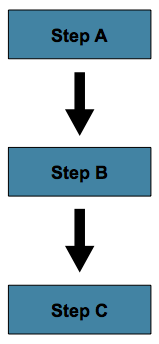
This can be achieved by using the 'next' attribute of the step element, as shown in the following example:
<job id="job">
    <step id="stepA" parent="s1" next="stepB" />
    <step id="stepB" parent="s2" next="stepC"/>
    <step id="stepC" parent="s3" />
</job>@Bean
public Job job() {
return this.jobBuilderFactory.get("job")
.start(stepA())
.next(stepB())
.next(stepC())
.build();
}In the scenario above, 'step A' runs first because it is the first Step listed. If
'step A' completes normally, then 'step B' runs, and so on. However, if 'step A' fails,
then the entire Job fails and 'step B' does not execute.
|
With the Spring Batch namespace, the first step listed in the
configuration is always the first step
run by the |
5.3.2. Conditional Flow
In the example above, there are only two possibilities:
-
The
Stepis successful and the nextStepshould be executed. -
The
Stepfailed and, thus, theJobshould fail.
In many cases, this may be sufficient. However, what about a scenario in which the
failure of a Step should trigger a different Step, rather than causing failure? The
following image shows such a flow:
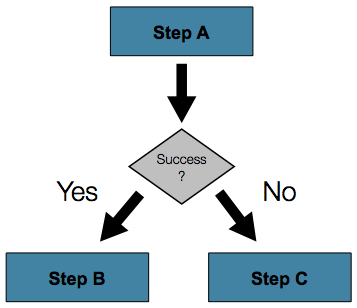
In order to handle more complex scenarios, the Spring Batch namespace allows transition
elements to be defined within the step element. One such transition is the next
element. Like the next attribute, the next element tells the Job which Step to
execute next. However, unlike the attribute, any number of next elements are allowed on
a given Step, and there is no default behavior in the case of failure. This means that, if
transition elements are used, then all of the behavior for the Step transitions must be
defined explicitly. Note also that a single step cannot have both a next attribute and
a transition element.
The next element specifies a pattern to match and the step to execute next, as shown in
the following example:
<job id="job">
    <step id="stepA" parent="s1">
        <next on="*" to="stepB" />
        <next on="FAILED" to="stepC" />
    </step>
    <step id="stepB" parent="s2" next="stepC" />
    <step id="stepC" parent="s3" />
</job>@Bean
public Job job() {
return this.jobBuilderFactory.get("job")
.start(stepA())
.on("*").to(stepB())
.from(stepA()).on("FAILED").to(stepC())
.end()
.build();
}When using XML configuration, the on attribute of a transition element uses a simple
pattern-matching scheme to match the ExitStatus that results from the execution of the
Step.
When using java configuration the on method uses a simple pattern-matching scheme to
match the ExitStatus that results from the execution of the Step.
Only two special characters are allowed in the pattern:
-
"*" matches zero or more characters
-
"?" matches exactly one character
For example, "c*t" matches "cat" and "count", while "c?t" matches "cat" but not "count".
While there is no limit to the number of transition elements on a Step, if the Step
execution results in an ExitStatus that is not covered by an element, then the
framework throws an exception and the Job fails. The framework automatically orders
transitions from most specific to least specific. This means that, even if the ordering
were swapped for "stepA" in the example above, an ExitStatus of "FAILED" would still go
to "stepC".
Batch Status Versus Exit Status
When configuring a Job for conditional flow, it is important to understand the
difference between BatchStatus and ExitStatus. BatchStatus is an enumeration that
is a property of both JobExecution and StepExecution and is used by the framework to
record the status of a Job or Step. It can be one of the following values:
COMPLETED, STARTING, STARTED, STOPPING, STOPPED, FAILED, ABANDONED, or
UNKNOWN. Most of them are self explanatory: COMPLETED is the status set when a step
or job has completed successfully, FAILED is set when it fails, and so on.
The following example contains the 'next' element when using XML configuration:
<next on="FAILED" to="stepB" />The following example contains the 'on' element when using Java Configuration:
...
.from(stepA()).on("FAILED").to(stepB())
...
At first glance, it would appear that 'on' references the BatchStatus of the Step to
which it belongs. However, it actually references the ExitStatus of the Step. As the
name implies, ExitStatus represents the status of a Step after it finishes execution.
More specifically, when using XML configuration, the 'next' element shown in the
preceding XML configuration example references the exit code of ExitStatus.
When using Java configuration, the 'on' method shown in the preceding
Java configuration example references the exit code of ExitStatus.
In English, it says: "go to stepB if the exit code is FAILED ". By default, the exit
code is always the same as the BatchStatus for the Step, which is why the entry above
works. However, what if the exit code needs to be different? A good example comes from
the skip sample job within the samples project:
<step id="step1" parent="s1">
    <end on="FAILED" />
    <next on="COMPLETED WITH SKIPS" to="errorPrint1" />
    <next on="*" to="step2" />
</step>@Bean
public Job job() {
return this.jobBuilderFactory.get("job")
.start(step1()).on("FAILED").end()
.from(step1()).on("COMPLETED WITH SKIPS").to(errorPrint1())
.from(step1()).on("*").to(step2())
.end()
.build();
}step1 has three possibilities:
-
The
Stepfailed, in which case the job should fail. -
The
Stepcompleted successfully. -
The
Stepcompleted successfully but with an exit code of 'COMPLETED WITH SKIPS'. In this case, a different step should be run to handle the errors.
The above configuration works. However, something needs to change the exit code based on the condition of the execution having skipped records, as shown in the following example:
public class SkipCheckingListener extends StepExecutionListenerSupport {
    public ExitStatus afterStep(StepExecution stepExecution) {
        String exitCode = stepExecution.getExitStatus().getExitCode();
        if (!exitCode.equals(ExitStatus.FAILED.getExitCode()) &&
              stepExecution.getSkipCount() > 0) {
            return new ExitStatus("COMPLETED WITH SKIPS");
        }
        else {
            return null;
        }
    }
}
The above code is a StepExecutionListener that first checks to make sure the Step was
successful and then checks to see if the skip count on the StepExecution is higher than
0. If both conditions are met, a new ExitStatus with an exit code of
COMPLETED WITH SKIPS is returned.
5.3.3. Configuring for Stop
After the discussion of BatchStatus and ExitStatus,
one might wonder how the BatchStatus and ExitStatus are determined for the Job.
While these statuses are determined for the Step by the code that is executed, the
statuses for the Job are determined based on the configuration.
So far, all of the job configurations discussed have had at least one final Step with
no transitions. For example, after the following step executes, the Job ends, as shown
in the following example:
<step id="stepC" parent="s3"/>@Bean
public Job job() {
return this.jobBuilderFactory.get("job")
.start(step1())
.build();
}If no transitions are defined for a Step, then the status of the Job is defined as
follows:
-
If the
Stepends withExitStatusFAILED, then theBatchStatusandExitStatusof theJobare bothFAILED. -
Otherwise, the
BatchStatusandExitStatusof theJobare bothCOMPLETED.
While this method of terminating a batch job is sufficient for some batch jobs, such as a
simple sequential step job, custom defined job-stopping scenarios may be required. For
this purpose, Spring Batch provides three transition elements to stop a Job (in
addition to the next element that we discussed previously).
Each of these stopping elements stops a Job with a particular BatchStatus. It is
important to note that the stop transition elements have no effect on either the
BatchStatus or ExitStatus of any Steps in the Job. These elements affect only the
final statuses of the Job. For example, it is possible for every step in a job to have
a status of FAILED but for the job to have a status of COMPLETED.
Ending at a Step
Configuring a step end instructs a Job to stop with a BatchStatus of COMPLETED. A
Job that has finished with status COMPLETED cannot be restarted (the framework throws
a JobInstanceAlreadyCompleteException).
When using XML configuration, the 'end' element is used for this task. The end element
also allows for an optional 'exit-code' attribute that can be used to customize the
ExitStatus of the Job. If no 'exit-code' attribute is given, then the ExitStatus is
COMPLETED by default, to match the BatchStatus.
When using Java configuration, the 'end' method is used for this task. The end method
also allows for an optional 'exitStatus' parameter that can be used to customize the
ExitStatus of the Job. If no 'exitStatus' value is provided, then the ExitStatus is
COMPLETED by default, to match the BatchStatus.
In the following scenario, if step2 fails, then the Job stops with a BatchStatus of
COMPLETED and an ExitStatus of COMPLETED and step3 does not run. Otherwise,
execution moves to step3. Note that if step2 fails, the Job is not restartable
(because the status is COMPLETED).
<step id="step1" parent="s1" next="step2">
<step id="step2" parent="s2">
<end on="FAILED"/>
<next on="*" to="step3"/>
</step>
<step id="step3" parent="s3">@Bean
public Job job() {
return this.jobBuilderFactory.get("job")
.start(step1())
.next(step2())
.on("FAILED").end()
.from(step2()).on("*").to(step3())
.end()
.build();
}Failing a Step
Configuring a step to fail at a given point instructs a Job to stop with a
BatchStatus of FAILED. Unlike end, the failure of a Job does not prevent the Job
from being restarted.
When using XML configuration, the 'fail' element also allows for an optional 'exit-code'
attribute that can be used to customize the ExitStatus of the Job. If no 'exit-code'
attribute is given, then the ExitStatus is FAILED by default, to match the
BatchStatus.
In the following scenario, if step2 fails, then the Job stops with a BatchStatus of
FAILED and an ExitStatus of EARLY TERMINATION and step3 does not execute.
Otherwise, execution moves to step3. Additionally, if step2 fails and the Job is
restarted, then execution begins again on step2.
<step id="step1" parent="s1" next="step2">
<step id="step2" parent="s2">
<fail on="FAILED" exit-code="EARLY TERMINATION"/>
<next on="*" to="step3"/>
</step>
<step id="step3" parent="s3">@Bean
public Job job() {
return this.jobBuilderFactory.get("job")
.start(step1())
.next(step2()).on("FAILED").fail()
.from(step2()).on("*").to(step3())
.end()
.build();
}Stopping a Job at a Given Step
Configuring a job to stop at a particular step instructs a Job to stop with a
BatchStatus of STOPPED. Stopping a Job can provide a temporary break in processing,
so that the operator can take some action before restarting the Job.
When using XML configuration 'stop' element requires a 'restart' attribute that specifies the step where execution should pick up when the "Job is restarted".
When using java configuration, the stopAndRestart method requires a 'restart' attribute
that specifies the step where execution should pick up when the "Job is restarted".
In the following scenario, if step1 finishes with COMPLETE, then the job stops.
Once it is restarted, execution begins on step2.
<step id="step1" parent="s1">
<stop on="COMPLETED" restart="step2"/>
</step>
<step id="step2" parent="s2"/>@Bean
public Job job() {
return this.jobBuilderFactory.get("job")
.start(step1()).on("COMPLETED").stopAndRestart(step2())
.end()
.build();
}5.3.4. Programmatic Flow Decisions
In some situations, more information than the ExitStatus may be required to decide
which step to execute next. In this case, a JobExecutionDecider can be used to assist
in the decision, as shown in the following example:
public class MyDecider implements JobExecutionDecider {
public FlowExecutionStatus decide(JobExecution jobExecution, StepExecution stepExecution) {
String status;
if (someCondition()) {
status = "FAILED";
}
else {
status = "COMPLETED";
}
return new FlowExecutionStatus(status);
}
}In the following sample job configuration, a decision specifies the decider to use as
well as all of the transitions:
<job id="job">
<step id="step1" parent="s1" next="decision" />
<decision id="decision" decider="decider">
<next on="FAILED" to="step2" />
<next on="COMPLETED" to="step3" />
</decision>
<step id="step2" parent="s2" next="step3"/>
<step id="step3" parent="s3" />
</job>
<beans:bean id="decider" class="com.MyDecider"/>In the following example, a bean implementing the JobExecutionDecider is passed
directly to the next call when using Java configuration.
@Bean
public Job job() {
return this.jobBuilderFactory.get("job")
.start(step1())
.next(decider()).on("FAILED").to(step2())
.from(decider()).on("COMPLETED").to(step3())
.end()
.build();
}5.3.5. Split Flows
Every scenario described so far has involved a Job that executes its steps one at a
time in a linear fashion. In addition to this typical style, Spring Batch also allows
for a job to be configured with parallel flows.
The XML namespace allows you to use the 'split' element. As the following example shows, the 'split' element contains one or more 'flow' elements, where entire separate flows can be defined. A 'split' element may also contain any of the previously discussed transition elements, such as the 'next' attribute or the 'next', 'end' or 'fail' elements.
<split id="split1" next="step4">
<flow>
<step id="step1" parent="s1" next="step2"/>
<step id="step2" parent="s2"/>
</flow>
<flow>
<step id="step3" parent="s3"/>
</flow>
</split>
<step id="step4" parent="s4"/>Java based configuration lets you configure splits through the provided builders. As the following example shows, the 'split' element contains one or more 'flow' elements, where entire separate flows can be defined. A 'split' element may also contain any of the previously discussed transition elements, such as the 'next' attribute or the 'next', 'end' or 'fail' elements.
@Bean
public Job job() {
Flow flow1 = new FlowBuilder<SimpleFlow>("flow1")
.start(step1())
.next(step2())
.build();
Flow flow2 = new FlowBuilder<SimpleFlow>("flow2")
.start(step3())
.build();
return this.jobBuilderFactory.get("job")
.start(flow1)
.split(new SimpleAsyncTaskExecutor())
.add(flow2)
.next(step4())
.end()
.build();
}5.3.6. Externalizing Flow Definitions and Dependencies Between Jobs
Part of the flow in a job can be externalized as a separate bean definition and then re-used. There are two ways to do so. The first is to simply declare the flow as a reference to one defined elsewhere, as shown in the following example:
<job id="job">
<flow id="job1.flow1" parent="flow1" next="step3"/>
<step id="step3" parent="s3"/>
</job>
<flow id="flow1">
<step id="step1" parent="s1" next="step2"/>
<step id="step2" parent="s2"/>
</flow>@Bean
public Job job() {
return this.jobBuilderFactory.get("job")
.start(flow1())
.next(step3())
.end()
.build();
}
@Bean
public Flow flow1() {
return new FlowBuilder<SimpleFlow>("flow1")
.start(step1())
.next(step2())
.build();
}The effect of defining an external flow as shown in the preceding example is to insert the steps from the external flow into the job as if they had been declared inline. In this way, many jobs can refer to the same template flow and compose such templates into different logical flows. This is also a good way to separate the integration testing of the individual flows.
The other form of an externalized flow is to use a JobStep. A JobStep is similar to a
FlowStep but actually creates and launches a separate job execution for the steps in
the flow specified.
The following XML snippet shows an example of a JobStep:
<job id="jobStepJob" restartable="true">
<step id="jobStepJob.step1">
<job ref="job" job-launcher="jobLauncher"
job-parameters-extractor="jobParametersExtractor"/>
</step>
</job>
<job id="job" restartable="true">...</job>
<bean id="jobParametersExtractor" class="org.spr...DefaultJobParametersExtractor">
<property name="keys" value="input.file"/>
</bean>The following Java snippet shows an example of a JobStep:
@Bean
public Job jobStepJob() {
return this.jobBuilderFactory.get("jobStepJob")
.start(jobStepJobStep1(null))
.build();
}
@Bean
public Step jobStepJobStep1(JobLauncher jobLauncher) {
return this.stepBuilderFactory.get("jobStepJobStep1")
.job(job())
.launcher(jobLauncher)
.parametersExtractor(jobParametersExtractor())
.build();
}
@Bean
public Job job() {
	return this.jobBuilderFactory.get("job")
				.start(step1())
				.build();
}
@Bean
public DefaultJobParametersExtractor jobParametersExtractor() {
DefaultJobParametersExtractor extractor = new DefaultJobParametersExtractor();
extractor.setKeys(new String[]{"input.file"});
return extractor;
}The job parameters extractor is a strategy that determines how the ExecutionContext for
the Step is converted into JobParameters for the Job that is run. The JobStep is
useful when you want to have some more granular options for monitoring and reporting on
jobs and steps. Using JobStep is also often a good answer to the question: "How do I
create dependencies between jobs?" It is a good way to break up a large system into
smaller modules and control the flow of jobs.
5.4. Late Binding of Job and Step Attributes
Both the XML and flat file examples shown earlier use the Spring Resource abstraction
to obtain a file. This works because Resource has a getFile method, which returns a
java.io.File. Both XML and flat file resources can be configured using standard Spring
constructs, as shown in the following example:
<bean id="flatFileItemReader"
      class="org.springframework.batch.item.file.FlatFileItemReader">
    <property name="resource"
              value="file://outputs/file.txt" />
</bean>@Bean
public FlatFileItemReader flatFileItemReader() {
FlatFileItemReader<Foo> reader = new FlatFileItemReaderBuilder<Foo>()
.name("flatFileItemReader")
.resource(new FileSystemResource("file://outputs/file.txt"))
...
}The preceding Resource loads the file from the specified file system location. Note
that absolute locations have to start with a double slash (//). In most Spring
applications, this solution is good enough, because the names of these resources are
known at compile time. However, in batch scenarios, the file name may need to be
determined at runtime as a parameter to the job. This can be solved using '-D' parameters
to read a system property.
The following XML snippet shows how to read a file name from a property:
<bean id="flatFileItemReader"
      class="org.springframework.batch.item.file.FlatFileItemReader">
    <property name="resource" value="${input.file.name}" />
</bean>
The following Java snippet shows how to read a file name from a property:
@Bean
public FlatFileItemReader flatFileItemReader(@Value("${input.file.name}") String name) {
	return new FlatFileItemReaderBuilder<Foo>()
			.name("flatFileItemReader")
			.resource(new FileSystemResource(name))
			...
}
All that would be required for this solution to work would be a system argument (such as
-Dinput.file.name="file://outputs/file.txt").
Although a PropertyPlaceholderConfigurer can be used here, it is not
necessary if the system property is always set because the ResourceEditor in Spring
already filters and does placeholder replacement on system properties.
|
Often, in a batch setting, it is preferable to parametrize the file name in the
JobParameters of the job, instead of through system properties, and access them that
way. To accomplish this, Spring Batch allows for the late binding of various Job and
Step attributes, as shown in the following snippet:
<bean id="flatFileItemReader" scope="step"
      class="org.springframework.batch.item.file.FlatFileItemReader">
    <property name="resource" value="#{jobParameters['input.file.name']}" />
</bean>@StepScope
@Bean
public FlatFileItemReader flatFileItemReader(@Value("#{jobParameters['input.file.name']}") String name) {
return new FlatFileItemReaderBuilder<Foo>()
.name("flatFileItemReader")
.resource(new FileSystemResource(name))
...
}Both the JobExecution and StepExecution level ExecutionContext can be accessed in
the same way, as shown in the following examples:
<bean id="flatFileItemReader" scope="step"
      class="org.springframework.batch.item.file.FlatFileItemReader">
    <property name="resource" value="#{jobExecutionContext['input.file.name']}" />
</bean><bean id="flatFileItemReader" scope="step"
class="org.springframework.batch.item.file.FlatFileItemReader">
<property name="resource" value="#{stepExecutionContext['input.file.name']}" />
</bean>@StepScope
@Bean
public FlatFileItemReader flatFileItemReader(@Value("#{jobExecutionContext['input.file.name']}") String name) {
return new FlatFileItemReaderBuilder<Foo>()
.name("flatFileItemReader")
.resource(new FileSystemResource(name))
...
}@StepScope
@Bean
public FlatFileItemReader flatFileItemReader(@Value("#{stepExecutionContext['input.file.name']}") String name) {
return new FlatFileItemReaderBuilder<Foo>()
.name("flatFileItemReader")
.resource(new FileSystemResource(name))
...
}|
Any bean that uses late-binding must be declared with scope="step". See Step Scope for more information. |
5.4.1. Step Scope
All of the late binding examples from above have a scope of "step" declared on the bean definition, as shown in the following example:
<bean id="flatFileItemReader" scope="step"
      class="org.springframework.batch.item.file.FlatFileItemReader">
    <property name="resource" value="#{jobParameters[input.file.name]}" />
</bean>@StepScope
@Bean
public FlatFileItemReader flatFileItemReader(@Value("#{jobParameters[input.file.name]}") String name) {
return new FlatFileItemReaderBuilder<Foo>()
.name("flatFileItemReader")
.resource(new FileSystemResource(name))
...
}Using a scope of Step is required in order to use late binding, because the bean cannot
actually be instantiated until the Step starts, to allow the attributes to be found.
Because it is not part of the Spring container by default, the scope must be added
explicitly, by using the batch namespace or by including a bean definition explicitly
for the StepScope, or by using the @EnableBatchProcessing annotation. Use only one of
those methods. The following example uses the batch namespace:
<beans xmlns="http://www.springframework.org/schema/beans"
       xmlns:batch="http://www.springframework.org/schema/batch"
       xmlns:xsi="http://www.w3.org/2001/XMLSchema-instance"
       xsi:schemaLocation="...">
<batch:job .../>
...
</beans>
The following example includes the bean definition explicitly:
<bean class="org.springframework.batch.core.scope.StepScope" />5.4.2. Job Scope
Job scope, introduced in Spring Batch 3.0, is similar to Step scope in configuration
but is a Scope for the Job context, so that there is only one instance of such a bean
per running job. Additionally, support is provided for late binding of references
accessible from the JobContext using #{..} placeholders. Using this feature, bean
properties can be pulled from the job or job execution context and the job parameters, as
shown in the following examples:
<bean id="..." class="..." scope="job">
    <property name="name" value="#{jobParameters[input]}" />
</bean><bean id="..." class="..." scope="job">
<property name="name" value="#{jobExecutionContext['input.name']}.txt" />
</bean>@JobScope
@Bean
public FlatFileItemReader flatFileItemReader(@Value("#{jobParameters[input]}") String name) {
return new FlatFileItemReaderBuilder<Foo>()
.name("flatFileItemReader")
.resource(new FileSystemResource(name))
...
}@JobScope
@Bean
public FlatFileItemReader flatFileItemReader(@Value("#{jobExecutionContext['input.name']}") String name) {
return new FlatFileItemReaderBuilder<Foo>()
.name("flatFileItemReader")
.resource(new FileSystemResource(name))
...
}Because it is not part of the Spring container by default, the scope must be added
explicitly, by using the batch namespace, by including a bean definition explicitly for
the JobScope, or using the @EnableBatchProcessing annotation (but not all of them).
The following example uses the batch namespace:
<beans xmlns="http://www.springframework.org/schema/beans"
		  xmlns:batch="http://www.springframework.org/schema/batch"
		  xmlns:xsi="http://www.w3.org/2001/XMLSchema-instance"
		  xsi:schemaLocation="...">

<batch:job .../>
...
</beans>
The following example includes a bean that explicitly defines the JobScope:
<bean class="org.springframework.batch.core.scope.JobScope" />6. ItemReaders and ItemWriters
All batch processing can be described in its most simple form as reading in large amounts
of data, performing some type of calculation or transformation, and writing the result
out. Spring Batch provides three key interfaces to help perform bulk reading and writing:
ItemReader, ItemProcessor, and ItemWriter.
6.1. ItemReader
Although a simple concept, an ItemReader is the means for providing data from many
different types of input. The most general examples include:
-
Flat File: Flat-file item readers read lines of data from a flat file that typically describes records with fields of data defined by fixed positions in the file or delimited by some special character (such as a comma).
-
XML: XML
ItemReadersprocess XML independently of technologies used for parsing, mapping and validating objects. Input data allows for the validation of an XML file against an XSD schema. -
Database: A database resource is accessed to return resultsets which can be mapped to objects for processing. The default SQL
ItemReaderimplementations invoke aRowMapperto return objects, keep track of the current row if restart is required, store basic statistics, and provide some transaction enhancements that are explained later.
There are many more possibilities, but we focus on the basic ones for this chapter. A
complete list of all available ItemReader implementations can be found in
Appendix A.
ItemReader is a basic interface for generic
input operations, as shown in the following interface definition:
public interface ItemReader<T> {

    T read() throws Exception, UnexpectedInputException, ParseException, NonTransientResourceException;

}
The read method defines the most essential contract of the ItemReader. Calling it
returns one item or null if no more items are left. An item might represent a line in a
file, a row in a database, or an element in an XML file. It is generally expected that
these are mapped to a usable domain object (such as Trade, Foo, or others), but there
is no requirement in the contract to do so.
It is expected that implementations of the ItemReader interface are forward only.
However, if the underlying resource is transactional (such as a JMS queue) then calling
read may return the same logical item on subsequent calls in a rollback scenario. It is
also worth noting that a lack of items to process by an ItemReader does not cause an
exception to be thrown. For example, a database ItemReader that is configured with a
query that returns 0 results returns null on the first invocation of read.
6.2. ItemWriter
ItemWriter is similar in functionality to an ItemReader but with inverse operations.
Resources still need to be located, opened, and closed but they differ in that an
ItemWriter writes out, rather than reading in. In the case of databases or queues,
these operations may be inserts, updates, or sends. The format of the serialization of
the output is specific to each batch job.
As with ItemReader,
ItemWriter is a fairly generic interface, as shown in the following interface definition:
public interface ItemWriter<T> {

    void write(List<? extends T> items) throws Exception;

}
As with read on ItemReader, write provides the basic contract of ItemWriter. It
attempts to write out the list of items passed in as long as it is open. Because it is
generally expected that items are 'batched' together into a chunk and then output, the
interface accepts a list of items, rather than an item by itself. After writing out the
list, any flushing that may be necessary can be performed before returning from the write
method. For example, if writing to a Hibernate DAO, multiple calls to write can be made,
one for each item. The writer can then call flush on the hibernate session before
returning.
6.3. ItemProcessor
The ItemReader and ItemWriter interfaces are both very useful for their specific
tasks, but what if you want to insert business logic before writing? One option for both
reading and writing is to use the composite pattern: Create an ItemWriter that contains
another ItemWriter or an ItemReader that contains another ItemReader. The following
code shows an example:
public class CompositeItemWriter<T> implements ItemWriter<T> {

    ItemWriter<T> itemWriter;

    public CompositeItemWriter(ItemWriter<T> itemWriter) {
        this.itemWriter = itemWriter;
    }

    public void write(List<? extends T> items) throws Exception {
        //Add business logic here
       itemWriter.write(items);
    }

    public void setDelegate(ItemWriter<T> itemWriter){
        this.itemWriter = itemWriter;
    }
}
The preceding class contains another ItemWriter to which it delegates after having
provided some business logic. This pattern could easily be used for an ItemReader as
well, perhaps to obtain more reference data based upon the input that was provided by the
main ItemReader. It is also useful if you need to control the call to write yourself.
However, if you only want to 'transform' the item passed in for writing before it is
actually written, you need not write yourself. You can just modify the item. For this
scenario, Spring Batch provides the ItemProcessor interface, as shown in the following
interface definition:
public interface ItemProcessor<I, O> {

    O process(I item) throws Exception;
}
An ItemProcessor is simple. Given one object, transform it and return another. The
provided object may or may not be of the same type. The point is that business logic may
be applied within the process, and it is completely up to the developer to create that
logic. An ItemProcessor can be wired directly into a step. For example, assume an
ItemReader provides a class of type Foo and that it needs to be converted to type Bar
before being written out. The following example shows an ItemProcessor that performs
the conversion:
public class Foo {}

public class Bar {
    public Bar(Foo foo) {}
}

public class FooProcessor implements ItemProcessor<Foo,Bar>{
    public Bar process(Foo foo) throws Exception {
        //Perform simple transformation, convert a Foo to a Bar
        return new Bar(foo);
    }
}

public class BarWriter implements ItemWriter<Bar>{
    public void write(List<? extends Bar> bars) throws Exception {
        //write bars
    }
}
In the preceding example, there is a class Foo, a class Bar, and a class
FooProcessor that adheres to the ItemProcessor interface. The transformation is
simple, but any type of transformation could be done here. The BarWriter writes Bar
objects, throwing an exception if any other type is provided. Similarly, the
FooProcessor throws an exception if anything but a Foo is provided. The
FooProcessor can then be injected into a Step, as shown in the following example:
<job id="ioSampleJob">
    <step name="step1">
        <tasklet>
            <chunk reader="fooReader" processor="fooProcessor" writer="barWriter"
                   commit-interval="2"/>
        </tasklet>
    </step>
</job>@Bean
public Job ioSampleJob() {
return this.jobBuilderFactory.get("ioSampleJOb")
.start(step1())
.end()
.build();
}
@Bean
public Step step1() {
return this.stepBuilderFactory.get("step1")
.<String, String>chunk(2)
.reader(fooReader())
.processor(fooProcessor())
.writer(barWriter())
.build();
}6.3.1. Chaining ItemProcessors
Performing a single transformation is useful in many scenarios, but what if you want to
'chain' together multiple ItemProcessor implementations? This can be accomplished using
the composite pattern mentioned previously. To update the previous, single
transformation, example, Foo is transformed to Bar, which is transformed to Foobar
and written out, as shown in the following example:
public class Foo {}

public class Bar {
    public Bar(Foo foo) {}
}

public class Foobar {
    public Foobar(Bar bar) {}
}

public class FooProcessor implements ItemProcessor<Foo,Bar>{
    public Bar process(Foo foo) throws Exception {
        //Perform simple transformation, convert a Foo to a Bar
        return new Bar(foo);
    }
}

public class BarProcessor implements ItemProcessor<Bar,Foobar>{
    public Foobar process(Bar bar) throws Exception {
        return new Foobar(bar);
    }
}

public class FoobarWriter implements ItemWriter<Foobar>{
    public void write(List<? extends Foobar> items) throws Exception {
        //write items
    }
}
A FooProcessor and a BarProcessor can be 'chained' together to give the resultant
Foobar, as shown in the following example:
CompositeItemProcessor<Foo,Foobar> compositeProcessor =
                                      new CompositeItemProcessor<Foo,Foobar>();
List itemProcessors = new ArrayList();
itemProcessors.add(new FooTransformer());
itemProcessors.add(new BarTransformer());
compositeProcessor.setDelegates(itemProcessors);
Just as with the previous example, the composite processor can be configured into the
Step:
<job id="ioSampleJob">
    <step name="step1">
        <tasklet>
            <chunk reader="fooReader" processor="compositeItemProcessor" writer="foobarWriter"
                   commit-interval="2"/>
        </tasklet>
    </step>
</job>

<bean id="compositeItemProcessor"
      class="org.springframework.batch.item.support.CompositeItemProcessor">
    <property name="delegates">
        <list>
            <bean class="..FooProcessor" />
            <bean class="..BarProcessor" />
        </list>
    </property>
</bean>@Bean
public Job ioSampleJob() {
return this.jobBuilderFactory.get("ioSampleJob")
.start(step1())
.end()
.build();
}
@Bean
public Step step1() {
return this.stepBuilderFactory.get("step1")
.<String, String>chunk(2)
.reader(fooReader())
.processor(compositeProcessor())
.writer(foobarWriter())
.build();
}
@Bean
public CompositeItemProcessor compositeProcessor() {
List<ItemProcessor> delegates = new ArrayList<>(2);
delegates.add(new FooProcessor());
delegates.add(new BarProcessor());
CompositeItemProcessor processor = new CompositeItemProcessor();
processor.setDelegates(delegates);
return processor;
}6.3.2. Filtering Records
One typical use for an item processor is to filter out records before they are passed to
the ItemWriter. Filtering is an action distinct from skipping. Skipping indicates that
a record is invalid, while filtering simply indicates that a record should not be
written.
For example, consider a batch job that reads a file containing three different types of
records: records to insert, records to update, and records to delete. If record deletion
is not supported by the system, then we would not want to send any "delete" records to
the ItemWriter. But, since these records are not actually bad records, we would want to
filter them out rather than skip them. As a result, the ItemWriter would receive only
"insert" and "update" records.
To filter a record, you can return null from the ItemProcessor. The framework detects
that the result is null and avoids adding that item to the list of records delivered to
the ItemWriter. As usual, an exception thrown from the ItemProcessor results in a
skip.
6.3.3. Fault Tolerance
When a chunk is rolled back, items that have been cached during reading may be
reprocessed. If a step is configured to be fault tolerant (typically by using skip or
retry processing), any ItemProcessor used should be implemented in a way that is
idempotent. Typically that would consist of performing no changes on the input item for
the ItemProcessor and only updating the
instance that is the result.
6.4. ItemStream
Both ItemReaders and ItemWriters serve their individual purposes well, but there is a
common concern among both of them that necessitates another interface. In general, as
part of the scope of a batch job, readers and writers need to be opened, closed, and
require a mechanism for persisting state. The ItemStream interface serves that purpose,
as shown in the following example:
public interface ItemStream {

    void open(ExecutionContext executionContext) throws ItemStreamException;

    void update(ExecutionContext executionContext) throws ItemStreamException;

    void close() throws ItemStreamException;
}
Before describing each method, we should mention the ExecutionContext. Clients of an
ItemReader that also implement ItemStream should call open before any calls to
read, in order to open any resources such as files or to obtain connections. A similar
restriction applies to an ItemWriter that implements ItemStream. As mentioned in
Chapter 2, if expected data is found in the ExecutionContext, it may be used to start
the ItemReader or ItemWriter at a location other than its initial state. Conversely,
close is called to ensure that any resources allocated during open are released safely.
update is called primarily to ensure that any state currently being held is loaded into
the provided ExecutionContext. This method is called before committing, to ensure that
the current state is persisted in the database before commit.
In the special case where the client of an ItemStream is a Step (from the Spring
Batch Core), an ExecutionContext is created for each StepExecution to allow users to
store the state of a particular execution, with the expectation that it is returned if
the same JobInstance is started again. For those familiar with Quartz, the semantics
are very similar to a Quartz JobDataMap.
6.5. The Delegate Pattern and Registering with the Step
Note that the CompositeItemWriter is an example of the delegation pattern, which is
common in Spring Batch. The delegates themselves might implement callback interfaces,
such as StepListener. If they do and if they are being used in conjunction with Spring
Batch Core as part of a Step in a Job, then they almost certainly need to be
registered manually with the Step. A reader, writer, or processor that is directly
wired into the Step gets registered automatically if it implements ItemStream or a
StepListener interface. However, because the delegates are not known to the Step,
they need to be injected as listeners or streams (or both if appropriate), as shown in
the following example:
<job id="ioSampleJob">
    <step name="step1">
        <tasklet>
            <chunk reader="fooReader" processor="fooProcessor" writer="compositeItemWriter"
                   commit-interval="2">
                <streams>
                    <stream ref="barWriter" />
                </streams>
            </chunk>
        </tasklet>
    </step>
</job>

<bean id="compositeItemWriter" class="...CustomCompositeItemWriter">
    <property name="delegate" ref="barWriter" />
</bean>

<bean id="barWriter" class="...BarWriter" />@Bean
public Job ioSampleJob() {
return this.jobBuilderFactory.get("ioSampleJob")
.start(step1())
.end()
.build();
}
@Bean
public Step step1() {
return this.stepBuilderFactory.get("step1")
.<String, String>chunk(2)
.reader(fooReader())
.processor(fooProcessor())
.writer(compositeItemWriter())
.stream(barWriter())
.build();
}
@Bean
public CustomCompositeItemWriter compositeItemWriter() {
CustomCompositeItemWriter writer = new CustomCompositeItemWriter();
writer.setDelegate(barWriter());
return writer;
}
@Bean
public BarWriter barWriter() {
return new BarWriter();
}6.6. Flat Files
One of the most common mechanisms for interchanging bulk data has always been the flat file. Unlike XML, which has an agreed upon standard for defining how it is structured (XSD), anyone reading a flat file must understand ahead of time exactly how the file is structured. In general, all flat files fall into two types: delimited and fixed length. Delimited files are those in which fields are separated by a delimiter, such as a comma. Fixed Length files have fields that are a set length.
6.6.1. The FieldSet
When working with flat files in Spring Batch, regardless of whether it is for input or
output, one of the most important classes is the FieldSet. Many architectures and
libraries contain abstractions for helping you read in from a file, but they usually
return a String or an array of String objects. This really only gets you halfway
there. A FieldSet is Spring Batch’s abstraction for enabling the binding of fields from
a file resource. It allows developers to work with file input in much the same way as
they would work with database input. A FieldSet is conceptually similar to a JDBC
ResultSet. A FieldSet requires only one argument: a String array of tokens.
Optionally, you can also configure the names of the fields so that the fields may be
accessed either by index or name as patterned after ResultSet, as shown in the following
example:
String[] tokens = new String[]{"foo", "1", "true"};
FieldSet fs = new DefaultFieldSet(tokens);
String name = fs.readString(0);
int value = fs.readInt(1);
boolean booleanValue = fs.readBoolean(2);
There are many more options on the FieldSet interface, such as Date, long,
BigDecimal, and so on. The biggest advantage of the FieldSet is that it provides
consistent parsing of flat file input. Rather than each batch job parsing differently in
potentially unexpected ways, it can be consistent, both when handling errors caused by a
format exception, or when doing simple data conversions.
6.6.2. FlatFileItemReader
A flat file is any type of file that contains at most two-dimensional (tabular) data.
Reading flat files in the Spring Batch framework is facilitated by the class called
FlatFileItemReader, which provides basic functionality for reading and parsing flat
files. The two most important required dependencies of FlatFileItemReader are
Resource and LineMapper. The LineMapper interface is explored more in the next
sections. The resource property represents a Spring Core Resource. Documentation
explaining how to create beans of this type can be found in
Spring
Framework, Chapter 5. Resources. Therefore, this guide does not go into the details of
creating Resource objects beyond showing the following simple example:
Resource resource = new FileSystemResource("resources/trades.csv");In complex batch environments, the directory structures are often managed by the EAI infrastructure, where drop zones for external interfaces are established for moving files from FTP locations to batch processing locations and vice versa. File moving utilities are beyond the scope of the Spring Batch architecture, but it is not unusual for batch job streams to include file moving utilities as steps in the job stream. The batch architecture only needs to know how to locate the files to be processed. Spring Batch begins the process of feeding the data into the pipe from this starting point. However, Spring Integration provides many of these types of services.
The other properties in FlatFileItemReader let you further specify how your data is
interpreted, as described in the following table:
| Property | Type | Description |
|---|---|---|
comments |
String[] |
Specifies line prefixes that indicate comment rows. |
encoding |
String |
Specifies what text encoding to use. The default is the value of |
lineMapper |
|
Converts a |
linesToSkip |
int |
Number of lines to ignore at the top of the file. |
recordSeparatorPolicy |
RecordSeparatorPolicy |
Used to determine where the line endings are and do things like continue over a line ending if inside a quoted string. |
resource |
|
The resource from which to read. |
skippedLinesCallback |
LineCallbackHandler |
Interface that passes the raw line content of
the lines in the file to be skipped. If |
strict |
boolean |
In strict mode, the reader throws an exception on |
LineMapper
As with RowMapper, which takes a low-level construct such as ResultSet and returns
an Object, flat file processing requires the same construct to convert a String line
into an Object, as shown in the following interface definition:
public interface LineMapper<T> {

    T mapLine(String line, int lineNumber) throws Exception;

}
The basic contract is that, given the current line and the line number with which it is
associated, the mapper should return a resulting domain object. This is similar to
RowMapper, in that each line is associated with its line number, just as each row in a
ResultSet is tied to its row number. This allows the line number to be tied to the
resulting domain object for identity comparison or for more informative logging. However,
unlike RowMapper, the LineMapper is given a raw line which, as discussed above, only
gets you halfway there. The line must be tokenized into a FieldSet, which can then be
mapped to an object, as described later in this document.
LineTokenizer
An abstraction for turning a line of input into a FieldSet is necessary because there
can be many formats of flat file data that need to be converted to a FieldSet. In
Spring Batch, this interface is the LineTokenizer:
public interface LineTokenizer {

    FieldSet tokenize(String line);

}
The contract of a LineTokenizer is such that, given a line of input (in theory the
String could encompass more than one line), a FieldSet representing the line is
returned. This FieldSet can then be passed to a FieldSetMapper. Spring Batch contains
the following LineTokenizer implementations:
-
DelimitedLineTokenizer: Used for files where fields in a record are separated by a delimiter. The most common delimiter is a comma, but pipes or semicolons are often used as well. -
FixedLengthTokenizer: Used for files where fields in a record are each a "fixed width". The width of each field must be defined for each record type. -
PatternMatchingCompositeLineTokenizer: Determines whichLineTokenizeramong a list of tokenizers should be used on a particular line by checking against a pattern.
FieldSetMapper
The FieldSetMapper interface defines a single method, mapFieldSet, which takes a
FieldSet object and maps its contents to an object. This object may be a custom DTO, a
domain object, or an array, depending on the needs of the job. The FieldSetMapper is
used in conjunction with the LineTokenizer to translate a line of data from a resource
into an object of the desired type, as shown in the following interface definition:
public interface FieldSetMapper<T> {

    T mapFieldSet(FieldSet fieldSet) throws BindException;

}
The pattern used is the same as the RowMapper used by JdbcTemplate.
DefaultLineMapper
Now that the basic interfaces for reading in flat files have been defined, it becomes clear that three basic steps are required:
-
Read one line from the file.
-
Pass the
Stringline into theLineTokenizer#tokenize()method to retrieve aFieldSet. -
Pass the
FieldSetreturned from tokenizing to aFieldSetMapper, returning the result from theItemReader#read()method.
The two interfaces described above represent two separate tasks: converting a line into a
FieldSet and mapping a FieldSet to a domain object. Because the input of a
LineTokenizer matches the input of the LineMapper (a line), and the output of a
FieldSetMapper matches the output of the LineMapper, a default implementation that
uses both a LineTokenizer and a FieldSetMapper is provided. The DefaultLineMapper,
shown in the following class definition, represents the behavior most users need:
public class DefaultLineMapper<T> implements LineMapper<>, InitializingBean {

    private LineTokenizer tokenizer;

    private FieldSetMapper<T> fieldSetMapper;

    public T mapLine(String line, int lineNumber) throws Exception {
        return fieldSetMapper.mapFieldSet(tokenizer.tokenize(line));
    }

    public void setLineTokenizer(LineTokenizer tokenizer) {
        this.tokenizer = tokenizer;
    }

    public void setFieldSetMapper(FieldSetMapper<T> fieldSetMapper) {
        this.fieldSetMapper = fieldSetMapper;
    }
}
The above functionality is provided in a default implementation, rather than being built into the reader itself (as was done in previous versions of the framework) to allow users greater flexibility in controlling the parsing process, especially if access to the raw line is needed.
Simple Delimited File Reading Example
The following example illustrates how to read a flat file with an actual domain scenario. This particular batch job reads in football players from the following file:
ID,lastName,firstName,position,birthYear,debutYear
"AbduKa00,Abdul-Jabbar,Karim,rb,1974,1996",
"AbduRa00,Abdullah,Rabih,rb,1975,1999",
"AberWa00,Abercrombie,Walter,rb,1959,1982",
"AbraDa00,Abramowicz,Danny,wr,1945,1967",
"AdamBo00,Adams,Bob,te,1946,1969",
"AdamCh00,Adams,Charlie,wr,1979,2003"
The contents of this file are mapped to the following
Player domain object:
public class Player implements Serializable {

    private String ID;
    private String lastName;
    private String firstName;
    private String position;
    private int birthYear;
    private int debutYear;

    public String toString() {
        return "PLAYER:ID=" + ID + ",Last Name=" + lastName +
            ",First Name=" + firstName + ",Position=" + position +
            ",Birth Year=" + birthYear + ",DebutYear=" +
            debutYear;
    }

    // setters and getters...
}
To map a FieldSet into a Player object, a FieldSetMapper that returns players needs
to be defined, as shown in the following example:
protected static class PlayerFieldSetMapper implements FieldSetMapper<Player> {
    public Player mapFieldSet(FieldSet fieldSet) {
        Player player = new Player();

        player.setID(fieldSet.readString(0));
        player.setLastName(fieldSet.readString(1));
        player.setFirstName(fieldSet.readString(2));
        player.setPosition(fieldSet.readString(3));
        player.setBirthYear(fieldSet.readInt(4));
        player.setDebutYear(fieldSet.readInt(5));

        return player;
    }
}
The file can then be read by correctly constructing a FlatFileItemReader and calling
read, as shown in the following example:
FlatFileItemReader<Player> itemReader = new FlatFileItemReader<>();
itemReader.setResource(new FileSystemResource("resources/players.csv"));
//DelimitedLineTokenizer defaults to comma as its delimiter
DefaultLineMapper<Player> lineMapper = new DefaultLineMapper<>();
lineMapper.setLineTokenizer(new DelimitedLineTokenizer());
lineMapper.setFieldSetMapper(new PlayerFieldSetMapper());
itemReader.setLineMapper(lineMapper);
itemReader.open(new ExecutionContext());
Player player = itemReader.read();
Each call to read returns a new
Player object from each line in the file. When the end of the file is
reached, null is returned.
Mapping Fields by Name
There is one additional piece of functionality that is allowed by both
DelimitedLineTokenizer and FixedLengthTokenizer and that is similar in function to a
JDBC ResultSet. The names of the fields can be injected into either of these
LineTokenizer implementations to increase the readability of the mapping function.
First, the column names of all fields in the flat file are injected into the tokenizer,
as shown in the following example:
tokenizer.setNames(new String[] {"ID", "lastName","firstName","position","birthYear","debutYear"});A FieldSetMapper can use this information as follows:
public class PlayerMapper implements FieldSetMapper<Player> {
    public Player mapFieldSet(FieldSet fs) {

       if(fs == null){
           return null;
       }

       Player player = new Player();
       player.setID(fs.readString("ID"));
       player.setLastName(fs.readString("lastName"));
       player.setFirstName(fs.readString("firstName"));
       player.setPosition(fs.readString("position"));
       player.setDebutYear(fs.readInt("debutYear"));
       player.setBirthYear(fs.readInt("birthYear"));

       return player;
   }
}
Automapping FieldSets to Domain Objects
For many, having to write a specific FieldSetMapper is equally as cumbersome as writing
a specific RowMapper for a JdbcTemplate. Spring Batch makes this easier by providing
a FieldSetMapper that automatically maps fields by matching a field name with a setter
on the object using the JavaBean specification. Again using the football example, the
BeanWrapperFieldSetMapper configuration looks like the following snippet:
<bean id="fieldSetMapper"
      class="org.springframework.batch.item.file.mapping.BeanWrapperFieldSetMapper">
    <property name="prototypeBeanName" value="player" />
</bean>

<bean id="player"
      class="org.springframework.batch.sample.domain.Player"
scope="prototype" />@Bean
public FieldSetMapper fieldSetMapper() {
BeanWrapperFieldSetMapper fieldSetMapper = new BeanWrapperFieldSetMapper();
fieldSetMapper.setPrototypeBeanName("player");
return fieldSetMapper;
}
@Bean
@Scope("prototype")
public Player player() {
return new Player();
}For each entry in the FieldSet, the mapper looks for a corresponding setter on a new
instance of the Player object (for this reason, prototype scope is required) in the
same way the Spring container looks for setters matching a property name. Each available
field in the FieldSet is mapped, and the resultant Player object is returned, with no
code required.
Fixed Length File Formats
So far, only delimited files have been discussed in much detail. However, they represent only half of the file reading picture. Many organizations that use flat files use fixed length formats. An example fixed length file follows:
UK21341EAH4121131.11customer1
UK21341EAH4221232.11customer2
UK21341EAH4321333.11customer3
UK21341EAH4421434.11customer4
UK21341EAH4521535.11customer5
While this looks like one large field, it actually represent 4 distinct fields:
-
ISIN: Unique identifier for the item being ordered - 12 characters long.
-
Quantity: Number of the item being ordered - 3 characters long.
-
Price: Price of the item - 5 characters long.
-
Customer: ID of the customer ordering the item - 9 characters long.
When configuring the FixedLengthLineTokenizer, each of these lengths must be provided
in the form of ranges, as shown in the following example:
<bean id="fixedLengthLineTokenizer"
      class="org.springframework.batch.io.file.transform.FixedLengthTokenizer">
    <property name="names" value="ISIN,Quantity,Price,Customer" />
    <property name="columns" value="1-12, 13-15, 16-20, 21-29" />
</bean>
Because the FixedLengthLineTokenizer uses the same LineTokenizer interface as
discussed above, it returns the same FieldSet as if a delimiter had been used. This
allows the same approaches to be used in handling its output, such as using the
BeanWrapperFieldSetMapper.
|
Supporting the above syntax for ranges requires that a specialized property editor,
|
@Bean
public FixedLengthTokenizer fixedLengthTokenizer() {
	FixedLengthTokenizer tokenizer = new FixedLengthTokenizer();

	tokenizer.setNames("ISIN", "Quantity", "Price", "Customer");
	tokenizer.setColumns(new Range(1-12),
						new Range(13-15),
						new Range(16-20),
						new Range(21-29));

	return tokenizer;
}
Because the FixedLengthLineTokenizer uses the same LineTokenizer interface as
discussed above, it returns the same FieldSet as if a delimiter had been used. This
lets the same approaches be used in handling its output, such as using the
BeanWrapperFieldSetMapper.
Multiple Record Types within a Single File
All of the file reading examples up to this point have all made a key assumption for simplicity’s sake: all of the records in a file have the same format. However, this may not always be the case. It is very common that a file might have records with different formats that need to be tokenized differently and mapped to different objects. The following excerpt from a file illustrates this:
USER;Smith;Peter;;T;20014539;F
LINEA;1044391041ABC037.49G201XX1383.12H
LINEB;2134776319DEF422.99M005LI
In this file we have three types of records, "USER", "LINEA", and "LINEB". A "USER" line
corresponds to a User object. "LINEA" and "LINEB" both correspond to Line objects,
though a "LINEA" has more information than a "LINEB".
The ItemReader reads each line individually, but we must specify different
LineTokenizer and FieldSetMapper objects so that the ItemWriter receives the
correct items. The PatternMatchingCompositeLineMapper makes this easy by allowing maps
of patterns to LineTokenizer instances and patterns to FieldSetMapper instances to be
configured, as shown in the following example:
<bean id="orderFileLineMapper"
      class="org.spr...PatternMatchingCompositeLineMapper">
    <property name="tokenizers">
        <map>
            <entry key="USER*" value-ref="userTokenizer" />
            <entry key="LINEA*" value-ref="lineATokenizer" />
            <entry key="LINEB*" value-ref="lineBTokenizer" />
        </map>
    </property>
    <property name="fieldSetMappers">
        <map>
            <entry key="USER*" value-ref="userFieldSetMapper" />
            <entry key="LINE*" value-ref="lineFieldSetMapper" />
        </map>
    </property>
</bean>@Bean
public PatternMatchingCompositeLineMapper orderFileLineMapper() {
PatternMatchingCompositeLineMapper lineMapper =
new PatternMatchingCompositeLineMapper();
Map<String, LineTokenizer> tokenizers = new HashMap<>(3);
tokenizers.put("USER*", userTokenizer());
tokenizers.put("LINEA*", lineATokenizer());
tokenizers.put("LINEB*", lineBTokenizer());
lineMapper.setTokenizers(tokenizers);
Map<String, FieldSetMapper> mappers = new HashMap<>(2);
mappers.put("USER*", userFieldSetMapper());
mappers.put("LINE*", lineFieldSetMapper());
lineMapper.setFieldSetMappers(mappers);
return lineMapper;
}In this example, "LINEA" and "LINEB" have separate LineTokenizer instances, but they both use
the same FieldSetMapper.
The PatternMatchingCompositeLineMapper uses the PatternMatcher#match method
in order to select the correct delegate for each line. The PatternMatcher allows for
two wildcard characters with special meaning: the question mark ("?") matches exactly one
character, while the asterisk ("*") matches zero or more characters. Note that, in the
preceding configuration, all patterns end with an asterisk, making them effectively
prefixes to lines. The PatternMatcher always matches the most specific pattern
possible, regardless of the order in the configuration. So if "LINE*" and "LINEA*" were
both listed as patterns, "LINEA" would match pattern "LINEA*", while "LINEB" would match
pattern "LINE*". Additionally, a single asterisk ("*") can serve as a default by matching
any line not matched by any other pattern, as shown in the following example.
<entry key="*" value-ref="defaultLineTokenizer" />...
tokenizers.put("*", defaultLineTokenizer());
...There is also a PatternMatchingCompositeLineTokenizer that can be used for tokenization
alone.
It is also common for a flat file to contain records that each span multiple lines. To
handle this situation, a more complex strategy is required. A demonstration of this
common pattern can be found in the multiLineRecords sample.
Exception Handling in Flat Files
There are many scenarios when tokenizing a line may cause exceptions to be thrown. Many
flat files are imperfect and contain incorrectly formatted records. Many users choose to
skip these erroneous lines while logging the issue, the original line, and the line
number. These logs can later be inspected manually or by another batch job. For this
reason, Spring Batch provides a hierarchy of exceptions for handling parse exceptions:
FlatFileParseException and FlatFileFormatException. FlatFileParseException is
thrown by the FlatFileItemReader when any errors are encountered while trying to read a
file. FlatFileFormatException is thrown by implementations of the LineTokenizer
interface and indicates a more specific error encountered while tokenizing.
IncorrectTokenCountException
Both DelimitedLineTokenizer and FixedLengthLineTokenizer have the ability to specify
column names that can be used for creating a FieldSet. However, if the number of column
names does not match the number of columns found while tokenizing a line, the FieldSet
cannot be created, and an IncorrectTokenCountException is thrown, which contains the
number of tokens encountered, and the number expected, as shown in the following example:
tokenizer.setNames(new String[] {"A", "B", "C", "D"});

try {
    tokenizer.tokenize("a,b,c");
}
catch(IncorrectTokenCountException e){
    assertEquals(4, e.getExpectedCount());
    assertEquals(3, e.getActualCount());
}
Because the tokenizer was configured with 4 column names but only 3 tokens were found in
the file, an IncorrectTokenCountException was thrown.
IncorrectLineLengthException
Files formatted in a fixed-length format have additional requirements when parsing because, unlike a delimited format, each column must strictly adhere to its predefined width. If the total line length does not equal the widest value of this column, an exception is thrown, as shown in the following example:
tokenizer.setColumns(new Range[] { new Range(1, 5),
                                   new Range(6, 10),
                                   new Range(11, 15) });
try {
    tokenizer.tokenize("12345");
    fail("Expected IncorrectLineLengthException");
}
catch (IncorrectLineLengthException ex) {
    assertEquals(15, ex.getExpectedLength());
    assertEquals(5, ex.getActualLength());
}
The configured ranges for the tokenizer above are: 1-5, 6-10, and 11-15. Consequently,
the total length of the line is 15. However, in the preceding example, a line of length 5
was passed in, causing an IncorrectLineLengthException to be thrown. Throwing an
exception here rather than only mapping the first column allows the processing of the
line to fail earlier and with more information than it would contain if it failed while
trying to read in column 2 in a FieldSetMapper. However, there are scenarios where the
length of the line is not always constant. For this reason, validation of line length can
be turned off via the 'strict' property, as shown in the following example:
tokenizer.setColumns(new Range[] { new Range(1, 5), new Range(6, 10) });
tokenizer.setStrict(false);
FieldSet tokens = tokenizer.tokenize("12345");
assertEquals("12345", tokens.readString(0));
assertEquals("", tokens.readString(1));
The preceding example is almost identical to the one before it, except that
tokenizer.setStrict(false) was called. This setting tells the tokenizer to not enforce
line lengths when tokenizing the line. A FieldSet is now correctly created and
returned. However, it contains only empty tokens for the remaining values.
6.6.3. FlatFileItemWriter
Writing out to flat files has the same problems and issues that reading in from a file must overcome. A step must be able to write either delimited or fixed length formats in a transactional manner.
LineAggregator
Just as the LineTokenizer interface is necessary to take an item and turn it into a
String, file writing must have a way to aggregate multiple fields into a single string
for writing to a file. In Spring Batch, this is the LineAggregator, shown in the
following interface definition:
public interface LineAggregator<T> {

    public String aggregate(T item);

}
The LineAggregator is the logical opposite of LineTokenizer. LineTokenizer takes a
String and returns a FieldSet, whereas LineAggregator takes an item and returns a
String.
PassThroughLineAggregator
The most basic implementation of the LineAggregator interface is the
PassThroughLineAggregator, which assumes that the object is already a string or that
its string representation is acceptable for writing, as shown in the following code:
public class PassThroughLineAggregator<T> implements LineAggregator<T> {

    public String aggregate(T item) {
        return item.toString();
    }
}
The preceding implementation is useful if direct control of creating the string is
required but the advantages of a FlatFileItemWriter, such as transaction and restart
support, are necessary.
Simplified File Writing Example
Now that the LineAggregator interface and its most basic implementation,
PassThroughLineAggregator, have been defined, the basic flow of writing can be
explained:
-
The object to be written is passed to the
LineAggregatorin order to obtain aString. -
The returned
Stringis written to the configured file.
The following excerpt from the FlatFileItemWriter expresses this in code:
public void write(T item) throws Exception {
    write(lineAggregator.aggregate(item) + LINE_SEPARATOR);
}
A simple configuration might look like the following:
<bean id="itemWriter" class="org.spr...FlatFileItemWriter">
    <property name="resource" value="file:target/test-outputs/output.txt" />
    <property name="lineAggregator">
        <bean class="org.spr...PassThroughLineAggregator"/>
    </property>
</bean>@Bean
public FlatFileItemWriter itemWriter() {
return new FlatFileItemWriterBuilder<Foo>()
.name("itemWriter")
.resource(new FileSystemResource("target/test-outputs/output.txt"))
.lineAggregator(new PassThroughLineAggregator<>())
.build();
}FieldExtractor
The preceding example may be useful for the most basic uses of a writing to a file.
However, most users of the FlatFileItemWriter have a domain object that needs to be
written out and, thus, must be converted into a line. In file reading, the following was
required:
-
Read one line from the file.
-
Pass the line into the
LineTokenizer#tokenize()method, in order to retrieve aFieldSet. -
Pass the
FieldSetreturned from tokenizing to aFieldSetMapper, returning the result from theItemReader#read()method.
File writing has similar but inverse steps:
-
Pass the item to be written to the writer.
-
Convert the fields on the item into an array.
-
Aggregate the resulting array into a line.
Because there is no way for the framework to know which fields from the object need to
be written out, a FieldExtractor must be written to accomplish the task of turning the
item into an array, as shown in the following interface definition:
public interface FieldExtractor<T> {

    Object[] extract(T item);

}
Implementations of the FieldExtractor interface should create an array from the fields
of the provided object, which can then be written out with a delimiter between the
elements or as part of a fixed-width line.
PassThroughFieldExtractor
There are many cases where a collection, such as an array, Collection, or FieldSet,
needs to be written out. "Extracting" an array from one of these collection types is very
straightforward. To do so, convert the collection to an array. Therefore, the
PassThroughFieldExtractor should be used in this scenario. It should be noted that, if
the object passed in is not a type of collection, then the PassThroughFieldExtractor
returns an array containing solely the item to be extracted.
BeanWrapperFieldExtractor
As with the BeanWrapperFieldSetMapper described in the file reading section, it is
often preferable to configure how to convert a domain object to an object array, rather
than writing the conversion yourself. The BeanWrapperFieldExtractor provides this
functionality, as shown in the following example:
BeanWrapperFieldExtractor<Name> extractor = new BeanWrapperFieldExtractor<>();
extractor.setNames(new String[] { "first", "last", "born" });

String first = "Alan";
String last = "Turing";
int born = 1912;

Name n = new Name(first, last, born);
Object[] values = extractor.extract(n);

assertEquals(first, values[0]);
assertEquals(last, values[1]);
assertEquals(born, values[2]);
This extractor implementation has only one required property: the names of the fields to
map. Just as the BeanWrapperFieldSetMapper needs field names to map fields on the
FieldSet to setters on the provided object, the BeanWrapperFieldExtractor needs names
to map to getters for creating an object array. It is worth noting that the order of the
names determines the order of the fields within the array.
Delimited File Writing Example
The most basic flat file format is one in which all fields are separated by a delimiter.
This can be accomplished using a DelimitedLineAggregator. The following example writes
out a simple domain object that represents a credit to a customer account:
public class CustomerCredit {

    private int id;
    private String name;
    private BigDecimal credit;

    //getters and setters removed for clarity
}
Because a domain object is being used, an implementation of the FieldExtractor
interface must be provided, along with the delimiter to use, as shown in the following
example:
<bean id="itemWriter" class="org.springframework.batch.item.file.FlatFileItemWriter">
    <property name="resource" ref="outputResource" />
    <property name="lineAggregator">
        <bean class="org.spr...DelimitedLineAggregator">
            <property name="delimiter" value=","/>
            <property name="fieldExtractor">
                <bean class="org.spr...BeanWrapperFieldExtractor">
                    <property name="names" value="name,credit"/>
                </bean>
            </property>
        </bean>
    </property>
</bean>@Bean
public FlatFileItemWriter<CustomerCredit> itemWriter(Resource outputResource) throws Exception {
BeanWrapperFieldExtractor<CustomerCredit> fieldExtractor = new BeanWrapperFieldExtractor<>();
fieldExtractor.setNames(new String[] {"name", "credit"});
fieldExtractor.afterPropertiesSet();
DelimitedLineAggregator<CustomerCredit> lineAggregator = new DelimitedLineAggregator<>();
lineAggregator.setDelimiter(",");
lineAggregator.setFieldExtractor(fieldExtractor);
return new FlatFileItemWriterBuilder<CustomerCredit>()
.name("customerCreditWriter")
.resource(outputResource)
.lineAggregator(lineAggregator)
.build();
}In the previous example, the BeanWrapperFieldExtractor described earlier in this
chapter is used to turn the name and credit fields within CustomerCredit into an object
array, which is then written out with commas between each field.
It is also possible to use the FlatFileItemWriterBuilder.DelimitedBuilder to
automatically create the BeanWrapperFieldExtractor and DelimitedLineAggregator
as shown in the following example:
@Bean
public FlatFileItemWriter<CustomerCredit> itemWriter(Resource outputResource) throws Exception {
	return new FlatFileItemWriterBuilder<CustomerCredit>()
				.name("customerCreditWriter")
				.resource(outputResource)
				.delimited()
				.delimiter("|")
				.names(new String[] {"name", "credit"})
				.build();
}
Fixed Width File Writing Example
Delimited is not the only type of flat file format. Many prefer to use a set width for
each column to delineate between fields, which is usually referred to as 'fixed width'.
Spring Batch supports this in file writing with the FormatterLineAggregator. Using the
same CustomerCredit domain object described above, it can be configured as follows:
<bean id="itemWriter" class="org.springframework.batch.item.file.FlatFileItemWriter">
    <property name="resource" ref="outputResource" />
    <property name="lineAggregator">
        <bean class="org.spr...FormatterLineAggregator">
            <property name="fieldExtractor">
                <bean class="org.spr...BeanWrapperFieldExtractor">
                    <property name="names" value="name,credit" />
                </bean>
            </property>
            <property name="format" value="%-9s%-2.0f" />
        </bean>
    </property>
</bean>@Bean
public FlatFileItemWriter<CustomerCredit> itemWriter(Resource outputResource) throws Exception {
BeanWrapperFieldExtractor<CustomerCredit> fieldExtractor = new BeanWrapperFieldExtractor<>();
fieldExtractor.setNames(new String[] {"name", "credit"});
fieldExtractor.afterPropertiesSet();
FormatterLineAggregator<CustomerCredit> lineAggregator = new FormatterLineAggregator<>();
lineAggregator.setFormat("%-9s%-2.0f");
lineAggregator.setFieldExtractor(fieldExtractor);
return new FlatFileItemWriterBuilder<CustomerCredit>()
.name("customerCreditWriter")
.resource(outputResource)
.lineAggregator(lineAggregator)
.build();
}Most of the preceding example should look familiar. However, the value of the format property is new and is shown in the following element:
<property name="format" value="%-9s%-2.0f" />...
FormatterLineAggregator<CustomerCredit> lineAggregator = new FormatterLineAggregator<>();
lineAggregator.setFormat("%-9s%-2.0f");
...The underlying implementation is built using the same
Formatter added as part of Java 5. The Java
Formatter is based on the
printf functionality of the C programming
language. Most details on how to configure a formatter can be found in
the Javadoc of Formatter.
It is also possible to use the FlatFileItemWriterBuilder.FormattedBuilder to
automatically create the BeanWrapperFieldExtractor and FormatterLineAggregator
as shown in following example:
@Bean
public FlatFileItemWriter<CustomerCredit> itemWriter(Resource outputResource) throws Exception {
	return new FlatFileItemWriterBuilder<CustomerCredit>()
				.name("customerCreditWriter")
				.resource(outputResource)
				.formatted()
				.format("%-9s%-2.0f")
				.names(new String[] {"name", "credit"})
				.build();
}
Handling File Creation
FlatFileItemReader has a very simple relationship with file resources. When the reader
is initialized, it opens the file (if it exists), and throws an exception if it does not.
File writing isn’t quite so simple. At first glance, it seems like a similar
straightforward contract should exist for FlatFileItemWriter: If the file already
exists, throw an exception, and, if it does not, create it and start writing. However,
potentially restarting a Job can cause issues. In normal restart scenarios, the
contract is reversed: If the file exists, start writing to it from the last known good
position, and, if it does not, throw an exception. However, what happens if the file name
for this job is always the same? In this case, you would want to delete the file if it
exists, unless it’s a restart. Because of this possibility, the FlatFileItemWriter
contains the property, shouldDeleteIfExists. Setting this property to true causes an
existing file with the same name to be deleted when the writer is opened.
6.7. XML Item Readers and Writers
Spring Batch provides transactional infrastructure for both reading XML records and mapping them to Java objects as well as writing Java objects as XML records.
|
Constraints on streaming XML
The StAX API is used for I/O, as other standard XML parsing APIs do not fit batch processing requirements (DOM loads the whole input into memory at once and SAX controls the parsing process by allowing the user to provide only callbacks). |
We need to consider how XML input and output works in Spring Batch. First, there are a
few concepts that vary from file reading and writing but are common across Spring Batch
XML processing. With XML processing, instead of lines of records (FieldSet instances) that need
to be tokenized, it is assumed an XML resource is a collection of 'fragments'
corresponding to individual records, as shown in the following image:

The 'trade' tag is defined as the 'root element' in the scenario above. Everything between '<trade>' and '</trade>' is considered one 'fragment'. Spring Batch uses Object/XML Mapping (OXM) to bind fragments to objects. However, Spring Batch is not tied to any particular XML binding technology. Typical use is to delegate to Spring OXM, which provides uniform abstraction for the most popular OXM technologies. The dependency on Spring OXM is optional and you can choose to implement Spring Batch specific interfaces if desired. The relationship to the technologies that OXM supports is shown in the following image:
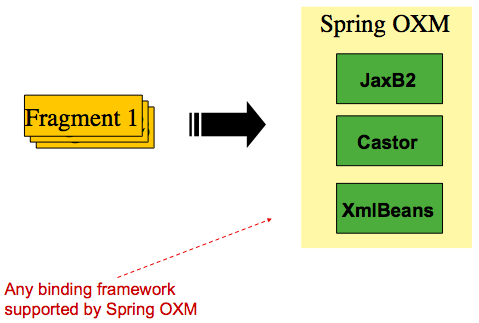
With an introduction to OXM and how one can use XML fragments to represent records, we can now more closely examine readers and writers.
6.7.1. StaxEventItemReader
The StaxEventItemReader configuration provides a typical setup for the processing of
records from an XML input stream. First, consider the following set of XML records that
the StaxEventItemReader can process:
<?xml version="1.0" encoding="UTF-8"?>
<records>
    <trade xmlns="https://springframework.org/batch/sample/io/oxm/domain">
        <isin>XYZ0001</isin>
        <quantity>5</quantity>
        <price>11.39</price>
        <customer>Customer1</customer>
    </trade>
    <trade xmlns="https://springframework.org/batch/sample/io/oxm/domain">
        <isin>XYZ0002</isin>
        <quantity>2</quantity>
        <price>72.99</price>
        <customer>Customer2c</customer>
    </trade>
    <trade xmlns="https://springframework.org/batch/sample/io/oxm/domain">
        <isin>XYZ0003</isin>
        <quantity>9</quantity>
        <price>99.99</price>
        <customer>Customer3</customer>
    </trade>
</records>
To be able to process the XML records, the following is needed:
-
Root Element Name: The name of the root element of the fragment that constitutes the object to be mapped. The example configuration demonstrates this with the value of trade.
-
Resource: A Spring Resource that represents the file to read.
-
Unmarshaller: An unmarshalling facility provided by Spring OXM for mapping the XML fragment to an object.
The following example shows how to define a StaxEventItemReader that works with a root
element named trade, a resource of org/springframework/batch/item/xml/domain/trades.xml, and an unmarshaller
called tradeMarshaller.
<bean id="itemReader" class="org.springframework.batch.item.xml.StaxEventItemReader">
    <property name="fragmentRootElementName" value="trade" />
    <property name="resource" value="org/springframework/batch/item/xml/domain/trades.xml" />
    <property name="unmarshaller" ref="tradeMarshaller" />
</bean>@Bean
public StaxEventItemReader itemReader() {
return new StaxEventItemReaderBuilder<Trade>()
.name("itemReader")
.resource(new FileSystemResource("org/springframework/batch/item/xml/domain/trades.xml"))
.addFragmentRootElements("trade")
.unmarshaller(tradeMarshaller())
.build();
}Note that, in this example, we have chosen to use an XStreamMarshaller, which accepts
an alias passed in as a map with the first key and value being the name of the fragment
(that is, a root element) and the object type to bind. Then, similar to a FieldSet, the
names of the other elements that map to fields within the object type are described as
key/value pairs in the map. In the configuration file, we can use a Spring configuration
utility to describe the required alias, as follows:
<bean id="tradeMarshaller"
      class="org.springframework.oxm.xstream.XStreamMarshaller">
    <property name="aliases">
        <util:map id="aliases">
            <entry key="trade"
                   value="org.springframework.batch.sample.domain.trade.Trade" />
            <entry key="price" value="java.math.BigDecimal" />
            <entry key="isin" value="java.lang.String" />
            <entry key="customer" value="java.lang.String" />
            <entry key="quantity" value="java.lang.Long" />
        </util:map>
    </property>
</bean>@Bean
public XStreamMarshaller tradeMarshaller() {
Map<String, Class> aliases = new HashMap<>();
aliases.put("trade", Trade.class);
aliases.put("price", BigDecimal.class);
aliases.put("isin", String.class);
aliases.put("customer", String.class);
aliases.put("quantity", Long.class);
XStreamMarshaller marshaller = new XStreamMarshaller();
marshaller.setAliases(aliases);
return marshaller;
}On input, the reader reads the XML resource until it recognizes that a new fragment is
about to start. By default, the reader matches the element name to recognize that a new
fragment is about to start. The reader creates a standalone XML document from the
fragment and passes the document to a deserializer (typically a wrapper around a Spring
OXM Unmarshaller) to map the XML to a Java object.
In summary, this procedure is analogous to the following Java code, which uses the injection provided by the Spring configuration:
StaxEventItemReader<Trade> xmlStaxEventItemReader = new StaxEventItemReader<>();
Resource resource = new ByteArrayResource(xmlResource.getBytes());
Map aliases = new HashMap();
aliases.put("trade","org.springframework.batch.sample.domain.trade.Trade");
aliases.put("price","java.math.BigDecimal");
aliases.put("customer","java.lang.String");
aliases.put("isin","java.lang.String");
aliases.put("quantity","java.lang.Long");
XStreamMarshaller unmarshaller = new XStreamMarshaller();
unmarshaller.setAliases(aliases);
xmlStaxEventItemReader.setUnmarshaller(unmarshaller);
xmlStaxEventItemReader.setResource(resource);
xmlStaxEventItemReader.setFragmentRootElementName("trade");
xmlStaxEventItemReader.open(new ExecutionContext());
boolean hasNext = true;
Trade trade = null;
while (hasNext) {
trade = xmlStaxEventItemReader.read();
if (trade == null) {
hasNext = false;
}
else {
System.out.println(trade);
}
}6.7.2. StaxEventItemWriter
Output works symmetrically to input. The StaxEventItemWriter needs a Resource, a
marshaller, and a rootTagName. A Java object is passed to a marshaller (typically a
standard Spring OXM Marshaller) which writes to a Resource by using a custom event
writer that filters the StartDocument and EndDocument events produced for each
fragment by the OXM tools. The following example uses the
StaxEventItemWriter:
<bean id="itemWriter" class="org.springframework.batch.item.xml.StaxEventItemWriter">
<property name="resource" ref="outputResource" />
<property name="marshaller" ref="tradeMarshaller" />
<property name="rootTagName" value="trade" />
<property name="overwriteOutput" value="true" />
</bean>@Bean
public StaxEventItemWriter itemWriter(Resource outputResource) {
return new StaxEventItemWriterBuilder<Trade>()
.name("tradesWriter")
.marshaller(tradeMarshaller())
.resource(outputResource)
.rootTagName("trade")
.overwriteOutput(true)
.build();
}The preceding configuration sets up the three required properties and sets the optional
overwriteOutput=true attribute, mentioned earlier in this chapter for specifying whether
an existing file can be overwritten. It should be noted the marshaller used for the
writer in the following example is the exact same as the one used in the reading example
from earlier in the chapter:
<bean id="customerCreditMarshaller"
class="org.springframework.oxm.xstream.XStreamMarshaller">
<property name="aliases">
<util:map id="aliases">
<entry key="customer"
value="org.springframework.batch.sample.domain.trade.Trade" />
<entry key="price" value="java.math.BigDecimal" />
<entry key="isin" value="java.lang.String" />
<entry key="customer" value="java.lang.String" />
<entry key="quantity" value="java.lang.Long" />
</util:map>
</property>
</bean>@Bean
public XStreamMarshaller customerCreditMarshaller() {
XStreamMarshaller marshaller = new XStreamMarshaller();
Map<String, Class> aliases = new HashMap<>();
aliases.put("trade", Trade.class);
aliases.put("price", BigDecimal.class);
aliases.put("isin", String.class);
aliases.put("customer", String.class);
aliases.put("quantity", Long.class);
marshaller.setAliases(aliases);
return marshaller;
}To summarize with a Java example, the following code illustrates all of the points discussed, demonstrating the programmatic setup of the required properties:
FileSystemResource resource = new FileSystemResource("data/outputFile.xml")
Map aliases = new HashMap();
aliases.put("trade","org.springframework.batch.sample.domain.trade.Trade");
aliases.put("price","java.math.BigDecimal");
aliases.put("customer","java.lang.String");
aliases.put("isin","java.lang.String");
aliases.put("quantity","java.lang.Long");
Marshaller marshaller = new XStreamMarshaller();
marshaller.setAliases(aliases);
StaxEventItemWriter staxItemWriter =
new StaxEventItemWriterBuilder<Trade>()
.name("tradesWriter")
.marshaller(marshaller)
.resource(resource)
.rootTagName("trade")
.overwriteOutput(true)
.build();
staxItemWriter.afterPropertiesSet();
ExecutionContext executionContext = new ExecutionContext();
staxItemWriter.open(executionContext);
Trade trade = new Trade();
trade.setPrice(11.39);
trade.setIsin("XYZ0001");
trade.setQuantity(5L);
trade.setCustomer("Customer1");
staxItemWriter.write(trade);6.8. JSON Item Readers And Writers
Spring Batch provides support for reading and Writing JSON resources in the following format:
[
{
"isin": "123",
"quantity": 1,
"price": 1.2,
"customer": "foo"
},
{
"isin": "456",
"quantity": 2,
"price": 1.4,
"customer": "bar"
}
]It is assumed that the JSON resource is an array of JSON objects corresponding to individual items. Spring Batch is not tied to any particular JSON library.
6.8.1. JsonItemReader
The JsonItemReader delegates JSON parsing and binding to implementations of the
org.springframework.batch.item.json.JsonObjectReader interface. This interface
is intended to be implemented by using a streaming API to read JSON objects
in chunks. Two implementations are currently provided:
To be able to process JSON records, the following is needed:
-
Resource: A Spring Resource that represents the JSON file to read. -
JsonObjectReader: A JSON object reader to parse and bind JSON objects to items
The following example shows how to define a JsonItemReader that works with the
previous JSON resource org/springframework/batch/item/json/trades.json and a
JsonObjectReader based on Jackson:
@Bean
public JsonItemReader<Trade> jsonItemReader() {
return new JsonItemReaderBuilder<Trade>()
.jsonObjectReader(new JacksonJsonObjectReader<>(Trade.class))
.resource(new ClassPathResource("trades.json"))
.name("tradeJsonItemReader")
.build();
}6.8.2. JsonFileItemWriter
The JsonFileItemWriter delegates the marshalling of items to the
org.springframework.batch.item.json.JsonObjectMarshaller interface. The contract
of this interface is to take an object and marshall it to a JSON String.
Two implementations are currently provided:
To be able to write JSON records, the following is needed:
-
Resource: A SpringResourcethat represents the JSON file to write -
JsonObjectMarshaller: A JSON object marshaller to marshall objects to JSON format
The following example shows how to define a JsonFileItemWriter:
@Bean
public JsonFileItemWriter<Trade> jsonFileItemWriter() {
return new JsonFileItemWriterBuilder<Trade>()
.jsonObjectMarshaller(new JacksonJsonObjectMarshaller<>())
.resource(new ClassPathResource("trades.json"))
.name("tradeJsonFileItemWriter")
.build();
}6.9. Multi-File Input
It is a common requirement to process multiple files within a single Step. Assuming the
files all have the same formatting, the MultiResourceItemReader supports this type of
input for both XML and flat file processing. Consider the following files in a directory:
file-1.txt file-2.txt ignored.txt
file-1.txt and file-2.txt are formatted the same and, for business reasons, should be
processed together. The MultiResourceItemReader can be used to read in both files by
using wildcards, as shown in the following example:
<bean id="multiResourceReader" class="org.spr...MultiResourceItemReader">
<property name="resources" value="classpath:data/input/file-*.txt" />
<property name="delegate" ref="flatFileItemReader" />
</bean>@Bean
public MultiResourceItemReader multiResourceReader() {
return new MultiResourceItemReaderBuilder<Foo>()
.delegate(flatFileItemReader())
.resources(resources())
.build();
}The referenced delegate is a simple FlatFileItemReader. The above configuration reads
input from both files, handling rollback and restart scenarios. It should be noted that,
as with any ItemReader, adding extra input (in this case a file) could cause potential
issues when restarting. It is recommended that batch jobs work with their own individual
directories until completed successfully.
Input resources are ordered by using MultiResourceItemReader#setComparator(Comparator)
to make sure resource ordering is preserved between job runs in restart scenario.
|
6.10. Database
Like most enterprise application styles, a database is the central storage mechanism for batch. However, batch differs from other application styles due to the sheer size of the datasets with which the system must work. If a SQL statement returns 1 million rows, the result set probably holds all returned results in memory until all rows have been read. Spring Batch provides two types of solutions for this problem:
6.10.1. Cursor-based ItemReader Implementations
Using a database cursor is generally the default approach of most batch developers,
because it is the database’s solution to the problem of 'streaming' relational data. The
Java ResultSet class is essentially an object oriented mechanism for manipulating a
cursor. A ResultSet maintains a cursor to the current row of data. Calling next on a
ResultSet moves this cursor to the next row. The Spring Batch cursor-based ItemReader
implementation opens a cursor on initialization and moves the cursor forward one row for
every call to read, returning a mapped object that can be used for processing. The
close method is then called to ensure all resources are freed up. The Spring core
JdbcTemplate gets around this problem by using the callback pattern to completely map
all rows in a ResultSet and close before returning control back to the method caller.
However, in batch, this must wait until the step is complete. The following image shows a
generic diagram of how a cursor-based ItemReader works. Note that, while the example
uses SQL (because SQL is so widely known), any technology could implement the basic
approach.

This example illustrates the basic pattern. Given a 'FOO' table, which has three columns:
ID, NAME, and BAR, select all rows with an ID greater than 1 but less than 7. This
puts the beginning of the cursor (row 1) on ID 2. The result of this row should be a
completely mapped Foo object. Calling read() again moves the cursor to the next row,
which is the Foo with an ID of 3. The results of these reads are written out after each
read, allowing the objects to be garbage collected (assuming no instance variables are
maintaining references to them).
JdbcCursorItemReader
JdbcCursorItemReader is the JDBC implementation of the cursor-based technique. It works
directly with a ResultSet and requires an SQL statement to run against a connection
obtained from a DataSource. The following database schema is used as an example:
CREATE TABLE CUSTOMER (
ID BIGINT IDENTITY PRIMARY KEY,
NAME VARCHAR(45),
CREDIT FLOAT
);Many people prefer to use a domain object for each row, so the following example uses an
implementation of the RowMapper interface to map a CustomerCredit object:
public class CustomerCreditRowMapper implements RowMapper<CustomerCredit> {
public static final String ID_COLUMN = "id";
public static final String NAME_COLUMN = "name";
public static final String CREDIT_COLUMN = "credit";
public CustomerCredit mapRow(ResultSet rs, int rowNum) throws SQLException {
CustomerCredit customerCredit = new CustomerCredit();
customerCredit.setId(rs.getInt(ID_COLUMN));
customerCredit.setName(rs.getString(NAME_COLUMN));
customerCredit.setCredit(rs.getBigDecimal(CREDIT_COLUMN));
return customerCredit;
}
}Because JdbcCursorItemReader shares key interfaces with JdbcTemplate, it is useful to
see an example of how to read in this data with JdbcTemplate, in order to contrast it
with the ItemReader. For the purposes of this example, assume there are 1,000 rows in
the CUSTOMER database. The first example uses JdbcTemplate:
//For simplicity sake, assume a dataSource has already been obtained
JdbcTemplate jdbcTemplate = new JdbcTemplate(dataSource);
List customerCredits = jdbcTemplate.query("SELECT ID, NAME, CREDIT from CUSTOMER",
new CustomerCreditRowMapper());After running the preceding code snippet, the customerCredits list contains 1,000
CustomerCredit objects. In the query method, a connection is obtained from the
DataSource, the provided SQL is run against it, and the mapRow method is called for
each row in the ResultSet. Contrast this with the approach of the
JdbcCursorItemReader, shown in the following example:
JdbcCursorItemReader itemReader = new JdbcCursorItemReader();
itemReader.setDataSource(dataSource);
itemReader.setSql("SELECT ID, NAME, CREDIT from CUSTOMER");
itemReader.setRowMapper(new CustomerCreditRowMapper());
int counter = 0;
ExecutionContext executionContext = new ExecutionContext();
itemReader.open(executionContext);
Object customerCredit = new Object();
while(customerCredit != null){
customerCredit = itemReader.read();
counter++;
}
itemReader.close();After running the preceding code snippet, the counter equals 1,000. If the code above had
put the returned customerCredit into a list, the result would have been exactly the
same as with the JdbcTemplate example. However, the big advantage of the ItemReader
is that it allows items to be 'streamed'. The read method can be called once, the item
can be written out by an ItemWriter, and then the next item can be obtained with
read. This allows item reading and writing to be done in 'chunks' and committed
periodically, which is the essence of high performance batch processing. Furthermore, it
is very easily configured for injection into a Spring Batch Step, as shown in the
following example:
<bean id="itemReader" class="org.spr...JdbcCursorItemReader">
<property name="dataSource" ref="dataSource"/>
<property name="sql" value="select ID, NAME, CREDIT from CUSTOMER"/>
<property name="rowMapper">
<bean class="org.springframework.batch.sample.domain.CustomerCreditRowMapper"/>
</property>
</bean>@Bean
public JdbcCursorItemReader<CustomerCredit> itemReader() {
return new JdbcCursorItemReaderBuilder<CustomerCredit>()
.dataSource(this.dataSource)
.name("creditReader")
.sql("select ID, NAME, CREDIT from CUSTOMER")
.rowMapper(new CustomerCreditRowMapper())
.build();
}Additional Properties
Because there are so many varying options for opening a cursor in Java, there are many
properties on the JdbcCursorItemReader that can be set, as described in the following
table:
ignoreWarnings |
Determines whether or not SQLWarnings are logged or cause an exception.
The default is |
fetchSize |
Gives the JDBC driver a hint as to the number of rows that should be fetched
from the database when more rows are needed by the |
maxRows |
Sets the limit for the maximum number of rows the underlying |
queryTimeout |
Sets the number of seconds the driver waits for a |
verifyCursorPosition |
Because the same |
saveState |
Indicates whether or not the reader’s state should be saved in the
|
driverSupportsAbsolute |
Indicates whether the JDBC driver supports
setting the absolute row on a |
setUseSharedExtendedConnection |
Indicates whether the connection
used for the cursor should be used by all other processing, thus sharing the same
transaction. If this is set to |
HibernateCursorItemReader
Just as normal Spring users make important decisions about whether or not to use ORM
solutions, which affect whether or not they use a JdbcTemplate or a
HibernateTemplate, Spring Batch users have the same options.
HibernateCursorItemReader is the Hibernate implementation of the cursor technique.
Hibernate’s usage in batch has been fairly controversial. This has largely been because
Hibernate was originally developed to support online application styles. However, that
does not mean it cannot be used for batch processing. The easiest approach for solving
this problem is to use a StatelessSession rather than a standard session. This removes
all of the caching and dirty checking Hibernate employs and that can cause issues in a
batch scenario. For more information on the differences between stateless and normal
hibernate sessions, refer to the documentation of your specific hibernate release. The
HibernateCursorItemReader lets you declare an HQL statement and pass in a
SessionFactory, which will pass back one item per call to read in the same basic
fashion as the JdbcCursorItemReader. The following example configuration uses the same
'customer credit' example as the JDBC reader:
HibernateCursorItemReader itemReader = new HibernateCursorItemReader();
itemReader.setQueryString("from CustomerCredit");
//For simplicity sake, assume sessionFactory already obtained.
itemReader.setSessionFactory(sessionFactory);
itemReader.setUseStatelessSession(true);
int counter = 0;
ExecutionContext executionContext = new ExecutionContext();
itemReader.open(executionContext);
Object customerCredit = new Object();
while(customerCredit != null){
customerCredit = itemReader.read();
counter++;
}
itemReader.close();This configured ItemReader returns CustomerCredit objects in the exact same manner
as described by the JdbcCursorItemReader, assuming hibernate mapping files have been
created correctly for the Customer table. The 'useStatelessSession' property defaults
to true but has been added here to draw attention to the ability to switch it on or off.
It is also worth noting that the fetch size of the underlying cursor can be set via the
setFetchSize property. As with JdbcCursorItemReader, configuration is
straightforward, as shown in the following example:
<bean id="itemReader"
class="org.springframework.batch.item.database.HibernateCursorItemReader">
<property name="sessionFactory" ref="sessionFactory" />
<property name="queryString" value="from CustomerCredit" />
</bean>@Bean
public HibernateCursorItemReader itemReader(SessionFactory sessionFactory) {
return new HibernateCursorItemReaderBuilder<CustomerCredit>()
.name("creditReader")
.sessionFactory(sessionFactory)
.queryString("from CustomerCredit")
.build();
}StoredProcedureItemReader
Sometimes it is necessary to obtain the cursor data by using a stored procedure. The
StoredProcedureItemReader works like the JdbcCursorItemReader, except that, instead
of running a query to obtain a cursor, it runs a stored procedure that returns a cursor.
The stored procedure can return the cursor in three different ways:
-
As a returned
ResultSet(used by SQL Server, Sybase, DB2, Derby, and MySQL). -
As a ref-cursor returned as an out parameter (used by Oracle and PostgreSQL).
-
As the return value of a stored function call.
The following example configuration uses the same 'customer credit' example as earlier examples:
<bean id="reader" class="o.s.batch.item.database.StoredProcedureItemReader">
<property name="dataSource" ref="dataSource"/>
<property name="procedureName" value="sp_customer_credit"/>
<property name="rowMapper">
<bean class="org.springframework.batch.sample.domain.CustomerCreditRowMapper"/>
</property>
</bean>@Bean
public StoredProcedureItemReader reader(DataSource dataSource) {
StoredProcedureItemReader reader = new StoredProcedureItemReader();
reader.setDataSource(dataSource);
reader.setProcedureName("sp_customer_credit");
reader.setRowMapper(new CustomerCreditRowMapper());
return reader;
}The preceding example relies on the stored procedure to provide a ResultSet as a
returned result (option 1 from earlier).
If the stored procedure returned a ref-cursor (option 2), then we would need to provide
the position of the out parameter that is the returned ref-cursor. The following
example shows how to work with the first parameter being a ref-cursor:
<bean id="reader" class="o.s.batch.item.database.StoredProcedureItemReader">
<property name="dataSource" ref="dataSource"/>
<property name="procedureName" value="sp_customer_credit"/>
<property name="refCursorPosition" value="1"/>
<property name="rowMapper">
<bean class="org.springframework.batch.sample.domain.CustomerCreditRowMapper"/>
</property>
</bean>@Bean
public StoredProcedureItemReader reader(DataSource dataSource) {
StoredProcedureItemReader reader = new StoredProcedureItemReader();
reader.setDataSource(dataSource);
reader.setProcedureName("sp_customer_credit");
reader.setRowMapper(new CustomerCreditRowMapper());
reader.setRefCursorPosition(1);
return reader;
}If the cursor was returned from a stored function (option 3), we would need to set the
property "function" to true. It defaults to false. The following example
shows what that would look like:
<bean id="reader" class="o.s.batch.item.database.StoredProcedureItemReader">
<property name="dataSource" ref="dataSource"/>
<property name="procedureName" value="sp_customer_credit"/>
<property name="function" value="true"/>
<property name="rowMapper">
<bean class="org.springframework.batch.sample.domain.CustomerCreditRowMapper"/>
</property>
</bean>@Bean
public StoredProcedureItemReader reader(DataSource dataSource) {
StoredProcedureItemReader reader = new StoredProcedureItemReader();
reader.setDataSource(dataSource);
reader.setProcedureName("sp_customer_credit");
reader.setRowMapper(new CustomerCreditRowMapper());
reader.setFunction(true);
return reader;
}In all of these cases, we need to define a RowMapper as well as a DataSource and the
actual procedure name.
If the stored procedure or function takes in parameters, then they must be declared and
set via the parameters property. The following example, for Oracle, declares three
parameters. The first one is the out parameter that returns the ref-cursor, and the
second and third are in parameters that takes a value of type INTEGER.
<bean id="reader" class="o.s.batch.item.database.StoredProcedureItemReader">
<property name="dataSource" ref="dataSource"/>
<property name="procedureName" value="spring.cursor_func"/>
<property name="parameters">
<list>
<bean class="org.springframework.jdbc.core.SqlOutParameter">
<constructor-arg index="0" value="newid"/>
<constructor-arg index="1">
<util:constant static-field="oracle.jdbc.OracleTypes.CURSOR"/>
</constructor-arg>
</bean>
<bean class="org.springframework.jdbc.core.SqlParameter">
<constructor-arg index="0" value="amount"/>
<constructor-arg index="1">
<util:constant static-field="java.sql.Types.INTEGER"/>
</constructor-arg>
</bean>
<bean class="org.springframework.jdbc.core.SqlParameter">
<constructor-arg index="0" value="custid"/>
<constructor-arg index="1">
<util:constant static-field="java.sql.Types.INTEGER"/>
</constructor-arg>
</bean>
</list>
</property>
<property name="refCursorPosition" value="1"/>
<property name="rowMapper" ref="rowMapper"/>
<property name="preparedStatementSetter" ref="parameterSetter"/>
</bean>@Bean
public StoredProcedureItemReader reader(DataSource dataSource) {
List<SqlParameter> parameters = new ArrayList<>();
parameters.add(new SqlOutParameter("newId", OracleTypes.CURSOR));
parameters.add(new SqlParameter("amount", Types.INTEGER);
parameters.add(new SqlParameter("custId", Types.INTEGER);
StoredProcedureItemReader reader = new StoredProcedureItemReader();
reader.setDataSource(dataSource);
reader.setProcedureName("spring.cursor_func");
reader.setParameters(parameters);
reader.setRefCursorPosition(1);
reader.setRowMapper(rowMapper());
reader.setPreparedStatementSetter(parameterSetter());
return reader;
}In addition to the parameter declarations, we need to specify a PreparedStatementSetter
implementation that sets the parameter values for the call. This works the same as for
the JdbcCursorItemReader above. All the additional properties listed in
Additional Properties apply to the StoredProcedureItemReader as well.
6.10.2. Paging ItemReader Implementations
An alternative to using a database cursor is running multiple queries where each query fetches a portion of the results. We refer to this portion as a page. Each query must specify the starting row number and the number of rows that we want returned in the page.
JdbcPagingItemReader
One implementation of a paging ItemReader is the JdbcPagingItemReader. The
JdbcPagingItemReader needs a PagingQueryProvider responsible for providing the SQL
queries used to retrieve the rows making up a page. Since each database has its own
strategy for providing paging support, we need to use a different PagingQueryProvider
for each supported database type. There is also the SqlPagingQueryProviderFactoryBean
that auto-detects the database that is being used and determine the appropriate
PagingQueryProvider implementation. This simplifies the configuration and is the
recommended best practice.
The SqlPagingQueryProviderFactoryBean requires that you specify a select clause and a
from clause. You can also provide an optional where clause. These clauses and the
required sortKey are used to build an SQL statement.
It is important to have a unique key constraint on the sortKey to guarantee that
no data is lost between executions.
|
After the reader has been opened, it passes back one item per call to read in the same
basic fashion as any other ItemReader. The paging happens behind the scenes when
additional rows are needed.
The following example configuration uses a similar 'customer credit' example as the
cursor-based ItemReaders shown previously:
<bean id="itemReader" class="org.spr...JdbcPagingItemReader">
<property name="dataSource" ref="dataSource"/>
<property name="queryProvider">
<bean class="org.spr...SqlPagingQueryProviderFactoryBean">
<property name="selectClause" value="select id, name, credit"/>
<property name="fromClause" value="from customer"/>
<property name="whereClause" value="where status=:status"/>
<property name="sortKey" value="id"/>
</bean>
</property>
<property name="parameterValues">
<map>
<entry key="status" value="NEW"/>
</map>
</property>
<property name="pageSize" value="1000"/>
<property name="rowMapper" ref="customerMapper"/>
</bean>@Bean
public JdbcPagingItemReader itemReader(DataSource dataSource, PagingQueryProvider queryProvider) {
Map<String, Object> parameterValues = new HashMap<>();
parameterValues.put("status", "NEW");
return new JdbcPagingItemReaderBuilder<CustomerCredit>()
.name("creditReader")
.dataSource(dataSource)
.queryProvider(queryProvider)
.parameterValues(parameterValues)
.rowMapper(customerCreditMapper())
.pageSize(1000)
.build();
}
@Bean
public SqlPagingQueryProviderFactoryBean queryProvider() {
SqlPagingQueryProviderFactoryBean provider = new SqlPagingQueryProviderFactoryBean();
provider.setSelectClause("select id, name, credit");
provider.setFromClause("from customer");
provider.setWhereClause("where status=:status");
provider.setSortKey("id");
return provider;
}This configured ItemReader returns CustomerCredit objects using the RowMapper,
which must be specified. The 'pageSize' property determines the number of entities read
from the database for each query run.
The 'parameterValues' property can be used to specify a Map of parameter values for the
query. If you use named parameters in the where clause, the key for each entry should
match the name of the named parameter. If you use a traditional '?' placeholder, then the
key for each entry should be the number of the placeholder, starting with 1.
JpaPagingItemReader
Another implementation of a paging ItemReader is the JpaPagingItemReader. JPA does
not have a concept similar to the Hibernate StatelessSession, so we have to use other
features provided by the JPA specification. Since JPA supports paging, this is a natural
choice when it comes to using JPA for batch processing. After each page is read, the
entities become detached and the persistence context is cleared, to allow the entities to
be garbage collected once the page is processed.
The JpaPagingItemReader lets you declare a JPQL statement and pass in a
EntityManagerFactory. It then passes back one item per call to read in the same basic
fashion as any other ItemReader. The paging happens behind the scenes when additional
entities are needed. The following example configuration uses the same 'customer credit'
example as the JDBC reader shown previously:
<bean id="itemReader" class="org.spr...JpaPagingItemReader">
<property name="entityManagerFactory" ref="entityManagerFactory"/>
<property name="queryString" value="select c from CustomerCredit c"/>
<property name="pageSize" value="1000"/>
</bean>@Bean
public JpaPagingItemReader itemReader() {
return new JpaPagingItemReaderBuilder<CustomerCredit>()
.name("creditReader")
.entityManagerFactory(entityManagerFactory())
.queryString("select c from CustomerCredit c")
.pageSize(1000)
.build();
}This configured ItemReader returns CustomerCredit objects in the exact same manner as
described for the JdbcPagingItemReader above, assuming the CustomerCredit object has the
correct JPA annotations or ORM mapping file. The 'pageSize' property determines the
number of entities read from the database for each query execution.
6.10.3. Database ItemWriters
While both flat files and XML files have a specific ItemWriter instance, there is no exact equivalent
in the database world. This is because transactions provide all the needed functionality.
ItemWriter implementations are necessary for files because they must act as if they’re transactional,
keeping track of written items and flushing or clearing at the appropriate times.
Databases have no need for this functionality, since the write is already contained in a
transaction. Users can create their own DAOs that implement the ItemWriter interface or
use one from a custom ItemWriter that’s written for generic processing concerns. Either
way, they should work without any issues. One thing to look out for is the performance
and error handling capabilities that are provided by batching the outputs. This is most
common when using hibernate as an ItemWriter but could have the same issues when using
JDBC batch mode. Batching database output does not have any inherent flaws, assuming we
are careful to flush and there are no errors in the data. However, any errors while
writing can cause confusion, because there is no way to know which individual item caused
an exception or even if any individual item was responsible, as illustrated in the
following image:
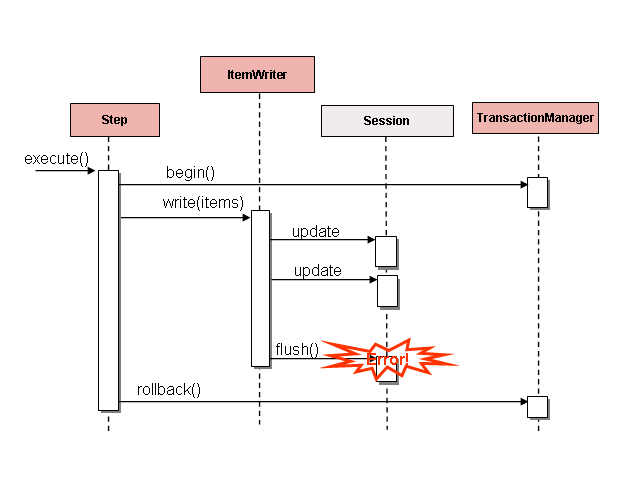
If items are buffered before being written, any errors are not thrown until the buffer is
flushed just before a commit. For example, assume that 20 items are written per chunk,
and the 15th item throws a DataIntegrityViolationException. As far as the Step
is concerned, all 20 item are written successfully, since there is no way to know that an
error occurs until they are actually written. Once Session#flush() is called, the
buffer is emptied and the exception is hit. At this point, there is nothing the Step
can do. The transaction must be rolled back. Normally, this exception might cause the
item to be skipped (depending upon the skip/retry policies), and then it is not written
again. However, in the batched scenario, there is no way to know which item caused the
issue. The whole buffer was being written when the failure happened. The only way to
solve this issue is to flush after each item, as shown in the following image:
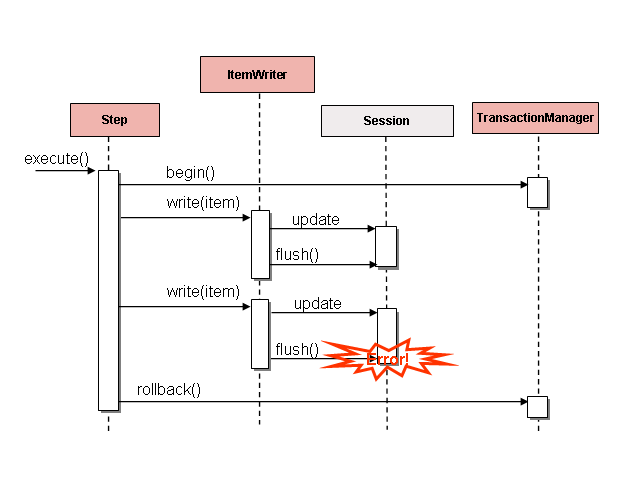
This is a common use case, especially when using Hibernate, and the simple guideline for
implementations of ItemWriter is to flush on each call to write(). Doing so allows
for items to be skipped reliably, with Spring Batch internally taking care of the
granularity of the calls to ItemWriter after an error.
6.11. Reusing Existing Services
Batch systems are often used in conjunction with other application styles. The most
common is an online system, but it may also support integration or even a thick client
application by moving necessary bulk data that each application style uses. For this
reason, it is common that many users want to reuse existing DAOs or other services within
their batch jobs. The Spring container itself makes this fairly easy by allowing any
necessary class to be injected. However, there may be cases where the existing service
needs to act as an ItemReader or ItemWriter, either to satisfy the dependency of
another Spring Batch class or because it truly is the main ItemReader for a step. It is
fairly trivial to write an adapter class for each service that needs wrapping, but
because it is such a common concern, Spring Batch provides implementations:
ItemReaderAdapter and ItemWriterAdapter. Both classes implement the standard Spring
method by invoking the delegate pattern and are fairly simple to set up. The following
example uses the ItemReaderAdapter:
<bean id="itemReader" class="org.springframework.batch.item.adapter.ItemReaderAdapter">
<property name="targetObject" ref="fooService" />
<property name="targetMethod" value="generateFoo" />
</bean>
<bean id="fooService" class="org.springframework.batch.item.sample.FooService" />@Bean
public ItemReaderAdapter itemReader() {
ItemReaderAdapter reader = new ItemReaderAdapter();
reader.setTargetObject(fooService());
reader.setTargetMethod("generateFoo");
return reader;
}
@Bean
public FooService fooService() {
return new FooService();
}One important point to note is that the contract of the targetMethod must be the same
as the contract for read: When exhausted, it returns null. Otherwise, it returns an
Object. Anything else prevents the framework from knowing when processing should end,
either causing an infinite loop or incorrect failure, depending upon the implementation
of the ItemWriter. The following example uses the ItemWriterAdapter:
<bean id="itemWriter" class="org.springframework.batch.item.adapter.ItemWriterAdapter">
<property name="targetObject" ref="fooService" />
<property name="targetMethod" value="processFoo" />
</bean>
<bean id="fooService" class="org.springframework.batch.item.sample.FooService" />@Bean
public ItemWriterAdapter itemWriter() {
ItemWriterAdapter writer = new ItemWriterAdapter();
writer.setTargetObject(fooService());
writer.setTargetMethod("processFoo");
return writer;
}
@Bean
public FooService fooService() {
return new FooService();
}6.12. Validating Input
During the course of this chapter, multiple approaches to parsing input have been
discussed. Each major implementation throws an exception if it is not 'well-formed'. The
FixedLengthTokenizer throws an exception if a range of data is missing. Similarly,
attempting to access an index in a RowMapper or FieldSetMapper that does not exist or
is in a different format than the one expected causes an exception to be thrown. All of
these types of exceptions are thrown before read returns. However, they do not address
the issue of whether or not the returned item is valid. For example, if one of the fields
is an age, it obviously cannot be negative. It may parse correctly, because it exists and
is a number, but it does not cause an exception. Since there are already a plethora of
validation frameworks, Spring Batch does not attempt to provide yet another. Rather, it
provides a simple interface, called Validator, that can be implemented by any number of
frameworks, as shown in the following interface definition:
public interface Validator<T> {
void validate(T value) throws ValidationException;
}The contract is that the validate method throws an exception if the object is invalid
and returns normally if it is valid. Spring Batch provides an out of the box
ValidatingItemProcessor, as shown in the following bean definition:
<bean class="org.springframework.batch.item.validator.ValidatingItemProcessor">
<property name="validator" ref="validator" />
</bean>
<bean id="validator" class="org.springframework.batch.item.validator.SpringValidator">
<property name="validator">
<bean class="org.springframework.batch.sample.domain.trade.internal.validator.TradeValidator"/>
</property>
</bean>@Bean
public ValidatingItemProcessor itemProcessor() {
ValidatingItemProcessor processor = new ValidatingItemProcessor();
processor.setValidator(validator());
return processor;
}
@Bean
public SpringValidator validator() {
SpringValidator validator = new SpringValidator();
validator.setValidator(new TradeValidator());
return validator;
}You can also use the BeanValidatingItemProcessor to validate items annotated with
the Bean Validation API (JSR-303) annotations. For example, given the following type Person:
class Person {
@NotEmpty
private String name;
public Person(String name) {
this.name = name;
}
public String getName() {
return name;
}
public void setName(String name) {
this.name = name;
}
}you can validate items by declaring a BeanValidatingItemProcessor bean in your
application context and register it as a processor in your chunk-oriented step:
@Bean
public BeanValidatingItemProcessor<Person> beanValidatingItemProcessor() throws Exception {
BeanValidatingItemProcessor<Person> beanValidatingItemProcessor = new BeanValidatingItemProcessor<>();
beanValidatingItemProcessor.setFilter(true);
return beanValidatingItemProcessor;
}6.13. Preventing State Persistence
By default, all of the ItemReader and ItemWriter implementations store their current
state in the ExecutionContext before it is committed. However, this may not always be
the desired behavior. For example, many developers choose to make their database readers
'rerunnable' by using a process indicator. An extra column is added to the input data to
indicate whether or not it has been processed. When a particular record is being read (or
written) the processed flag is flipped from false to true. The SQL statement can then
contain an extra statement in the where clause, such as where PROCESSED_IND = false,
thereby ensuring that only unprocessed records are returned in the case of a restart. In
this scenario, it is preferable to not store any state, such as the current row number,
since it is irrelevant upon restart. For this reason, all readers and writers include the
'saveState' property, as shown in the following example:
<bean id="playerSummarizationSource" class="org.spr...JdbcCursorItemReader">
<property name="dataSource" ref="dataSource" />
<property name="rowMapper">
<bean class="org.springframework.batch.sample.PlayerSummaryMapper" />
</property>
<property name="saveState" value="false" />
<property name="sql">
<value>
SELECT games.player_id, games.year_no, SUM(COMPLETES),
SUM(ATTEMPTS), SUM(PASSING_YARDS), SUM(PASSING_TD),
SUM(INTERCEPTIONS), SUM(RUSHES), SUM(RUSH_YARDS),
SUM(RECEPTIONS), SUM(RECEPTIONS_YARDS), SUM(TOTAL_TD)
from games, players where players.player_id =
games.player_id group by games.player_id, games.year_no
</value>
</property>
</bean>@Bean
public JdbcCursorItemReader playerSummarizationSource(DataSource dataSource) {
return new JdbcCursorItemReaderBuilder<PlayerSummary>()
.dataSource(dataSource)
.rowMapper(new PlayerSummaryMapper())
.saveState(false)
.sql("SELECT games.player_id, games.year_no, SUM(COMPLETES),"
+ "SUM(ATTEMPTS), SUM(PASSING_YARDS), SUM(PASSING_TD),"
+ "SUM(INTERCEPTIONS), SUM(RUSHES), SUM(RUSH_YARDS),"
+ "SUM(RECEPTIONS), SUM(RECEPTIONS_YARDS), SUM(TOTAL_TD)"
+ "from games, players where players.player_id ="
+ "games.player_id group by games.player_id, games.year_no")
.build();
}The ItemReader configured above does not make any entries in the ExecutionContext for
any executions in which it participates.
6.14. Creating Custom ItemReaders and ItemWriters
So far, this chapter has discussed the basic contracts of reading and writing in Spring
Batch and some common implementations for doing so. However, these are all fairly
generic, and there are many potential scenarios that may not be covered by out-of-the-box
implementations. This section shows, by using a simple example, how to create a custom
ItemReader and ItemWriter implementation and implement their contracts correctly. The
ItemReader also implements ItemStream, in order to illustrate how to make a reader or
writer restartable.
6.14.1. Custom ItemReader Example
For the purpose of this example, we create a simple ItemReader implementation that
reads from a provided list. We start by implementing the most basic contract of
ItemReader, the read method, as shown in the following code:
public class CustomItemReader<T> implements ItemReader<T>{
List<T> items;
public CustomItemReader(List<T> items) {
this.items = items;
}
public T read() throws Exception, UnexpectedInputException,
NonTransientResourceException, ParseException {
if (!items.isEmpty()) {
return items.remove(0);
}
return null;
}
}The preceding class takes a list of items and returns them one at a time, removing each
from the list. When the list is empty, it returns null, thus satisfying the most basic
requirements of an ItemReader, as illustrated in the following test code:
List<String> items = new ArrayList<>();
items.add("1");
items.add("2");
items.add("3");
ItemReader itemReader = new CustomItemReader<>(items);
assertEquals("1", itemReader.read());
assertEquals("2", itemReader.read());
assertEquals("3", itemReader.read());
assertNull(itemReader.read());Making the ItemReader Restartable
The final challenge is to make the ItemReader restartable. Currently, if processing is
interrupted and begins again, the ItemReader must start at the beginning. This is
actually valid in many scenarios, but it is sometimes preferable that a batch job
restarts where it left off. The key discriminant is often whether the reader is stateful
or stateless. A stateless reader does not need to worry about restartability, but a
stateful one has to try to reconstitute its last known state on restart. For this reason,
we recommend that you keep custom readers stateless if possible, so you need not worry
about restartability.
If you do need to store state, then the ItemStream interface should be used:
public class CustomItemReader<T> implements ItemReader<T>, ItemStream {
List<T> items;
int currentIndex = 0;
private static final String CURRENT_INDEX = "current.index";
public CustomItemReader(List<T> items) {
this.items = items;
}
public T read() throws Exception, UnexpectedInputException,
ParseException, NonTransientResourceException {
if (currentIndex < items.size()) {
return items.get(currentIndex++);
}
return null;
}
public void open(ExecutionContext executionContext) throws ItemStreamException {
if(executionContext.containsKey(CURRENT_INDEX)){
currentIndex = new Long(executionContext.getLong(CURRENT_INDEX)).intValue();
}
else{
currentIndex = 0;
}
}
public void update(ExecutionContext executionContext) throws ItemStreamException {
executionContext.putLong(CURRENT_INDEX, new Long(currentIndex).longValue());
}
public void close() throws ItemStreamException {}
}On each call to the ItemStream update method, the current index of the ItemReader
is stored in the provided ExecutionContext with a key of 'current.index'. When the
ItemStream open method is called, the ExecutionContext is checked to see if it
contains an entry with that key. If the key is found, then the current index is moved to
that location. This is a fairly trivial example, but it still meets the general contract:
ExecutionContext executionContext = new ExecutionContext();
((ItemStream)itemReader).open(executionContext);
assertEquals("1", itemReader.read());
((ItemStream)itemReader).update(executionContext);
List<String> items = new ArrayList<>();
items.add("1");
items.add("2");
items.add("3");
itemReader = new CustomItemReader<>(items);
((ItemStream)itemReader).open(executionContext);
assertEquals("2", itemReader.read());Most ItemReaders have much more sophisticated restart logic. The
JdbcCursorItemReader, for example, stores the row ID of the last processed row in the
cursor.
It is also worth noting that the key used within the ExecutionContext should not be
trivial. That is because the same ExecutionContext is used for all ItemStreams within
a Step. In most cases, simply prepending the key with the class name should be enough
to guarantee uniqueness. However, in the rare cases where two of the same type of
ItemStream are used in the same step (which can happen if two files are needed for
output), a more unique name is needed. For this reason, many of the Spring Batch
ItemReader and ItemWriter implementations have a setName() property that lets this
key name be overridden.
6.14.2. Custom ItemWriter Example
Implementing a Custom ItemWriter is similar in many ways to the ItemReader example
above but differs in enough ways as to warrant its own example. However, adding
restartability is essentially the same, so it is not covered in this example. As with the
ItemReader example, a List is used in order to keep the example as simple as
possible:
public class CustomItemWriter<T> implements ItemWriter<T> {
List<T> output = TransactionAwareProxyFactory.createTransactionalList();
public void write(List<? extends T> items) throws Exception {
output.addAll(items);
}
public List<T> getOutput() {
return output;
}
}Making the ItemWriter Restartable
To make the ItemWriter restartable, we would follow the same process as for the
ItemReader, adding and implementing the ItemStream interface to synchronize the
execution context. In the example, we might have to count the number of items processed
and add that as a footer record. If we needed to do that, we could implement
ItemStream in our ItemWriter so that the counter was reconstituted from the execution
context if the stream was re-opened.
In many realistic cases, custom ItemWriters also delegate to another writer that itself
is restartable (for example, when writing to a file), or else it writes to a
transactional resource and so does not need to be restartable, because it is stateless.
When you have a stateful writer you should probably be sure to implement ItemStream as
well as ItemWriter. Remember also that the client of the writer needs to be aware of
the ItemStream, so you may need to register it as a stream in the configuration.
6.15. Item Reader and Writer Implementations
In this section, we will introduce you to readers and writers that have not already been discussed in the previous sections.
6.15.1. Decorators
In some cases, a user needs specialized behavior to be appended to a pre-existing
ItemReader. Spring Batch offers some out of the box decorators that can add
additional behavior to to your ItemReader and ItemWriter implementations.
Spring Batch includes the following decorators:
SynchronizedItemStreamReader
When using an ItemReader that is not thread safe, Spring Batch offers the
SynchronizedItemStreamReader decorator, which can be used to make the ItemReader
thread safe. Spring Batch provides a SynchronizedItemStreamReaderBuilder to construct
an instance of the SynchronizedItemStreamReader.
SingleItemPeekableItemReader
Spring Batch includes a decorator that adds a peek method to an ItemReader. This peek
method lets the user peek one item ahead. Repeated calls to the peek returns the same
item, and this is the next item returned from the read method. Spring Batch provides a
SingleItemPeekableItemReaderBuilder to construct an instance of the
SingleItemPeekableItemReader.
| SingleItemPeekableItemReader’s peek method is not thread-safe, because it would not be possible to honor the peek in multiple threads. Only one of the threads that peeked would get that item in the next call to read. |
MultiResourceItemWriter
The MultiResourceItemWriter wraps a ResourceAwareItemWriterItemStream and creates a new
output resource when the count of items written in the current resource exceeds the
itemCountLimitPerResource. Spring Batch provides a MultiResourceItemWriterBuilder to
construct an instance of the MultiResourceItemWriter.
ClassifierCompositeItemWriter
The ClassifierCompositeItemWriter calls one of a collection of ItemWriter
implementations for each item, based on a router pattern implemented through the provided
Classifier. The implementation is thread-safe if all delegates are thread-safe. Spring
Batch provides a ClassifierCompositeItemWriterBuilder to construct an instance of the
ClassifierCompositeItemWriter.
ClassifierCompositeItemProcessor
The ClassifierCompositeItemProcessor is an ItemProcessor that calls one of a
collection of ItemProcessor implementations, based on a router pattern implemented
through the provided Classifier. Spring Batch provides a
ClassifierCompositeItemProcessorBuilder to construct an instance of the
ClassifierCompositeItemProcessor.
6.15.2. Messaging Readers And Writers
Spring Batch offers the following readers and writers for commonly used messaging systems:
AmqpItemReader
The AmqpItemReader is an ItemReader that uses an AmqpTemplate to receive or convert
messages from an exchange. Spring Batch provides a AmqpItemReaderBuilder to construct
an instance of the AmqpItemReader.
AmqpItemWriter
The AmqpItemWriter is an ItemWriter that uses an AmqpTemplate to send messages to
an AMQP exchange. Messages are sent to the nameless exchange if the name not specified in
the provided AmqpTemplate. Spring Batch provides an AmqpItemWriterBuilder to
construct an instance of the AmqpItemWriter.
JmsItemReader
The JmsItemReader is an ItemReader for JMS that uses a JmsTemplate. The template
should have a default destination, which is used to provide items for the read()
method. Spring Batch provides a JmsItemReaderBuilder to construct an instance of the
JmsItemReader.
JmsItemWriter
The JmsItemWriter is an ItemWriter for JMS that uses a JmsTemplate. The template
should have a default destination, which is used to send items in write(List). Spring
Batch provides a JmsItemWriterBuilder to construct an instance of the JmsItemWriter.
KafkaItemReader
The KafkaItemReader is an ItemReader for an Apache Kafka topic. It can be configured
to read messages from multiple partitions of the same topic. It stores message offsets
in the execution context to support restart capabilities. Spring Batch provides a
KafkaItemReaderBuilder to construct an instance of the KafkaItemReader.
6.15.3. Database Readers
Spring Batch offers the following database readers:
Neo4jItemReader
The Neo4jItemReader is an ItemReader that reads objects from the graph database Neo4j
by using a paging technique. Spring Batch provides a Neo4jItemReaderBuilder to
construct an instance of the Neo4jItemReader.
MongoItemReader
The MongoItemReader is an ItemReader that reads documents from MongoDB by using a
paging technique. Spring Batch provides a MongoItemReaderBuilder to construct an
instance of the MongoItemReader.
HibernateCursorItemReader
The HibernateCursorItemReader is an ItemStreamReader for reading database records
built on top of Hibernate. It executes the HQL query and then, when initialized, iterates
over the result set as the read() method is called, successively returning an object
corresponding to the current row. Spring Batch provides a
HibernateCursorItemReaderBuilder to construct an instance of the
HibernateCursorItemReader.
HibernatePagingItemReader
The HibernatePagingItemReader is an ItemReader for reading database records built on
top of Hibernate and reading only up to a fixed number of items at a time. Spring Batch
provides a HibernatePagingItemReaderBuilder to construct an instance of the
HibernatePagingItemReader.
6.15.4. Database Writers
Spring Batch offers the following database writers:
Neo4jItemWriter
The Neo4jItemWriter is an ItemWriter implementation that writes to a Neo4j database.
Spring Batch provides a Neo4jItemWriterBuilder to construct an instance of the
Neo4jItemWriter.
MongoItemWriter
The MongoItemWriter is an ItemWriter implementation that writes to a MongoDB store
using an implementation of Spring Data’s MongoOperations. Spring Batch provides a
MongoItemWriterBuilder to construct an instance of the MongoItemWriter.
RepositoryItemWriter
The RepositoryItemWriter is an ItemWriter wrapper for a CrudRepository from Spring
Data. Spring Batch provides a RepositoryItemWriterBuilder to construct an instance of
the RepositoryItemWriter.
HibernateItemWriter
The HibernateItemWriter is an ItemWriter that uses a Hibernate session to save or
update entities that are not part of the current Hibernate session. Spring Batch provides
a HibernateItemWriterBuilder to construct an instance of the HibernateItemWriter.
JdbcBatchItemWriter
The JdbcBatchItemWriter is an ItemWriter that uses the batching features from
NamedParameterJdbcTemplate to execute a batch of statements for all items provided.
Spring Batch provides a JdbcBatchItemWriterBuilder to construct an instance of the
JdbcBatchItemWriter.
6.15.5. Specialized Readers
Spring Batch offers the following specialized readers:
LdifReader
The LdifReader reads LDIF (LDAP Data Interchange Format) records from a Resource,
parses them, and returns a LdapAttribute object for each read executed. Spring Batch
provides a LdifReaderBuilder to construct an instance of the LdifReader.
MappingLdifReader
The MappingLdifReader reads LDIF (LDAP Data Interchange Format) records from a
Resource, parses them then maps each LDIF record to a POJO (Plain Old Java Object).
Each read returns a POJO. Spring Batch provides a MappingLdifReaderBuilder to construct
an instance of the MappingLdifReader.
AvroItemReader
The AvroItemReader reads serialized Avro data from a Resource.
Each read returns an instance of the type specified by a Java class or Avro Schema.
The reader may be optionnally configured for input that embeds an Avro schema or not.
Spring Batch provides an AvroItemReaderBuilder to construct an instance of the AvroItemReader.
6.15.6. Specialized Writers
Spring Batch offers the following specialized writers:
7. Scaling and Parallel Processing
Many batch processing problems can be solved with single threaded, single process jobs, so it is always a good idea to properly check if that meets your needs before thinking about more complex implementations. Measure the performance of a realistic job and see if the simplest implementation meets your needs first. You can read and write a file of several hundred megabytes in well under a minute, even with standard hardware.
When you are ready to start implementing a job with some parallel processing, Spring Batch offers a range of options, which are described in this chapter, although some features are covered elsewhere. At a high level, there are two modes of parallel processing:
-
Single process, multi-threaded
-
Multi-process
These break down into categories as well, as follows:
-
Multi-threaded Step (single process)
-
Parallel Steps (single process)
-
Remote Chunking of Step (multi process)
-
Partitioning a Step (single or multi process)
First, we review the single-process options. Then we review the multi-process options.
7.1. Multi-threaded Step
The simplest way to start parallel processing is to add a TaskExecutor to your Step
configuration.
For example, you might add an attribute of the tasklet, as shown in the
following example:
<step id="loading">
<tasklet task-executor="taskExecutor">...</tasklet>
</step>When using java configuration, a TaskExecutor can be added to the step
as shown in the following example:
@Bean
public TaskExecutor taskExecutor(){
return new SimpleAsyncTaskExecutor("spring_batch");
}
@Bean
public Step sampleStep(TaskExecutor taskExecutor) {
return this.stepBuilderFactory.get("sampleStep")
.<String, String>chunk(10)
.reader(itemReader())
.writer(itemWriter())
.taskExecutor(taskExecutor)
.build();
}In this example, the taskExecutor is a reference to another bean definition that
implements the TaskExecutor interface.
TaskExecutor
is a standard Spring interface, so consult the Spring User Guide for details of available
implementations. The simplest multi-threaded TaskExecutor is a
SimpleAsyncTaskExecutor.
The result of the above configuration is that the Step executes by reading, processing,
and writing each chunk of items (each commit interval) in a separate thread of execution.
Note that this means there is no fixed order for the items to be processed, and a chunk
might contain items that are non-consecutive compared to the single-threaded case. In
addition to any limits placed by the task executor (such as whether it is backed by a
thread pool), there is a throttle limit in the tasklet configuration which defaults to 4.
You may need to increase this to ensure that a thread pool is fully utilized.
For example you might increase the throttle-limit, as shown in the following example:
<step id="loading"> <tasklet
task-executor="taskExecutor"
throttle-limit="20">...</tasklet>
</step>When using java configuration, the builders provide access to the throttle limit:
@Bean
public Step sampleStep(TaskExecutor taskExecutor) {
return this.stepBuilderFactory.get("sampleStep")
.<String, String>chunk(10)
.reader(itemReader())
.writer(itemWriter())
.taskExecutor(taskExecutor)
.throttleLimit(20)
.build();
}Note also that there may be limits placed on concurrency by any pooled resources used in
your step, such as a DataSource. Be sure to make the pool in those resources at least
as large as the desired number of concurrent threads in the step.
There are some practical limitations of using multi-threaded Step implementations for
some common batch use cases. Many participants in a Step (such as readers and writers)
are stateful. If the state is not segregated by thread, then those components are not
usable in a multi-threaded Step. In particular, most of the off-the-shelf readers and
writers from Spring Batch are not designed for multi-threaded use. It is, however,
possible to work with stateless or thread safe readers and writers, and there is a sample
(called parallelJob) in the
Spring
Batch Samples that shows the use of a process indicator (see
Preventing State Persistence) to keep track
of items that have been processed in a database input table.
Spring Batch provides some implementations of ItemWriter and ItemReader. Usually,
they say in the Javadoc if they are thread safe or not or what you have to do to avoid
problems in a concurrent environment. If there is no information in the Javadoc, you can
check the implementation to see if there is any state. If a reader is not thread safe,
you can decorate it with the provided SynchronizedItemStreamReader or use it in your own
synchronizing delegator. You can synchronize the call to read() and as long as the
processing and writing is the most expensive part of the chunk, your step may still
complete much faster than it would in a single threaded configuration.
7.2. Parallel Steps
As long as the application logic that needs to be parallelized can be split into distinct responsibilities and assigned to individual steps, then it can be parallelized in a single process. Parallel Step execution is easy to configure and use.
For example, executing steps (step1,step2) in parallel with step3 is straightforward,
as shown in the following example:
<job id="job1">
<split id="split1" task-executor="taskExecutor" next="step4">
<flow>
<step id="step1" parent="s1" next="step2"/>
<step id="step2" parent="s2"/>
</flow>
<flow>
<step id="step3" parent="s3"/>
</flow>
</split>
<step id="step4" parent="s4"/>
</job>
<beans:bean id="taskExecutor" class="org.spr...SimpleAsyncTaskExecutor"/>When using java configuration, executing steps (step1,step2) in parallel with step3
is straightforward, as shown in the following example:
@Bean
public Job job() {
return jobBuilderFactory.get("job")
.start(splitFlow())
.next(step4())
.build() //builds FlowJobBuilder instance
.build(); //builds Job instance
}
@Bean
public Flow splitFlow() {
return new FlowBuilder<SimpleFlow>("splitFlow")
.split(taskExecutor())
.add(flow1(), flow2())
.build();
}
@Bean
public Flow flow1() {
return new FlowBuilder<SimpleFlow>("flow1")
.start(step1())
.next(step2())
.build();
}
@Bean
public Flow flow2() {
return new FlowBuilder<SimpleFlow>("flow2")
.start(step3())
.build();
}
@Bean
public TaskExecutor taskExecutor(){
return new SimpleAsyncTaskExecutor("spring_batch");
}The configurable task executor is used to specify which TaskExecutor
implementation should be used to execute the individual flows. The default is
SyncTaskExecutor, but an asynchronous TaskExecutor is required to run the steps in
parallel. Note that the job ensures that every flow in the split completes before
aggregating the exit statuses and transitioning.
See the section on Split Flows for more detail.
7.3. Remote Chunking
In remote chunking, the Step processing is split across multiple processes,
communicating with each other through some middleware. The following image shows the
pattern:
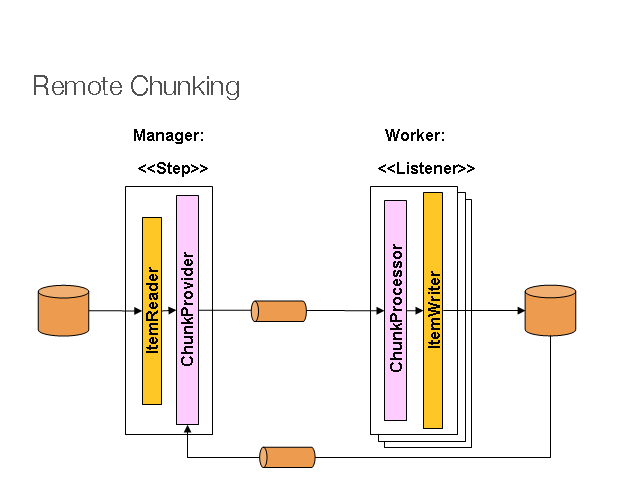
The manager component is a single process, and the workers are multiple remote processes. This pattern works best if the manager is not a bottleneck, so the processing must be more expensive than the reading of items (as is often the case in practice).
The manager is an implementation of a Spring Batch Step with the ItemWriter replaced
by a generic version that knows how to send chunks of items to the middleware as
messages. The workers are standard listeners for whatever middleware is being used (for
example, with JMS, they would be MesssageListener implementations), and their role is
to process the chunks of items using a standard ItemWriter or ItemProcessor plus
ItemWriter, through the ChunkProcessor interface. One of the advantages of using this
pattern is that the reader, processor, and writer components are off-the-shelf (the same
as would be used for a local execution of the step). The items are divided up dynamically
and work is shared through the middleware, so that, if the listeners are all eager
consumers, then load balancing is automatic.
The middleware has to be durable, with guaranteed delivery and a single consumer for each message. JMS is the obvious candidate, but other options (such as JavaSpaces) exist in the grid computing and shared memory product space.
See the section on Spring Batch Integration - Remote Chunking for more detail.
7.4. Partitioning
Spring Batch also provides an SPI for partitioning a Step execution and executing it
remotely. In this case, the remote participants are Step instances that could just as
easily have been configured and used for local processing. The following image shows the
pattern:
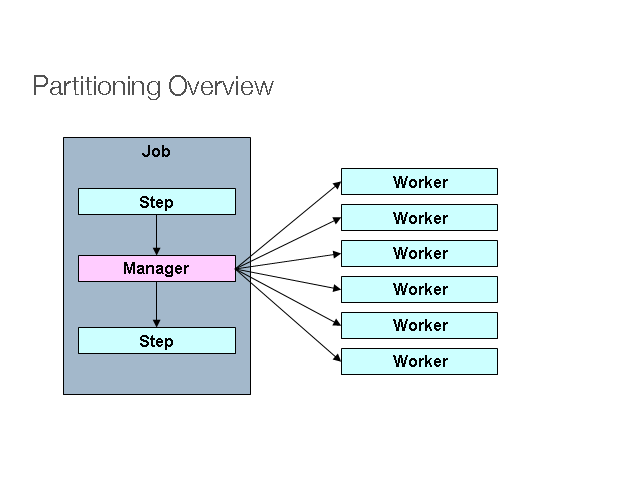
The Job runs on the left-hand side as a sequence of Step instances, and one of the
Step instances is labeled as a manager. The workers in this picture are all identical
instances of a Step, which could in fact take the place of the manager, resulting in the
same outcome for the Job. The workers are typically going to be remote services but
could also be local threads of execution. The messages sent by the manager to the workers
in this pattern do not need to be durable or have guaranteed delivery. Spring Batch
metadata in the JobRepository ensures that each worker is executed once and only once for
each Job execution.
The SPI in Spring Batch consists of a special implementation of Step (called the
PartitionStep) and two strategy interfaces that need to be implemented for the specific
environment. The strategy interfaces are PartitionHandler and StepExecutionSplitter,
and their role is shown in the following sequence diagram:
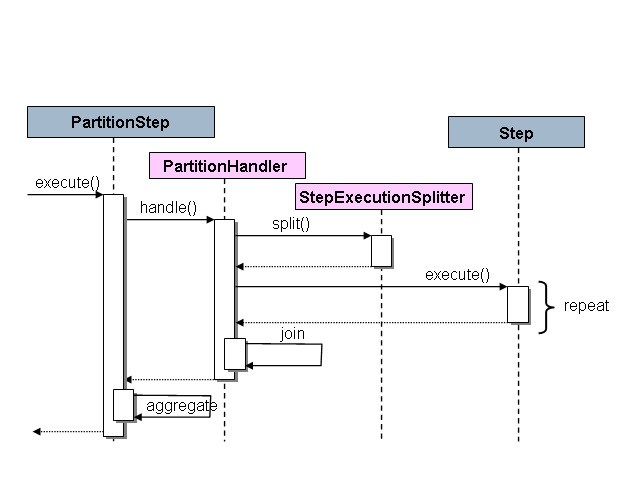
The Step on the right in this case is the “remote” worker, so, potentially, there are
many objects and or processes playing this role, and the PartitionStep is shown driving
the execution.
The following example shows the PartitionStep configuration:
<step id="step1.manager">
<partition step="step1" partitioner="partitioner">
<handler grid-size="10" task-executor="taskExecutor"/>
</partition>
</step>The following example shows the PartitionStep configuration using java configuration:
@Bean
public Step step1Manager() {
return stepBuilderFactory.get("step1.manager")
.<String, String>partitioner("step1", partitioner())
.step(step1())
.gridSize(10)
.taskExecutor(taskExecutor())
.build();
}Similar to the multi-threaded step’s throttle-limit attribute, the grid-size
attribute prevents the task executor from being saturated with requests from a single
step.
There is a simple example that can be copied and extended in the unit test suite for
Spring
Batch Samples (see Partition*Job.xml configuration).
Spring Batch creates step executions for the partitions called "step1:partition0", and so
on. Many people prefer to call the manager step "step1:manager" for consistency. You can
use an alias for the step (by specifying the name attribute instead of the id
attribute).
7.4.1. PartitionHandler
The PartitionHandler is the component that knows about the fabric of the remoting or
grid environment. It is able to send StepExecution requests to the remote Step
instances, wrapped in some fabric-specific format, like a DTO. It does not have to know
how to split the input data or how to aggregate the result of multiple Step executions.
Generally speaking, it probably also does not need to know about resilience or failover,
since those are features of the fabric in many cases. In any case, Spring Batch always
provides restartability independent of the fabric. A failed Job can always be restarted
and only the failed Steps are re-executed.
The PartitionHandler interface can have specialized implementations for a variety of
fabric types, including simple RMI remoting, EJB remoting, custom web service, JMS, Java
Spaces, shared memory grids (like Terracotta or Coherence), and grid execution fabrics
(like GridGain). Spring Batch does not contain implementations for any proprietary grid
or remoting fabrics.
Spring Batch does, however, provide a useful implementation of PartitionHandler that
executes Step instances locally in separate threads of execution, using the
TaskExecutor strategy from Spring. The implementation is called
TaskExecutorPartitionHandler.
The TaskExecutorPartitionHandler is the default for a step configured with the XML
namespace shown previously. It can also be configured explicitly, as shown in the
following example:
<step id="step1.manager">
<partition step="step1" handler="handler"/>
</step>
<bean class="org.spr...TaskExecutorPartitionHandler">
<property name="taskExecutor" ref="taskExecutor"/>
<property name="step" ref="step1" />
<property name="gridSize" value="10" />
</bean>The TaskExecutorPartitionHandler can be configured explicitly within java configuration,
as shown in the following example:
@Bean
public Step step1Manager() {
return stepBuilderFactory.get("step1.manager")
.partitioner("step1", partitioner())
.partitionHandler(partitionHandler())
.build();
}
@Bean
public PartitionHandler partitionHandler() {
TaskExecutorPartitionHandler retVal = new TaskExecutorPartitionHandler();
retVal.setTaskExecutor(taskExecutor());
retVal.setStep(step1());
retVal.setGridSize(10);
return retVal;
}The gridSize attribute determines the number of separate step executions to create, so
it can be matched to the size of the thread pool in the TaskExecutor. Alternatively, it
can be set to be larger than the number of threads available, which makes the blocks of
work smaller.
The TaskExecutorPartitionHandler is useful for IO-intensive Step instances, such as
copying large numbers of files or replicating filesystems into content management
systems. It can also be used for remote execution by providing a Step implementation
that is a proxy for a remote invocation (such as using Spring Remoting).
7.4.2. Partitioner
The Partitioner has a simpler responsibility: to generate execution contexts as input
parameters for new step executions only (no need to worry about restarts). It has a
single method, as shown in the following interface definition:
public interface Partitioner {
Map<String, ExecutionContext> partition(int gridSize);
}The return value from this method associates a unique name for each step execution (the
String) with input parameters in the form of an ExecutionContext. The names show up
later in the Batch metadata as the step name in the partitioned StepExecutions. The
ExecutionContext is just a bag of name-value pairs, so it might contain a range of
primary keys, line numbers, or the location of an input file. The remote Step then
normally binds to the context input using #{…} placeholders (late binding in step
scope), as illustrated in the next section.
The names of the step executions (the keys in the Map returned by Partitioner) need
to be unique amongst the step executions of a Job but do not have any other specific
requirements. The easiest way to do this (and to make the names meaningful for users) is
to use a prefix+suffix naming convention, where the prefix is the name of the step that
is being executed (which itself is unique in the Job), and the suffix is just a
counter. There is a SimplePartitioner in the framework that uses this convention.
An optional interface called PartitionNameProvider can be used to provide the partition
names separately from the partitions themselves. If a Partitioner implements this
interface, then, on a restart, only the names are queried. If partitioning is expensive,
this can be a useful optimization. The names provided by the PartitionNameProvider must
match those provided by the Partitioner.
7.4.3. Binding Input Data to Steps
It is very efficient for the steps that are executed by the PartitionHandler to have
identical configuration and for their input parameters to be bound at runtime from the
ExecutionContext. This is easy to do with the StepScope feature of Spring Batch
(covered in more detail in the section on Late Binding). For
example, if the Partitioner creates ExecutionContext instances with an attribute key
called fileName, pointing to a different file (or directory) for each step invocation,
the Partitioner output might resemble the content of the following table:
Step Execution Name (key) |
ExecutionContext (value) |
filecopy:partition0 |
fileName=/home/data/one |
filecopy:partition1 |
fileName=/home/data/two |
filecopy:partition2 |
fileName=/home/data/three |
Then the file name can be bound to a step using late binding to the execution context, as shown in the following example:
<bean id="itemReader" scope="step"
class="org.spr...MultiResourceItemReader">
<property name="resources" value="#{stepExecutionContext[fileName]}/*"/>
</bean>@Bean
public MultiResourceItemReader itemReader(
@Value("#{stepExecutionContext['fileName']}/*") Resource [] resources) {
return new MultiResourceItemReaderBuilder<String>()
.delegate(fileReader())
.name("itemReader")
.resources(resources)
.build();
}8. Repeat
8.1. RepeatTemplate
Batch processing is about repetitive actions, either as a simple optimization or as part
of a job. To strategize and generalize the repetition and to provide what amounts to an
iterator framework, Spring Batch has the RepeatOperations interface. The
RepeatOperations interface has the following definition:
public interface RepeatOperations {
RepeatStatus iterate(RepeatCallback callback) throws RepeatException;
}The callback is an interface, shown in the following definition, that lets you insert some business logic to be repeated:
public interface RepeatCallback {
RepeatStatus doInIteration(RepeatContext context) throws Exception;
}The callback is executed repeatedly until the implementation determines that the
iteration should end. The return value in these interfaces is an enumeration that can
either be RepeatStatus.CONTINUABLE or RepeatStatus.FINISHED. A RepeatStatus
enumeration conveys information to the caller of the repeat operations about whether
there is any more work to do. Generally speaking, implementations of RepeatOperations
should inspect the RepeatStatus and use it as part of the decision to end the
iteration. Any callback that wishes to signal to the caller that there is no more work to
do can return RepeatStatus.FINISHED.
The simplest general purpose implementation of RepeatOperations is RepeatTemplate, as
shown in the following example:
RepeatTemplate template = new RepeatTemplate();
template.setCompletionPolicy(new SimpleCompletionPolicy(2));
template.iterate(new RepeatCallback() {
public RepeatStatus doInIteration(RepeatContext context) {
// Do stuff in batch...
return RepeatStatus.CONTINUABLE;
}
});In the preceding example, we return RepeatStatus.CONTINUABLE, to show that there is
more work to do. The callback can also return RepeatStatus.FINISHED, to signal to the
caller that there is no more work to do. Some iterations can be terminated by
considerations intrinsic to the work being done in the callback. Others are effectively
infinite loops as far as the callback is concerned and the completion decision is
delegated to an external policy, as in the case shown in the preceding example.
8.1.1. RepeatContext
The method parameter for the RepeatCallback is a RepeatContext. Many callbacks ignore
the context. However, if necessary, it can be used as an attribute bag to store transient
data for the duration of the iteration. After the iterate method returns, the context
no longer exists.
If there is a nested iteration in progress, a RepeatContext has a parent context. The
parent context is occasionally useful for storing data that need to be shared between
calls to iterate. This is the case, for instance, if you want to count the number of
occurrences of an event in the iteration and remember it across subsequent calls.
8.1.2. RepeatStatus
RepeatStatus is an enumeration used by Spring Batch to indicate whether processing has
finished. It has two possible RepeatStatus values, described in the following table:
Value |
Description |
CONTINUABLE |
There is more work to do. |
FINISHED |
No more repetitions should take place. |
RepeatStatus values can also be combined with a logical AND operation by using the
and() method in RepeatStatus. The effect of this is to do a logical AND on the
continuable flag. In other words, if either status is FINISHED, then the result is
FINISHED.
8.2. Completion Policies
Inside a RepeatTemplate, the termination of the loop in the iterate method is
determined by a CompletionPolicy, which is also a factory for the RepeatContext. The
RepeatTemplate has the responsibility to use the current policy to create a
RepeatContext and pass that in to the RepeatCallback at every stage in the iteration.
After a callback completes its doInIteration, the RepeatTemplate has to make a call
to the CompletionPolicy to ask it to update its state (which will be stored in the
RepeatContext). Then it asks the policy if the iteration is complete.
Spring Batch provides some simple general purpose implementations of CompletionPolicy.
SimpleCompletionPolicy allows execution up to a fixed number of times (with
RepeatStatus.FINISHED forcing early completion at any time).
Users might need to implement their own completion policies for more complicated decisions. For example, a batch processing window that prevents batch jobs from executing once the online systems are in use would require a custom policy.
8.3. Exception Handling
If there is an exception thrown inside a RepeatCallback, the RepeatTemplate consults
an ExceptionHandler, which can decide whether or not to re-throw the exception.
The following listing shows the ExceptionHandler interface definition:
public interface ExceptionHandler {
void handleException(RepeatContext context, Throwable throwable)
throws Throwable;
}A common use case is to count the number of exceptions of a given type and fail when a
limit is reached. For this purpose, Spring Batch provides the
SimpleLimitExceptionHandler and a slightly more flexible
RethrowOnThresholdExceptionHandler. The SimpleLimitExceptionHandler has a limit
property and an exception type that should be compared with the current exception. All
subclasses of the provided type are also counted. Exceptions of the given type are
ignored until the limit is reached, and then they are rethrown. Exceptions of other types
are always rethrown.
An important optional property of the SimpleLimitExceptionHandler is the boolean flag
called useParent. It is false by default, so the limit is only accounted for in the
current RepeatContext. When set to true, the limit is kept across sibling contexts in
a nested iteration (such as a set of chunks inside a step).
8.4. Listeners
Often, it is useful to be able to receive additional callbacks for cross-cutting concerns
across a number of different iterations. For this purpose, Spring Batch provides the
RepeatListener interface. The RepeatTemplate lets users register RepeatListener
implementations, and they are given callbacks with the RepeatContext and RepeatStatus
where available during the iteration.
The RepeatListener interface has the following definition:
public interface RepeatListener {
void before(RepeatContext context);
void after(RepeatContext context, RepeatStatus result);
void open(RepeatContext context);
void onError(RepeatContext context, Throwable e);
void close(RepeatContext context);
}The open and close callbacks come before and after the entire iteration. before,
after, and onError apply to the individual RepeatCallback calls.
Note that, when there is more than one listener, they are in a list, so there is an
order. In this case, open and before are called in the same order while after,
onError, and close are called in reverse order.
8.5. Parallel Processing
Implementations of RepeatOperations are not restricted to executing the callback
sequentially. It is quite important that some implementations are able to execute their
callbacks in parallel. To this end, Spring Batch provides the
TaskExecutorRepeatTemplate, which uses the Spring TaskExecutor strategy to run the
RepeatCallback. The default is to use a SynchronousTaskExecutor, which has the effect
of executing the whole iteration in the same thread (the same as a normal
RepeatTemplate).
8.6. Declarative Iteration
Sometimes there is some business processing that you know you want to repeat every time
it happens. The classic example of this is the optimization of a message pipeline. It is
more efficient to process a batch of messages, if they are arriving frequently, than to
bear the cost of a separate transaction for every message. Spring Batch provides an AOP
interceptor that wraps a method call in a RepeatOperations object for just this
purpose. The RepeatOperationsInterceptor executes the intercepted method and repeats
according to the CompletionPolicy in the provided RepeatTemplate.
The following example shows declarative iteration using the Spring AOP namespace to
repeat a service call to a method called processMessage (for more detail on how to
configure AOP interceptors, see the Spring User Guide):
<aop:config>
<aop:pointcut id="transactional"
expression="execution(* com..*Service.processMessage(..))" />
<aop:advisor pointcut-ref="transactional"
advice-ref="retryAdvice" order="-1"/>
</aop:config>
<bean id="retryAdvice" class="org.spr...RepeatOperationsInterceptor"/>The following example demonstrates using java configuration to
repeat a service call to a method called processMessage (for more detail on how to
configure AOP interceptors, see the Spring User Guide):
@Bean
public MyService myService() {
ProxyFactory factory = new ProxyFactory(RepeatOperations.class.getClassLoader());
factory.setInterfaces(MyService.class);
factory.setTarget(new MyService());
MyService service = (MyService) factory.getProxy();
JdkRegexpMethodPointcut pointcut = new JdkRegexpMethodPointcut();
pointcut.setPatterns(".*processMessage.*");
RepeatOperationsInterceptor interceptor = new RepeatOperationsInterceptor();
((Advised) service).addAdvisor(new DefaultPointcutAdvisor(pointcut, interceptor));
return service;
}The preceding example uses a default RepeatTemplate inside the interceptor. To change
the policies, listeners, and other details, you can inject an instance of
RepeatTemplate into the interceptor.
If the intercepted method returns void, then the interceptor always returns
RepeatStatus.CONTINUABLE (so there is a danger of an infinite loop if the
CompletionPolicy does not have a finite end point). Otherwise, it returns
RepeatStatus.CONTINUABLE until the return value from the intercepted method is null,
at which point it returns RepeatStatus.FINISHED. Consequently, the business logic
inside the target method can signal that there is no more work to do by returning null
or by throwing an exception that is re-thrown by the ExceptionHandler in the provided
RepeatTemplate.
9. Retry
To make processing more robust and less prone to failure, it sometimes
helps to automatically retry a failed operation in case it might
succeed on a subsequent attempt. Errors that are susceptible to intermittent failure
are often transient in nature. Examples include remote calls to a web
service that fails because of a network glitch or a
DeadlockLoserDataAccessException in a database update.
9.1. RetryTemplate
|
The retry functionality was pulled out of Spring Batch as of 2.2.0. It is now part of a new library, Spring Retry. |
To automate retry
operations Spring Batch has the RetryOperations
strategy. The following interface definition for RetryOperations:
public interface RetryOperations {
<T, E extends Throwable> T execute(RetryCallback<T, E> retryCallback) throws E;
<T, E extends Throwable> T execute(RetryCallback<T, E> retryCallback, RecoveryCallback<T> recoveryCallback)
throws E;
<T, E extends Throwable> T execute(RetryCallback<T, E> retryCallback, RetryState retryState)
throws E, ExhaustedRetryException;
<T, E extends Throwable> T execute(RetryCallback<T, E> retryCallback, RecoveryCallback<T> recoveryCallback,
RetryState retryState) throws E;
}The basic callback is a simple interface that lets you insert some business logic to be retried, as shown in the following interface definition:
public interface RetryCallback<T, E extends Throwable> {
T doWithRetry(RetryContext context) throws E;
}The callback runs and, if it fails (by throwing an
Exception), it is retried until either it is
successful or the implementation aborts. There are a number of
overloaded execute methods in the
RetryOperations interface. Those methods deal with various use
cases for recovery when all retry attempts are exhausted and deal with
retry state, which allows clients and implementations to store information
between calls (we cover this in more detail later in the chapter).
The simplest general purpose implementation of
RetryOperations is
RetryTemplate. It can be used as follows:
RetryTemplate template = new RetryTemplate();
TimeoutRetryPolicy policy = new TimeoutRetryPolicy();
policy.setTimeout(30000L);
template.setRetryPolicy(policy);
Foo result = template.execute(new RetryCallback<Foo>() {
public Foo doWithRetry(RetryContext context) {
// Do stuff that might fail, e.g. webservice operation
return result;
}
});In the preceding example, we make a web service call and return the result to the user. If that call fails, then it is retried until a timeout is reached.
9.1.1. RetryContext
The method parameter for the RetryCallback
is a RetryContext. Many callbacks
ignore the context, but, if necessary, it can be used as an attribute bag
to store data for the duration of the iteration.
A RetryContext has a parent context
if there is a nested retry in progress in the same thread. The parent
context is occasionally useful for storing data that need to be shared
between calls to execute.
9.1.2. RecoveryCallback
When a retry is exhausted, the
RetryOperations can pass control to a different
callback, called the RecoveryCallback. To use this
feature, clients pass in the callbacks together to the same method,
as shown in the following example:
Foo foo = template.execute(new RetryCallback<Foo>() {
public Foo doWithRetry(RetryContext context) {
// business logic here
},
new RecoveryCallback<Foo>() {
Foo recover(RetryContext context) throws Exception {
// recover logic here
}
});If the business logic does not succeed before the template decides to abort, then the client is given the chance to do some alternate processing through the recovery callback.
9.1.3. Stateless Retry
In the simplest case, a retry is just a while loop. The
RetryTemplate can just keep trying until it
either succeeds or fails. The RetryContext
contains some state to determine whether to retry or abort, but this
state is on the stack and there is no need to store it anywhere
globally, so we call this stateless retry. The distinction between
stateless and stateful retry is contained in the implementation of the
RetryPolicy (the
RetryTemplate can handle both). In a stateless
retry, the retry callback is always executed in the same thread it was on
when it failed.
9.1.4. Stateful Retry
Where the failure has caused a transactional resource to become invalid, there are some special considerations. This does not apply to a simple remote call because there is no transactional resource (usually), but it does sometimes apply to a database update, especially when using Hibernate. In this case it only makes sense to re-throw the exception that called the failure immediately, so that the transaction can roll back and we can start a new, valid transaction.
In cases involving transactions, a stateless retry is not good enough, because the
re-throw and roll back necessarily involve leaving the
RetryOperations.execute() method and potentially losing the
context that was on the stack. To avoid losing it we have to introduce a
storage strategy to lift it off the stack and put it (at a minimum) in
heap storage. For this purpose, Spring Batch provides a storage strategy called
RetryContextCache, which can be injected into the
RetryTemplate. The default implementation of the
RetryContextCache is in memory, using a simple
Map. Advanced usage with multiple processes in a
clustered environment might also consider implementing the
RetryContextCache with a cluster cache of some
sort (however, even in a clustered environment, this might be
overkill).
Part of the responsibility of the
RetryOperations is to recognize the failed
operations when they come back in a new execution (and usually wrapped
in a new transaction). To facilitate this, Spring Batch provides the
RetryState abstraction. This works in conjunction
with a special execute methods in the
RetryOperations interface.
The way the failed operations are recognized is by identifying the
state across multiple invocations of the retry. To identify the state,
the user can provide a RetryState object that is
responsible for returning a unique key identifying the item. The
identifier is used as a key in the
RetryContextCache interface.
|
Be very careful with the implementation of
|
When the retry is exhausted, there is also the option to handle the
failed item in a different way, instead of calling the
RetryCallback (which is now presumed to be likely
to fail). Just like in the stateless case, this option is provided by
the RecoveryCallback, which can be provided by
passing it in to the execute method of
RetryOperations.
The decision to retry or not is actually delegated to a regular
RetryPolicy, so the usual concerns about limits
and timeouts can be injected there (described later in this chapter).
9.2. Retry Policies
Inside a RetryTemplate, the decision to retry
or fail in the execute method is determined by a
RetryPolicy, which is also a factory for the
RetryContext. The
RetryTemplate has the responsibility to use the
current policy to create a RetryContext and pass
that in to the RetryCallback at every attempt.
After a callback fails, the RetryTemplate has to
make a call to the RetryPolicy to ask it to update
its state (which is stored in the
RetryContext) and then asks the policy if
another attempt can be made. If another attempt cannot be made (such as when a
limit is reached or a timeout is detected) then the policy is also
responsible for handling the exhausted state. Simple implementations
throw RetryExhaustedException, which causes
any enclosing transaction to be rolled back. More sophisticated
implementations might attempt to take some recovery action, in which case
the transaction can remain intact.
|
Failures are inherently either retryable or not. If the same exception is always going to be thrown from the business logic, it does no good to retry it. So do not retry on all exception types. Rather, try to focus on only those exceptions that you expect to be retryable. It is not usually harmful to the business logic to retry more aggressively, but it is wasteful, because, if a failure is deterministic, you spend time retrying something that you know in advance is fatal. |
Spring Batch provides some simple general purpose implementations of
stateless RetryPolicy, such as
SimpleRetryPolicy and
TimeoutRetryPolicy (used in the preceding example).
The SimpleRetryPolicy allows a retry on
any of a named list of exception types, up to a fixed number of times. It
also has a list of "fatal" exceptions that should never be retried, and
this list overrides the retryable list so that it can be used to give
finer control over the retry behavior, as shown in the following example:
SimpleRetryPolicy policy = new SimpleRetryPolicy();
// Set the max retry attempts
policy.setMaxAttempts(5);
// Retry on all exceptions (this is the default)
policy.setRetryableExceptions(new Class[] {Exception.class});
// ... but never retry IllegalStateException
policy.setFatalExceptions(new Class[] {IllegalStateException.class});
// Use the policy...
RetryTemplate template = new RetryTemplate();
template.setRetryPolicy(policy);
template.execute(new RetryCallback<Foo>() {
public Foo doWithRetry(RetryContext context) {
// business logic here
}
});There is also a more flexible implementation called
ExceptionClassifierRetryPolicy, which allows the
user to configure different retry behavior for an arbitrary set of
exception types though the ExceptionClassifier
abstraction. The policy works by calling on the classifier to convert an
exception into a delegate RetryPolicy. For
example, one exception type can be retried more times before failure than
another by mapping it to a different policy.
Users might need to implement their own retry policies for more customized decisions. For instance, a custom retry policy makes sense when there is a well-known, solution-specific classification of exceptions into retryable and not retryable.
9.3. Backoff Policies
When retrying after a transient failure, it often helps to wait a bit
before trying again, because usually the failure is caused by some problem
that can only be resolved by waiting. If a
RetryCallback fails, the
RetryTemplate can pause execution according to the
BackoffPolicy.
The following code shows the interface definition for the BackOffPolicy interface:
public interface BackoffPolicy {
BackOffContext start(RetryContext context);
void backOff(BackOffContext backOffContext)
throws BackOffInterruptedException;
}A BackoffPolicy is free to implement
the backOff in any way it chooses. The policies provided by Spring Batch
out of the box all use Object.wait(). A common use case is to
backoff with an exponentially increasing wait period, to avoid two retries
getting into lock step and both failing (this is a lesson learned from
ethernet). For this purpose, Spring Batch provides the
ExponentialBackoffPolicy.
9.4. Listeners
Often, it is useful to be able to receive additional callbacks for
cross cutting concerns across a number of different retries. For this
purpose, Spring Batch provides the RetryListener
interface. The RetryTemplate lets users
register RetryListeners, and they are given
callbacks with RetryContext and
Throwable where available during the
iteration.
The following code shows the interface definition for RetryListener:
public interface RetryListener {
<T, E extends Throwable> boolean open(RetryContext context, RetryCallback<T, E> callback);
<T, E extends Throwable> void onError(RetryContext context, RetryCallback<T, E> callback, Throwable throwable);
<T, E extends Throwable> void close(RetryContext context, RetryCallback<T, E> callback, Throwable throwable);
}The open and
close callbacks come before and after the entire
retry in the simplest case, and onError applies to
the individual RetryCallback calls. The
close method might also receive a
Throwable. If there has been an error, it is the
last one thrown by the RetryCallback.
Note that, when there is more than one listener, they are in a list,
so there is an order. In this case, open is
called in the same order while onError and
close are called in reverse order.
9.5. Declarative Retry
Sometimes, there is some business processing that you know you want
to retry every time it happens. The classic example of this is the remote
service call. Spring Batch provides an AOP interceptor that wraps a method
call in a RetryOperations implementation for just this purpose.
The RetryOperationsInterceptor executes the
intercepted method and retries on failure according to the
RetryPolicy in the provided
RetryTemplate.
The following example shows a declarative retry that uses the Spring AOP
namespace to retry a service call to a method called
remoteCall (for more detail on how to configure
AOP interceptors, see the Spring User Guide):
<aop:config>
<aop:pointcut id="transactional"
expression="execution(* com..*Service.remoteCall(..))" />
<aop:advisor pointcut-ref="transactional"
advice-ref="retryAdvice" order="-1"/>
</aop:config>
<bean id="retryAdvice"
class="org.springframework.batch.retry.interceptor.RetryOperationsInterceptor"/>The following example shows a declarative retry that uses java configuration
to retry a service call to a method called
remoteCall (for more detail on how to configure
AOP interceptors, see the Spring User Guide):
@Bean
public MyService myService() {
ProxyFactory factory = new ProxyFactory(RepeatOperations.class.getClassLoader());
factory.setInterfaces(MyService.class);
factory.setTarget(new MyService());
MyService service = (MyService) factory.getProxy();
JdkRegexpMethodPointcut pointcut = new JdkRegexpMethodPointcut();
pointcut.setPatterns(".*remoteCall.*");
RetryOperationsInterceptor interceptor = new RetryOperationsInterceptor();
((Advised) service).addAdvisor(new DefaultPointcutAdvisor(pointcut, interceptor));
return service;
}The preceding example uses a default
RetryTemplate inside the interceptor. To change the
policies or listeners, you can inject an instance of
RetryTemplate into the interceptor.
10. Unit Testing
As with other application styles, it is extremely important to unit test any code written as part of a batch job. The Spring core documentation covers how to unit and integration test with Spring in great detail, so it is not be repeated here. It is important, however, to think about how to 'end to end' test a batch job, which is what this chapter covers. The spring-batch-test project includes classes that facilitate this end-to-end test approach.
10.1. Creating a Unit Test Class
In order for the unit test to run a batch job, the framework must
load the job’s ApplicationContext. Two annotations are used to trigger
this behavior:
-
@RunWith(SpringRunner.class): Indicates that the class should use Spring’s JUnit facilities -
@ContextConfiguration(…): Indicates which resources to configure theApplicationContextwith.
Starting from v4.1, it is also possible to inject Spring Batch test utilities
like the JobLauncherTestUtils and JobRepositoryTestUtils in the test context
using the @SpringBatchTest annotation.
The following example shows the annotations in use:
@SpringBatchTest
@RunWith(SpringRunner.class)
@ContextConfiguration(classes=SkipSampleConfiguration.class)
public class SkipSampleFunctionalTests { ... }@SpringBatchTest
@RunWith(SpringRunner.class)
@ContextConfiguration(locations = { "/simple-job-launcher-context.xml",
"/jobs/skipSampleJob.xml" })
public class SkipSampleFunctionalTests { ... }10.2. End-To-End Testing of Batch Jobs
'End To End' testing can be defined as testing the complete run of a batch job from beginning to end. This allows for a test that sets up a test condition, executes the job, and verifies the end result.
In the following example, the batch job reads from the database and
writes to a flat file. The test method begins by setting up the database
with test data. It clears the CUSTOMER table and then inserts 10 new
records. The test then launches the Job by using the
launchJob() method. The
launchJob() method is provided by the
JobLauncherTestUtils class. The JobLauncherTestUtils class also provides the
launchJob(JobParameters) method, which
allows the test to give particular parameters. The
launchJob() method returns the
JobExecution object, which is useful for asserting
particular information about the Job run. In the
following case, the test verifies that the Job ended
with status "COMPLETED":
@SpringBatchTest
@RunWith(SpringRunner.class)
@ContextConfiguration(locations = { "/simple-job-launcher-context.xml",
"/jobs/skipSampleJob.xml" })
public class SkipSampleFunctionalTests {
@Autowired
private JobLauncherTestUtils jobLauncherTestUtils;
private SimpleJdbcTemplate simpleJdbcTemplate;
@Autowired
public void setDataSource(DataSource dataSource) {
this.simpleJdbcTemplate = new SimpleJdbcTemplate(dataSource);
}
@Test
public void testJob() throws Exception {
simpleJdbcTemplate.update("delete from CUSTOMER");
for (int i = 1; i <= 10; i++) {
simpleJdbcTemplate.update("insert into CUSTOMER values (?, 0, ?, 100000)",
i, "customer" + i);
}
JobExecution jobExecution = jobLauncherTestUtils.launchJob();
Assert.assertEquals("COMPLETED", jobExecution.getExitStatus().getExitCode());
}
}@SpringBatchTest
@RunWith(SpringRunner.class)
@ContextConfiguration(classes=SkipSampleConfiguration.class)
public class SkipSampleFunctionalTests {
@Autowired
private JobLauncherTestUtils jobLauncherTestUtils;
private SimpleJdbcTemplate simpleJdbcTemplate;
@Autowired
public void setDataSource(DataSource dataSource) {
this.simpleJdbcTemplate = new SimpleJdbcTemplate(dataSource);
}
@Test
public void testJob() throws Exception {
simpleJdbcTemplate.update("delete from CUSTOMER");
for (int i = 1; i <= 10; i++) {
simpleJdbcTemplate.update("insert into CUSTOMER values (?, 0, ?, 100000)",
i, "customer" + i);
}
JobExecution jobExecution = jobLauncherTestUtils.launchJob();
Assert.assertEquals("COMPLETED", jobExecution.getExitStatus().getExitCode());
}
}10.3. Testing Individual Steps
For complex batch jobs, test cases in the end-to-end testing
approach may become unmanageable. It these cases, it may be more useful to
have test cases to test individual steps on their own. The
JobLauncherTestUtils class contains a method called
launchStep, which takes a step name and runs just
that particular Step. This approach allows for more
targeted tests letting the test set up data for only that step and
to validate its results directly. The following example shows how to use the
launchStep method to load a Step by name:
JobExecution jobExecution = jobLauncherTestUtils.launchStep("loadFileStep");10.4. Testing Step-Scoped Components
Often, the components that are configured for your steps at runtime
use step scope and late binding to inject context from the step or job
execution. These are tricky to test as standalone components, unless you
have a way to set the context as if they were in a step execution. That is
the goal of two components in Spring Batch:
StepScopeTestExecutionListener and
StepScopeTestUtils.
The listener is declared at the class level, and its job is to create a step execution context for each test method, as shown in the following example:
@ContextConfiguration
@TestExecutionListeners( { DependencyInjectionTestExecutionListener.class,
StepScopeTestExecutionListener.class })
@RunWith(SpringRunner.class)
public class StepScopeTestExecutionListenerIntegrationTests {
// This component is defined step-scoped, so it cannot be injected unless
// a step is active...
@Autowired
private ItemReader<String> reader;
public StepExecution getStepExecution() {
StepExecution execution = MetaDataInstanceFactory.createStepExecution();
execution.getExecutionContext().putString("input.data", "foo,bar,spam");
return execution;
}
@Test
public void testReader() {
// The reader is initialized and bound to the input data
assertNotNull(reader.read());
}
}There are two TestExecutionListeners. One
is the regular Spring Test framework, which handles dependency injection
from the configured application context to inject the reader. The
other is the Spring Batch
StepScopeTestExecutionListener. It works by looking
for a factory method in the test case for a
StepExecution, using that as the context for
the test method, as if that execution were active in a Step at runtime. The
factory method is detected by its signature (it must return a
StepExecution). If a factory method is not provided,
then a default StepExecution is created.
Starting from v4.1, the StepScopeTestExecutionListener and
JobScopeTestExecutionListener are imported as test execution listeners
if the test class is annotated with @SpringBatchTest. The preceding test
example can be configured as follows:
@SpringBatchTest
@RunWith(SpringRunner.class)
@ContextConfiguration
public class StepScopeTestExecutionListenerIntegrationTests {
// This component is defined step-scoped, so it cannot be injected unless
// a step is active...
@Autowired
private ItemReader<String> reader;
public StepExecution getStepExecution() {
StepExecution execution = MetaDataInstanceFactory.createStepExecution();
execution.getExecutionContext().putString("input.data", "foo,bar,spam");
return execution;
}
@Test
public void testReader() {
// The reader is initialized and bound to the input data
assertNotNull(reader.read());
}
}The listener approach is convenient if you want the duration of the
step scope to be the execution of the test method. For a more flexible
but more invasive approach, you can use the
StepScopeTestUtils. The following example counts the
number of items available in the reader shown in the previous example:
int count = StepScopeTestUtils.doInStepScope(stepExecution,
new Callable<Integer>() {
public Integer call() throws Exception {
int count = 0;
while (reader.read() != null) {
count++;
}
return count;
}
});10.5. Validating Output Files
When a batch job writes to the database, it is easy to query the
database to verify that the output is as expected. However, if the batch
job writes to a file, it is equally important that the output be verified.
Spring Batch provides a class called AssertFile to
facilitate the verification of output files. The method called
assertFileEquals takes two
File objects (or two
Resource objects) and asserts, line by line, that
the two files have the same content. Therefore, it is possible to create a
file with the expected output and to compare it to the actual
result, as shown in the following example:
private static final String EXPECTED_FILE = "src/main/resources/data/input.txt";
private static final String OUTPUT_FILE = "target/test-outputs/output.txt";
AssertFile.assertFileEquals(new FileSystemResource(EXPECTED_FILE),
new FileSystemResource(OUTPUT_FILE));10.6. Mocking Domain Objects
Another common issue encountered while writing unit and integration
tests for Spring Batch components is how to mock domain objects. A good
example is a StepExecutionListener, as illustrated
in the following code snippet:
public class NoWorkFoundStepExecutionListener extends StepExecutionListenerSupport {
public ExitStatus afterStep(StepExecution stepExecution) {
if (stepExecution.getReadCount() == 0) {
return ExitStatus.FAILED;
}
return null;
}
}The preceding listener example is provided by the framework and checks a
StepExecution for an empty read count, thus
signifying that no work was done. While this example is fairly simple, it
serves to illustrate the types of problems that may be encountered when
attempting to unit test classes that implement interfaces requiring Spring
Batch domain objects. Consider the following unit test for the listener’s in the preceding example:
private NoWorkFoundStepExecutionListener tested = new NoWorkFoundStepExecutionListener();
@Test
public void noWork() {
StepExecution stepExecution = new StepExecution("NoProcessingStep",
new JobExecution(new JobInstance(1L, new JobParameters(),
"NoProcessingJob")));
stepExecution.setExitStatus(ExitStatus.COMPLETED);
stepExecution.setReadCount(0);
ExitStatus exitStatus = tested.afterStep(stepExecution);
assertEquals(ExitStatus.FAILED.getExitCode(), exitStatus.getExitCode());
}Because the Spring Batch domain model follows good object-oriented
principles, the StepExecution requires a
JobExecution, which requires a
JobInstance and
JobParameters, to create a valid
StepExecution. While this is good in a solid domain
model, it does make creating stub objects for unit testing verbose. To
address this issue, the Spring Batch test module includes a factory for
creating domain objects: MetaDataInstanceFactory.
Given this factory, the unit test can be updated to be more
concise, as shown in the following example:
private NoWorkFoundStepExecutionListener tested = new NoWorkFoundStepExecutionListener();
@Test
public void testAfterStep() {
StepExecution stepExecution = MetaDataInstanceFactory.createStepExecution();
stepExecution.setExitStatus(ExitStatus.COMPLETED);
stepExecution.setReadCount(0);
ExitStatus exitStatus = tested.afterStep(stepExecution);
assertEquals(ExitStatus.FAILED.getExitCode(), exitStatus.getExitCode());
}The preceding method for creating a simple
StepExecution is just one convenience method
available within the factory. A full method listing can be found in its
Javadoc.
11. Common Batch Patterns
Some batch jobs can be assembled purely from off-the-shelf components in Spring Batch.
For instance, the ItemReader and ItemWriter implementations can be configured to
cover a wide range of scenarios. However, for the majority of cases, custom code must be
written. The main API entry points for application developers are the Tasklet, the
ItemReader, the ItemWriter, and the various listener interfaces. Most simple batch
jobs can use off-the-shelf input from a Spring Batch ItemReader, but it is often the
case that there are custom concerns in the processing and writing that require developers
to implement an ItemWriter or ItemProcessor.
In this chapter, we provide a few examples of common patterns in custom business logic.
These examples primarily feature the listener interfaces. It should be noted that an
ItemReader or ItemWriter can implement a listener interface as well, if appropriate.
11.1. Logging Item Processing and Failures
A common use case is the need for special handling of errors in a step, item by item,
perhaps logging to a special channel or inserting a record into a database. A
chunk-oriented Step (created from the step factory beans) lets users implement this use
case with a simple ItemReadListener for errors on read and an ItemWriteListener for
errors on write. The following code snippet illustrates a listener that logs both read
and write failures:
public class ItemFailureLoggerListener extends ItemListenerSupport {
private static Log logger = LogFactory.getLog("item.error");
public void onReadError(Exception ex) {
logger.error("Encountered error on read", e);
}
public void onWriteError(Exception ex, List<? extends Object> items) {
logger.error("Encountered error on write", ex);
}
}Having implemented this listener, it must be registered with a step, as shown in the following example:
<step id="simpleStep">
...
<listeners>
<listener>
<bean class="org.example...ItemFailureLoggerListener"/>
</listener>
</listeners>
</step>@Bean
public Step simpleStep() {
return this.stepBuilderFactory.get("simpleStep")
...
.listener(new ItemFailureLoggerListener())
.build();
}
if your listener does anything in an onError() method, it must be inside
a transaction that is going to be rolled back. If you need to use a transactional
resource, such as a database, inside an onError() method, consider adding a declarative
transaction to that method (see Spring Core Reference Guide for details), and giving its
propagation attribute a value of REQUIRES_NEW.
|
11.2. Stopping a Job Manually for Business Reasons
Spring Batch provides a stop() method through the JobLauncher interface, but this is
really for use by the operator rather than the application programmer. Sometimes, it is
more convenient or makes more sense to stop a job execution from within the business
logic.
The simplest thing to do is to throw a RuntimeException (one that is neither retried
indefinitely nor skipped). For example, a custom exception type could be used, as shown
in the following example:
public class PoisonPillItemProcessor<T> implements ItemProcessor<T, T> {
@Override
public T process(T item) throws Exception {
if (isPoisonPill(item)) {
throw new PoisonPillException("Poison pill detected: " + item);
}
return item;
}
}Another simple way to stop a step from executing is to return null from the
ItemReader, as shown in the following example:
public class EarlyCompletionItemReader implements ItemReader<T> {
private ItemReader<T> delegate;
public void setDelegate(ItemReader<T> delegate) { ... }
public T read() throws Exception {
T item = delegate.read();
if (isEndItem(item)) {
return null; // end the step here
}
return item;
}
}The previous example actually relies on the fact that there is a default implementation
of the CompletionPolicy strategy that signals a complete batch when the item to be
processed is null. A more sophisticated completion policy could be implemented and
injected into the Step through the SimpleStepFactoryBean, as shown in the following
example:
<step id="simpleStep">
<tasklet>
<chunk reader="reader" writer="writer" commit-interval="10"
chunk-completion-policy="completionPolicy"/>
</tasklet>
</step>
<bean id="completionPolicy" class="org.example...SpecialCompletionPolicy"/>@Bean
public Step simpleStep() {
return this.stepBuilderFactory.get("simpleStep")
.<String, String>chunk(new SpecialCompletionPolicy())
.reader(reader())
.writer(writer())
.build();
}An alternative is to set a flag in the StepExecution, which is checked by the Step
implementations in the framework in between item processing. To implement this
alternative, we need access to the current StepExecution, and this can be achieved by
implementing a StepListener and registering it with the Step. The following example
shows a listener that sets the flag:
public class CustomItemWriter extends ItemListenerSupport implements StepListener {
private StepExecution stepExecution;
public void beforeStep(StepExecution stepExecution) {
this.stepExecution = stepExecution;
}
public void afterRead(Object item) {
if (isPoisonPill(item)) {
stepExecution.setTerminateOnly();
}
}
}When the flag is set, the default behavior is for the step to throw a
JobInterruptedException. This behavior can be controlled through the
StepInterruptionPolicy. However, the only choice is to throw or not throw an exception,
so this is always an abnormal ending to a job.
11.3. Adding a Footer Record
Often, when writing to flat files, a "footer" record must be appended to the end of the
file, after all processing has be completed. This can be achieved using the
FlatFileFooterCallback interface provided by Spring Batch. The FlatFileFooterCallback
(and its counterpart, the FlatFileHeaderCallback) are optional properties of the
FlatFileItemWriter and can be added to an item writer as shown in the following
example:
<bean id="itemWriter" class="org.spr...FlatFileItemWriter">
<property name="resource" ref="outputResource" />
<property name="lineAggregator" ref="lineAggregator"/>
<property name="headerCallback" ref="headerCallback" />
<property name="footerCallback" ref="footerCallback" />
</bean>@Bean
public FlatFileItemWriter<String> itemWriter(Resource outputResource) {
return new FlatFileItemWriterBuilder<String>()
.name("itemWriter")
.resource(outputResource)
.lineAggregator(lineAggregator())
.headerCallback(headerCallback())
.footerCallback(footerCallback())
.build();
}The footer callback interface has just one method that is called when the footer must be written, as shown in the following interface definition:
public interface FlatFileFooterCallback {
void writeFooter(Writer writer) throws IOException;
}11.3.1. Writing a Summary Footer
A common requirement involving footer records is to aggregate information during the output process and to append this information to the end of the file. This footer often serves as a summarization of the file or provides a checksum.
For example, if a batch job is writing Trade records to a flat file, and there is a
requirement that the total amount from all the Trades is placed in a footer, then the
following ItemWriter implementation can be used:
public class TradeItemWriter implements ItemWriter<Trade>,
FlatFileFooterCallback {
private ItemWriter<Trade> delegate;
private BigDecimal totalAmount = BigDecimal.ZERO;
public void write(List<? extends Trade> items) throws Exception {
BigDecimal chunkTotal = BigDecimal.ZERO;
for (Trade trade : items) {
chunkTotal = chunkTotal.add(trade.getAmount());
}
delegate.write(items);
// After successfully writing all items
totalAmount = totalAmount.add(chunkTotal);
}
public void writeFooter(Writer writer) throws IOException {
writer.write("Total Amount Processed: " + totalAmount);
}
public void setDelegate(ItemWriter delegate) {...}
}This TradeItemWriter stores a totalAmount value that is increased with the amount
from each Trade item written. After the last Trade is processed, the framework calls
writeFooter, which puts the totalAmount into the file. Note that the write method
makes use of a temporary variable, chunkTotal, that stores the total of the
Trade amounts in the chunk. This is done to ensure that, if a skip occurs in the
write method, the totalAmount is left unchanged. It is only at the end of the write
method, once we are guaranteed that no exceptions are thrown, that we update the
totalAmount.
In order for the writeFooter method to be called, the TradeItemWriter (which
implements FlatFileFooterCallback) must be wired into the FlatFileItemWriter as the
footerCallback. The following example shows how to do so:
<bean id="tradeItemWriter" class="..TradeItemWriter">
<property name="delegate" ref="flatFileItemWriter" />
</bean>
<bean id="flatFileItemWriter" class="org.spr...FlatFileItemWriter">
<property name="resource" ref="outputResource" />
<property name="lineAggregator" ref="lineAggregator"/>
<property name="footerCallback" ref="tradeItemWriter" />
</bean>@Bean
public TradeItemWriter tradeItemWriter() {
TradeItemWriter itemWriter = new TradeItemWriter();
itemWriter.setDelegate(flatFileItemWriter(null));
return itemWriter;
}
@Bean
public FlatFileItemWriter<String> flatFileItemWriter(Resource outputResource) {
return new FlatFileItemWriterBuilder<String>()
.name("itemWriter")
.resource(outputResource)
.lineAggregator(lineAggregator())
.footerCallback(tradeItemWriter())
.build();
}The way that the TradeItemWriter has been written so far functions correctly only if
the Step is not restartable. This is because the class is stateful (since it stores the
totalAmount), but the totalAmount is not persisted to the database. Therefore, it
cannot be retrieved in the event of a restart. In order to make this class restartable,
the ItemStream interface should be implemented along with the methods open and
update, as shown in the following example:
public void open(ExecutionContext executionContext) {
if (executionContext.containsKey("total.amount") {
totalAmount = (BigDecimal) executionContext.get("total.amount");
}
}
public void update(ExecutionContext executionContext) {
executionContext.put("total.amount", totalAmount);
}The update method stores the most current version of totalAmount to the
ExecutionContext just before that object is persisted to the database. The open method
retrieves any existing totalAmount from the ExecutionContext and uses it as the
starting point for processing, allowing the TradeItemWriter to pick up on restart where
it left off the previous time the Step was run.
11.4. Driving Query Based ItemReaders
In the chapter on readers and writers, database input using paging was discussed. Many database vendors, such as DB2, have extremely pessimistic locking strategies that can cause issues if the table being read also needs to be used by other portions of the online application. Furthermore, opening cursors over extremely large datasets can cause issues on databases from certain vendors. Therefore, many projects prefer to use a 'Driving Query' approach to reading in data. This approach works by iterating over keys, rather than the entire object that needs to be returned, as the following image illustrates:
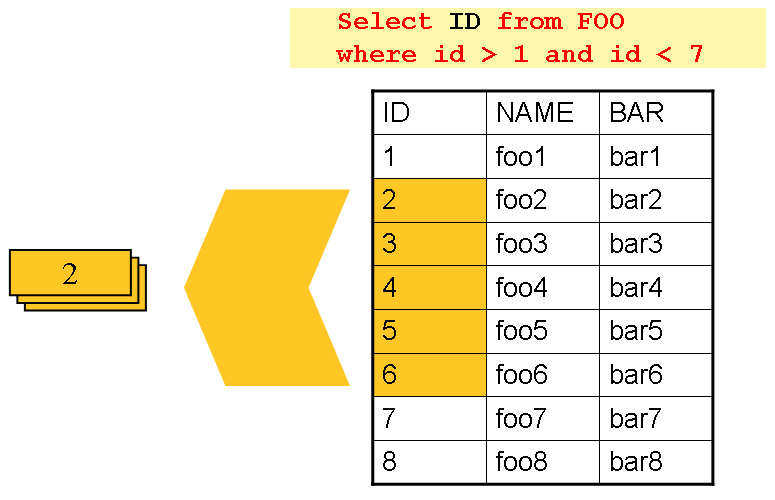
As you can see, the example shown in the preceding image uses the same 'FOO' table as was
used in the cursor-based example. However, rather than selecting the entire row, only the
IDs were selected in the SQL statement. So, rather than a FOO object being returned
from read, an Integer is returned. This number can then be used to query for the
'details', which is a complete Foo object, as shown in the following image:
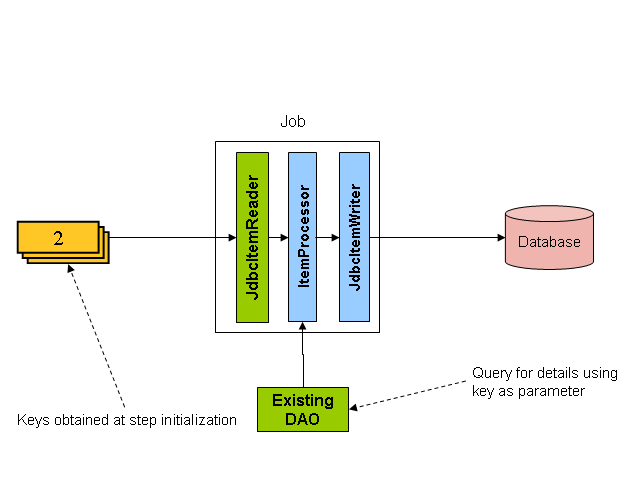
An ItemProcessor should be used to transform the key obtained from the driving query
into a full 'Foo' object. An existing DAO can be used to query for the full object based
on the key.
11.5. Multi-Line Records
While it is usually the case with flat files that each record is confined to a single line, it is common that a file might have records spanning multiple lines with multiple formats. The following excerpt from a file shows an example of such an arrangement:
HEA;0013100345;2007-02-15 NCU;Smith;Peter;;T;20014539;F BAD;;Oak Street 31/A;;Small Town;00235;IL;US FOT;2;2;267.34
Everything between the line starting with 'HEA' and the line starting with 'FOT' is considered one record. There are a few considerations that must be made in order to handle this situation correctly:
-
Instead of reading one record at a time, the
ItemReadermust read every line of the multi-line record as a group, so that it can be passed to theItemWriterintact. -
Each line type may need to be tokenized differently.
Because a single record spans multiple lines and because we may not know how many lines
there are, the ItemReader must be careful to always read an entire record. In order to
do this, a custom ItemReader should be implemented as a wrapper for the
FlatFileItemReader, as shown in the following example:
<bean id="itemReader" class="org.spr...MultiLineTradeItemReader">
<property name="delegate">
<bean class="org.springframework.batch.item.file.FlatFileItemReader">
<property name="resource" value="data/iosample/input/multiLine.txt" />
<property name="lineMapper">
<bean class="org.spr...DefaultLineMapper">
<property name="lineTokenizer" ref="orderFileTokenizer"/>
<property name="fieldSetMapper" ref="orderFieldSetMapper"/>
</bean>
</property>
</bean>
</property>
</bean>@Bean
public MultiLineTradeItemReader itemReader() {
MultiLineTradeItemReader itemReader = new MultiLineTradeItemReader();
itemReader.setDelegate(flatFileItemReader());
return itemReader;
}
@Bean
public FlatFileItemReader flatFileItemReader() {
FlatFileItemReader<Trade> reader = new FlatFileItemReaderBuilder<>()
.name("flatFileItemReader")
.resource(new ClassPathResource("data/iosample/input/multiLine.txt"))
.lineTokenizer(orderFileTokenizer())
.fieldSetMapper(orderFieldSetMapper())
.build();
return reader;
}To ensure that each line is tokenized properly, which is especially important for
fixed-length input, the PatternMatchingCompositeLineTokenizer can be used on the
delegate FlatFileItemReader. See
FlatFileItemReader in the Readers and
Writers chapter for more details. The delegate reader then uses a
PassThroughFieldSetMapper to deliver a FieldSet for each line back to the wrapping
ItemReader, as shown in the following example:
<bean id="orderFileTokenizer" class="org.spr...PatternMatchingCompositeLineTokenizer">
<property name="tokenizers">
<map>
<entry key="HEA*" value-ref="headerRecordTokenizer" />
<entry key="FOT*" value-ref="footerRecordTokenizer" />
<entry key="NCU*" value-ref="customerLineTokenizer" />
<entry key="BAD*" value-ref="billingAddressLineTokenizer" />
</map>
</property>
</bean>@Bean
public PatternMatchingCompositeLineTokenizer orderFileTokenizer() {
PatternMatchingCompositeLineTokenizer tokenizer =
new PatternMatchingCompositeLineTokenizer();
Map<String, LineTokenizer> tokenizers = new HashMap<>(4);
tokenizers.put("HEA*", headerRecordTokenizer());
tokenizers.put("FOT*", footerRecordTokenizer());
tokenizers.put("NCU*", customerLineTokenizer());
tokenizers.put("BAD*", billingAddressLineTokenizer());
tokenizer.setTokenizers(tokenizers);
return tokenizer;
}This wrapper has to be able to recognize the end of a record so that it can continually
call read() on its delegate until the end is reached. For each line that is read, the
wrapper should build up the item to be returned. Once the footer is reached, the item can
be returned for delivery to the ItemProcessor and ItemWriter, as shown in the
following example:
private FlatFileItemReader<FieldSet> delegate;
public Trade read() throws Exception {
Trade t = null;
for (FieldSet line = null; (line = this.delegate.read()) != null;) {
String prefix = line.readString(0);
if (prefix.equals("HEA")) {
t = new Trade(); // Record must start with header
}
else if (prefix.equals("NCU")) {
Assert.notNull(t, "No header was found.");
t.setLast(line.readString(1));
t.setFirst(line.readString(2));
...
}
else if (prefix.equals("BAD")) {
Assert.notNull(t, "No header was found.");
t.setCity(line.readString(4));
t.setState(line.readString(6));
...
}
else if (prefix.equals("FOT")) {
return t; // Record must end with footer
}
}
Assert.isNull(t, "No 'END' was found.");
return null;
}11.6. Executing System Commands
Many batch jobs require that an external command be called from within the batch job. Such a process could be kicked off separately by the scheduler, but the advantage of common metadata about the run would be lost. Furthermore, a multi-step job would also need to be split up into multiple jobs as well.
Because the need is so common, Spring Batch provides a Tasklet implementation for
calling system commands, as shown in the following example:
<bean class="org.springframework.batch.core.step.tasklet.SystemCommandTasklet">
<property name="command" value="echo hello" />
<!-- 5 second timeout for the command to complete -->
<property name="timeout" value="5000" />
</bean>@Bean
public SystemCommandTasklet tasklet() {
SystemCommandTasklet tasklet = new SystemCommandTasklet();
tasklet.setCommand("echo hello");
tasklet.setTimeout(5000);
return tasklet;
}11.7. Handling Step Completion When No Input is Found
In many batch scenarios, finding no rows in a database or file to process is not
exceptional. The Step is simply considered to have found no work and completes with 0
items read. All of the ItemReader implementations provided out of the box in Spring
Batch default to this approach. This can lead to some confusion if nothing is written out
even when input is present (which usually happens if a file was misnamed or some similar
issue arises). For this reason, the metadata itself should be inspected to determine how
much work the framework found to be processed. However, what if finding no input is
considered exceptional? In this case, programmatically checking the metadata for no items
processed and causing failure is the best solution. Because this is a common use case,
Spring Batch provides a listener with exactly this functionality, as shown in
the class definition for NoWorkFoundStepExecutionListener:
public class NoWorkFoundStepExecutionListener extends StepExecutionListenerSupport {
public ExitStatus afterStep(StepExecution stepExecution) {
if (stepExecution.getReadCount() == 0) {
return ExitStatus.FAILED;
}
return null;
}
}The preceding StepExecutionListener inspects the readCount property of the
StepExecution during the 'afterStep' phase to determine if no items were read. If that
is the case, an exit code of FAILED is returned, indicating that the Step should fail.
Otherwise, null is returned, which does not affect the status of the Step.
11.8. Passing Data to Future Steps
It is often useful to pass information from one step to another. This can be done through
the ExecutionContext. The catch is that there are two ExecutionContexts: one at the
Step level and one at the Job level. The Step ExecutionContext remains only as
long as the step, while the Job ExecutionContext remains through the whole Job. On
the other hand, the Step ExecutionContext is updated every time the Step commits a
chunk, while the Job ExecutionContext is updated only at the end of each Step.
The consequence of this separation is that all data must be placed in the Step
ExecutionContext while the Step is executing. Doing so ensures that the data is
stored properly while the Step runs. If data is stored to the Job ExecutionContext,
then it is not persisted during Step execution. If the Step fails, that data is lost.
public class SavingItemWriter implements ItemWriter<Object> {
private StepExecution stepExecution;
public void write(List<? extends Object> items) throws Exception {
// ...
ExecutionContext stepContext = this.stepExecution.getExecutionContext();
stepContext.put("someKey", someObject);
}
@BeforeStep
public void saveStepExecution(StepExecution stepExecution) {
this.stepExecution = stepExecution;
}
}To make the data available to future Steps, it must be "promoted" to the Job
ExecutionContext after the step has finished. Spring Batch provides the
ExecutionContextPromotionListener for this purpose. The listener must be configured
with the keys related to the data in the ExecutionContext that must be promoted. It can
also, optionally, be configured with a list of exit code patterns for which the promotion
should occur (COMPLETED is the default). As with all listeners, it must be registered
on the Step as shown in the following example:
<job id="job1">
<step id="step1">
<tasklet>
<chunk reader="reader" writer="savingWriter" commit-interval="10"/>
</tasklet>
<listeners>
<listener ref="promotionListener"/>
</listeners>
</step>
<step id="step2">
...
</step>
</job>
<beans:bean id="promotionListener" class="org.spr....ExecutionContextPromotionListener">
<beans:property name="keys">
<list>
<value>someKey</value>
</list>
</beans:property>
</beans:bean>@Bean
public Job job1() {
return this.jobBuilderFactory.get("job1")
.start(step1())
.next(step1())
.build();
}
@Bean
public Step step1() {
return this.stepBuilderFactory.get("step1")
.<String, String>chunk(10)
.reader(reader())
.writer(savingWriter())
.listener(promotionListener())
.build();
}
@Bean
public ExecutionContextPromotionListener promotionListener() {
ExecutionContextPromotionListener listener = new ExecutionContextPromotionListener();
listener.setKeys(new String[] {"someKey" });
return listener;
}Finally, the saved values must be retrieved from the Job ExecutionContext, as shown
in the following example:
public class RetrievingItemWriter implements ItemWriter<Object> {
private Object someObject;
public void write(List<? extends Object> items) throws Exception {
// ...
}
@BeforeStep
public void retrieveInterstepData(StepExecution stepExecution) {
JobExecution jobExecution = stepExecution.getJobExecution();
ExecutionContext jobContext = jobExecution.getExecutionContext();
this.someObject = jobContext.get("someKey");
}
}12. JSR-352 Support
As of Spring Batch 3.0 support for JSR-352 has been fully implemented. This section is not a replacement for the spec itself and instead, intends to explain how the JSR-352 specific concepts apply to Spring Batch. Additional information on JSR-352 can be found via the JCP here: https://jcp.org/en/jsr/detail?id=352
12.1. General Notes about Spring Batch and JSR-352
Spring Batch and JSR-352 are structurally the same. They both have jobs that are made up of steps. They
both have readers, processors, writers, and listeners. However, their interactions are subtly different.
For example, the org.springframework.batch.core.SkipListener#onSkipInWrite(S item, Throwable t)
within Spring Batch receives two parameters: the item that was skipped and the Exception that caused the
skip. The JSR-352 version of the same method
(javax.batch.api.chunk.listener.SkipWriteListener#onSkipWriteItem(List<Object> items, Exception ex))
also receives two parameters. However the first one is a List of all the items
within the current chunk with the second being the Exception that caused the skip.
Because of these differences, it is important to note that there are two paths to execute a job within
Spring Batch: either a traditional Spring Batch job or a JSR-352 based job. While the use of Spring Batch
artifacts (readers, writers, etc) will work within a job configured via JSR-352’s JSL and executed via the
JsrJobOperator, they will behave according to the rules of JSR-352. It is also
important to note that batch artifacts that have been developed against the JSR-352 interfaces will not work
within a traditional Spring Batch job.
12.2. Setup
12.2.1. Application Contexts
All JSR-352 based jobs within Spring Batch consist of two application contexts. A parent context, that
contains beans related to the infrastructure of Spring Batch such as the JobRepository,
PlatformTransactionManager, etc and a child context that consists of the configuration
of the job to be run. The parent context is defined via the jsrBaseContext.xml provided
by the framework. This context may be overridden via the JSR-352-BASE-CONTEXT system
property.
|
The base context is not processed by the JSR-352 processors for things like property injection so no components requiring that additional processing should be configured there. |
12.2.2. Launching a JSR-352 based job
JSR-352 requires a very simple path to executing a batch job. The following code is all that is needed to execute your first batch job:
JobOperator operator = BatchRuntime.getJobOperator();
jobOperator.start("myJob", new Properties());While that is convenient for developers, the devil is in the details. Spring Batch bootstraps a bit of
infrastructure behind the scenes that a developer may want to override. The following is bootstrapped the
first time BatchRuntime.getJobOperator() is called:
Bean Name |
Default Configuration |
Notes |
dataSource |
Apache DBCP BasicDataSource with configured values. |
By default, HSQLDB is bootstrapped. |
|
|
References the dataSource bean defined above. |
A Datasource initializer |
This is configured to execute the scripts configured via the
|
|
jobRepository |
A JDBC based |
This |
jobLauncher |
|
Used to launch jobs. |
batchJobOperator |
|
The |
jobExplorer |
|
Used to address lookup functionality provided by the |
jobParametersConverter |
|
JSR-352 specific implementation of the |
jobRegistry |
|
Used by the |
placeholderProperties |
|
Loads the properties file |
|
None of the above beans are optional for executing JSR-352 based jobs. All may be overriden to provide customized functionality as needed. |
12.3. Dependency Injection
JSR-352 is based heavily on the Spring Batch programming model. As such, while not explicitly requiring a formal dependency injection implementation, DI of some kind implied. Spring Batch supports all three methods for loading batch artifacts defined by JSR-352:
-
Implementation Specific Loader - Spring Batch is built upon Spring and so supports Spring dependency injection within JSR-352 batch jobs.
-
Archive Loader - JSR-352 defines the existing of a batch.xml file that provides mappings between a logical name and a class name. This file must be found within the /META-INF/ directory if it is used.
-
Thread Context Class Loader - JSR-352 allows configurations to specify batch artifact implementations in their JSL by providing the fully qualified class name inline. Spring Batch supports this as well in JSR-352 configured jobs.
To use Spring dependency injection within a JSR-352 based batch job consists of configuring batch artifacts using a Spring application context as beans. Once the beans have been defined, a job can refer to them as it would any bean defined within the batch.xml.
<?xml version="1.0" encoding="UTF-8"?>
<beans xmlns="http://www.springframework.org/schema/beans"
xmlns:xsi="http://www.w3.org/2001/XMLSchema-instance"
xsi:schemaLocation="http://www.springframework.org/schema/beans
https://www.springframework.org/schema/beans/spring-beans.xsd
http://xmlns.jcp.org/xml/ns/javaee
https://xmlns.jcp.org/xml/ns/javaee/jobXML_1_0.xsd">
<!-- javax.batch.api.Batchlet implementation -->
<bean id="fooBatchlet" class="io.spring.FooBatchlet">
<property name="prop" value="bar"/>
</bean>
<!-- Job is defined using the JSL schema provided in JSR-352 -->
<job id="fooJob" xmlns="http://xmlns.jcp.org/xml/ns/javaee" version="1.0">
<step id="step1">
<batchlet ref="fooBatchlet"/>
</step>
</job>
</beans>@Configuration
public class BatchConfiguration {
@Bean
public Batchlet fooBatchlet() {
FooBatchlet batchlet = new FooBatchlet();
batchlet.setProp("bar");
return batchlet;
}
}
<?xml version="1.0" encoding="UTF-8"?>
<job id="fooJob" xmlns="http://xmlns.jcp.org/xml/ns/javaee" version="1.0">
<step id="step1" >
<batchlet ref="fooBatchlet" />
</step>
</job>The assembly of Spring contexts (imports, etc) works with JSR-352 jobs just as it would with any other Spring based application. The only difference with a JSR-352 based job is that the entry point for the context definition will be the job definition found in /META-INF/batch-jobs/.
To use the thread context class loader approach, all you need to do is provide the fully qualified class name as the ref. It is important to note that when using this approach or the batch.xml approach, the class referenced requires a no argument constructor which will be used to create the bean.
<?xml version="1.0" encoding="UTF-8"?>
<job id="fooJob" xmlns="http://xmlns.jcp.org/xml/ns/javaee" version="1.0">
<step id="step1" >
<batchlet ref="io.spring.FooBatchlet" />
</step>
</job>12.4. Batch Properties
12.4.1. Property Support
JSR-352 allows for properties to be defined at the Job, Step and batch artifact level by way of configuration in the JSL. Batch properties are configured at each level in the following way:
<properties>
<property name="propertyName1" value="propertyValue1"/>
<property name="propertyName2" value="propertyValue2"/>
</properties>Properties may be configured on any batch artifact.
12.4.2. @BatchProperty annotation
Properties are referenced in batch artifacts by annotating class fields with the
@BatchProperty and @Inject annotations (both annotations
are required by the spec). As defined by JSR-352, fields for properties must be String typed. Any type
conversion is up to the implementing developer to perform.
An javax.batch.api.chunk.ItemReader artifact could be configured with a
properties block such as the one described above and accessed as such:
public class MyItemReader extends AbstractItemReader {
@Inject
@BatchProperty
private String propertyName1;
...
}The value of the field "propertyName1" will be "propertyValue1"
12.4.3. Property Substitution
Property substitution is provided by way of operators and simple conditional expressions. The general
usage is #{operator['key']}.
Supported operators:
-
jobParameters - access job parameter values that the job was started/restarted with.
-
jobProperties - access properties configured at the job level of the JSL.
-
systemProperties - access named system properties.
-
partitionPlan - access named property from the partition plan of a partitioned step.
#{jobParameters['unresolving.prop']}?:#{systemProperties['file.separator']}
The left hand side of the assignment is the expected value, the right hand side is the default value. In
this example, the result will resolve to a value of the system property file.separator as
#{jobParameters['unresolving.prop']} is assumed to not be resolvable. If neither expressions can be
resolved, an empty String will be returned. Multiple conditions can be used, which are separated by a
';'.
12.5. Processing Models
JSR-352 provides the same two basic processing models that Spring Batch does:
-
Item based processing - Using an
javax.batch.api.chunk.ItemReader, an optionaljavax.batch.api.chunk.ItemProcessor, and anjavax.batch.api.chunk.ItemWriter. -
Task based processing - Using a
javax.batch.api.Batchletimplementation. This processing model is the same as theorg.springframework.batch.core.step.tasklet.Taskletbased processing currently available.
12.5.1. Item based processing
Item based processing in this context is a chunk size being set by the number of items read by an
ItemReader. To configure a step this way, specify the
item-count (which defaults to 10) and optionally configure the
checkpoint-policy as item (this is the default).
...
<step id="step1">
<chunk checkpoint-policy="item" item-count="3">
<reader ref="fooReader"/>
<processor ref="fooProcessor"/>
<writer ref="fooWriter"/>
</chunk>
</step>
...If item based checkpointing is chosen, an additional attribute time-limit is
supported. This sets a time limit for how long the number of items specified has to be processed. If
the timeout is reached, the chunk will complete with however many items have been read by then
regardless of what the item-count is configured to be.
12.5.2. Custom checkpointing
JSR-352 calls the process around the commit interval within a step "checkpointing". Item based
checkpointing is one approach as mentioned above. However, this will not be robust enough in many
cases. Because of this, the spec allows for the implementation of a custom checkpointing algorithm by
implementing the javax.batch.api.chunk.CheckpointAlgorithm interface. This
functionality is functionally the same as Spring Batch’s custom completion policy. To use an
implementation of CheckpointAlgorithm, configure your step with the custom
checkpoint-policy as shown below where fooCheckpointer refers to an
implementation of CheckpointAlgorithm.
...
<step id="step1">
<chunk checkpoint-policy="custom">
<checkpoint-algorithm ref="fooCheckpointer"/>
<reader ref="fooReader"/>
<processor ref="fooProcessor"/>
<writer ref="fooWriter"/>
</chunk>
</step>
...12.6. Running a job
The entrance to executing a JSR-352 based job is through the
javax.batch.operations.JobOperator. Spring Batch provides its own implementation of
this interface (org.springframework.batch.core.jsr.launch.JsrJobOperator). This
implementation is loaded via the javax.batch.runtime.BatchRuntime. Launching a
JSR-352 based batch job is implemented as follows:
JobOperator jobOperator = BatchRuntime.getJobOperator();
long jobExecutionId = jobOperator.start("fooJob", new Properties());The above code does the following:
-
Bootstraps a base
ApplicationContext- In order to provide batch functionality, the framework needs some infrastructure bootstrapped. This occurs once per JVM. The components that are bootstrapped are similar to those provided by@EnableBatchProcessing. Specific details can be found in the javadoc for theJsrJobOperator. -
Loads an
ApplicationContextfor the job requested - In the example above, the framework will look in /META-INF/batch-jobs for a file named fooJob.xml and load a context that is a child of the shared context mentioned previously. -
Launch the job - The job defined within the context will be executed asynchronously. The
JobExecution’sid will be returned.
|
All JSR-352 based batch jobs are executed asynchronously. |
When JobOperator#start is called using SimpleJobOperator,
Spring Batch determines if the call is an initial run or a retry of a previously executed run. Using the
JSR-352 based JobOperator#start(String jobXMLName, Properties jobParameters), the
framework will always create a new JobInstance (JSR-352 job parameters are
non-identifying). In order to restart a job, a call to
JobOperator#restart(long executionId, Properties restartParameters) is required.
12.7. Contexts
JSR-352 defines two context objects that are used to interact with the meta-data of a job or step from
within a batch artifact: javax.batch.runtime.context.JobContext and
javax.batch.runtime.context.StepContext. Both of these are available in any step
level artifact (Batchlet, ItemReader, etc) with the
JobContext being available to job level artifacts as well
(JobListener for example).
To obtain a reference to the JobContext or StepContext
within the current scope, simply use the @Inject annotation:
@Inject
JobContext jobContext;|
@Autowire for JSR-352 contexts
Using Spring’s @Autowire is not supported for the injection of these contexts. |
In Spring Batch, the JobContext and StepContext wrap their
corresponding execution objects (JobExecution and
StepExecution respectively). Data stored via
StepContext#setPersistentUserData(Serializable data) is stored in the
Spring Batch StepExecution#executionContext.
12.8. Step Flow
Within a JSR-352 based job, the flow of steps works similarly as it does within Spring Batch. However, there are a few subtle differences:
-
Decision’s are steps - In a regular Spring Batch job, a decision is a state that does not have an independent
StepExecutionor any of the rights and responsibilities that go along with being a full step.. However, with JSR-352, a decision is a step just like any other and will behave just as any other steps (transactionality, it gets aStepExecution, etc). This means that they are treated the same as any other step on restarts as well. -
nextattribute and step transitions - In a regular job, these are allowed to appear together in the same step. JSR-352 allows them to both be used in the same step with the next attribute taking precedence in evaluation. -
Transition element ordering - In a standard Spring Batch job, transition elements are sorted from most specific to least specific and evaluated in that order. JSR-352 jobs evaluate transition elements in the order they are specified in the XML.
12.9. Scaling a JSR-352 batch job
Traditional Spring Batch jobs have four ways of scaling (the last two capable of being executed across multiple JVMs):
-
Split - Running multiple steps in parallel.
-
Multiple threads - Executing a single step via multiple threads.
-
Partitioning - Dividing the data up for parallel processing (manager/worker).
-
Remote Chunking - Executing the processor piece of logic remotely.
JSR-352 provides two options for scaling batch jobs. Both options support only a single JVM:
-
Split - Same as Spring Batch
-
Partitioning - Conceptually the same as Spring Batch however implemented slightly different.
12.9.1. Partitioning
Conceptually, partitioning in JSR-352 is the same as it is in Spring Batch. Meta-data is provided to each worker to identify the input to be processed, with the workers reporting back to the manager the results upon completion. However, there are some important differences:
-
Partitioned
Batchlet- This will run multiple instances of the configuredBatchleton multiple threads. Each instance will have it’s own set of properties as provided by the JSL or thePartitionPlan -
PartitionPlan- With Spring Batch’s partitioning, anExecutionContextis provided for each partition. With JSR-352, a singlejavax.batch.api.partition.PartitionPlanis provided with an array ofPropertiesproviding the meta-data for each partition. -
PartitionMapper- JSR-352 provides two ways to generate partition meta-data. One is via the JSL (partition properties). The second is via an implementation of thejavax.batch.api.partition.PartitionMapperinterface. Functionally, this interface is similar to theorg.springframework.batch.core.partition.support.Partitionerinterface provided by Spring Batch in that it provides a way to programmatically generate meta-data for partitioning. -
StepExecutions- In Spring Batch, partitioned steps are run as manager/worker. Within JSR-352, the same configuration occurs. However, the worker steps do not get officialStepExecutions. Because of that, calls toJsrJobOperator#getStepExecutions(long jobExecutionId)will only return theStepExecutionfor the manager.
|
The child |
-
Compensating logic - Since Spring Batch implements the manager/worker logic of partitioning using steps,
StepExecutionListenerscan be used to handle compensating logic if something goes wrong. However, since the workers JSR-352 provides a collection of other components for the ability to provide compensating logic when errors occur and to dynamically set the exit status. These components include the following:
Artifact Interface |
Description |
|
Provides a way for worker steps to send information back to the manager. There is one instance per worker thread. |
|
End point that receives the information collected by the
|
|
Provides the ability to provide compensating logic for a partitioned step. |
12.10. Testing
Since all JSR-352 based jobs are executed asynchronously, it can be difficult to determine when a job has
completed. To help with testing, Spring Batch provides the
org.springframework.batch.test.JsrTestUtils. This utility class provides the
ability to start a job and restart a job and wait for it to complete. Once the job completes, the
associated JobExecution is returned.
13. Spring Batch Integration
13.1. Spring Batch Integration Introduction
Many users of Spring Batch may encounter requirements that are outside the scope of Spring Batch but that may be efficiently and concisely implemented by using Spring Integration. Conversely, Spring Integration users may encounter Spring Batch requirements and need a way to efficiently integrate both frameworks. In this context, several patterns and use-cases emerge, and Spring Batch Integration addresses those requirements.
The line between Spring Batch and Spring Integration is not always clear, but two pieces of advice can help: Think about granularity, and apply common patterns. Some of those common patterns are described in this reference manual section.
Adding messaging to a batch process enables automation of operations and also separation and strategizing of key concerns. For example, a message might trigger a job to execute, and then the sending of the message can be exposed in a variety of ways. Alternatively, when a job completes or fails, that event might trigger a message to be sent, and the consumers of those messages might have operational concerns that have nothing to do with the application itself. Messaging can also be embedded in a job (for example reading or writing items for processing via channels). Remote partitioning and remote chunking provide methods to distribute workloads over a number of workers.
This section covers the following key concepts:
13.1.1. Namespace Support
Since Spring Batch Integration 1.3, dedicated XML Namespace support was added, with the aim to provide an easier configuration experience. In order to activate the namespace, add the following namespace declarations to your Spring XML Application Context file:
<beans xmlns="http://www.springframework.org/schema/beans"
xmlns:xsi="http://www.w3.org/2001/XMLSchema-instance"
xmlns:batch-int="http://www.springframework.org/schema/batch-integration"
xsi:schemaLocation="
http://www.springframework.org/schema/batch-integration
https://www.springframework.org/schema/batch-integration/spring-batch-integration.xsd">
...
</beans>A fully configured Spring XML Application Context file for Spring Batch Integration may look like the following:
<beans xmlns="http://www.springframework.org/schema/beans"
xmlns:xsi="http://www.w3.org/2001/XMLSchema-instance"
xmlns:int="http://www.springframework.org/schema/integration"
xmlns:batch="http://www.springframework.org/schema/batch"
xmlns:batch-int="http://www.springframework.org/schema/batch-integration"
xsi:schemaLocation="
http://www.springframework.org/schema/batch-integration
https://www.springframework.org/schema/batch-integration/spring-batch-integration.xsd
http://www.springframework.org/schema/batch
https://www.springframework.org/schema/batch/spring-batch.xsd
http://www.springframework.org/schema/beans
https://www.springframework.org/schema/beans/spring-beans.xsd
http://www.springframework.org/schema/integration
https://www.springframework.org/schema/integration/spring-integration.xsd">
...
</beans>Appending version numbers to the referenced XSD file is also allowed, but, as a version-less declaration always uses the latest schema, we generally do not recommend appending the version number to the XSD name. Adding a version number could possibly create issues when updating the Spring Batch Integration dependencies, as they may require more recent versions of the XML schema.
13.1.2. Launching Batch Jobs through Messages
When starting batch jobs by using the core Spring Batch API, you basically have 2 options:
-
From the command line, with the
CommandLineJobRunner -
Programmatically, with either
JobOperator.start()orJobLauncher.run()
For example, you may want to use the
CommandLineJobRunner when invoking Batch Jobs by
using a shell script. Alternatively, you may use the
JobOperator directly (for example, when using
Spring Batch as part of a web application). However, what about
more complex use cases? Maybe you need to poll a remote (S)FTP
server to retrieve the data for the Batch Job or your application
has to support multiple different data sources simultaneously. For
example, you may receive data files not only from the web, but also from
FTP and other sources. Maybe additional transformation of the input files is
needed before invoking Spring Batch.
Therefore, it would be much more powerful to execute the batch job
using Spring Integration and its numerous adapters. For example,
you can use a File Inbound Channel Adapter to
monitor a directory in the file-system and start the Batch Job as
soon as the input file arrives. Additionally, you can create Spring
Integration flows that use multiple different adapters to easily
ingest data for your batch jobs from multiple sources
simultaneously using only configuration. Implementing all these
scenarios with Spring Integration is easy, as it allows for
decoupled, event-driven execution of the
JobLauncher.
Spring Batch Integration provides the
JobLaunchingMessageHandler class that you can
use to launch batch jobs. The input for the
JobLaunchingMessageHandler is provided by a
Spring Integration message, which has a payload of type
JobLaunchRequest. This class is a wrapper around the Job
that needs to be launched and around the JobParameters
necessary to launch the Batch job.
The following image illustrates the typical Spring Integration message flow in order to start a Batch job. The EIP (Enterprise Integration Patterns) website provides a full overview of messaging icons and their descriptions.
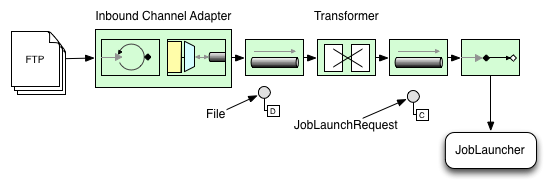
Transforming a file into a JobLaunchRequest
package io.spring.sbi;
import org.springframework.batch.core.Job;
import org.springframework.batch.core.JobParametersBuilder;
import org.springframework.batch.integration.launch.JobLaunchRequest;
import org.springframework.integration.annotation.Transformer;
import org.springframework.messaging.Message;
import java.io.File;
public class FileMessageToJobRequest {
private Job job;
private String fileParameterName;
public void setFileParameterName(String fileParameterName) {
this.fileParameterName = fileParameterName;
}
public void setJob(Job job) {
this.job = job;
}
@Transformer
public JobLaunchRequest toRequest(Message<File> message) {
JobParametersBuilder jobParametersBuilder =
new JobParametersBuilder();
jobParametersBuilder.addString(fileParameterName,
message.getPayload().getAbsolutePath());
return new JobLaunchRequest(job, jobParametersBuilder.toJobParameters());
}
}The JobExecution Response
When a batch job is being executed, a
JobExecution instance is returned. This
instance can be used to determine the status of an execution. If
a JobExecution is able to be created
successfully, it is always returned, regardless of whether
or not the actual execution is successful.
The exact behavior on how the JobExecution
instance is returned depends on the provided
TaskExecutor. If a
synchronous (single-threaded)
TaskExecutor implementation is used, the
JobExecution response is returned only
after the job completes. When using an
asynchronous
TaskExecutor, the
JobExecution instance is returned
immediately. Users can then take the id of
JobExecution instance
(with JobExecution.getJobId()) and query the
JobRepository for the job’s updated status
using the JobExplorer. For more
information, please refer to the Spring
Batch reference documentation on
Querying the Repository.
Spring Batch Integration Configuration
The following configuration creates a file
inbound-channel-adapter to listen for CSV
files in the provided directory, hand them off to our
transformer (FileMessageToJobRequest),
launch the job via the Job Launching Gateway, and then log the output of the
JobExecution with the
logging-channel-adapter.
<int:channel id="inboundFileChannel"/>
<int:channel id="outboundJobRequestChannel"/>
<int:channel id="jobLaunchReplyChannel"/>
<int-file:inbound-channel-adapter id="filePoller"
channel="inboundFileChannel"
directory="file:/tmp/myfiles/"
filename-pattern="*.csv">
<int:poller fixed-rate="1000"/>
</int-file:inbound-channel-adapter>
<int:transformer input-channel="inboundFileChannel"
output-channel="outboundJobRequestChannel">
<bean class="io.spring.sbi.FileMessageToJobRequest">
<property name="job" ref="personJob"/>
<property name="fileParameterName" value="input.file.name"/>
</bean>
</int:transformer>
<batch-int:job-launching-gateway request-channel="outboundJobRequestChannel"
reply-channel="jobLaunchReplyChannel"/>
<int:logging-channel-adapter channel="jobLaunchReplyChannel"/>@Bean
public FileMessageToJobRequest fileMessageToJobRequest() {
FileMessageToJobRequest fileMessageToJobRequest = new FileMessageToJobRequest();
fileMessageToJobRequest.setFileParameterName("input.file.name");
fileMessageToJobRequest.setJob(personJob());
return fileMessageToJobRequest;
}
@Bean
public JobLaunchingGateway jobLaunchingGateway() {
SimpleJobLauncher simpleJobLauncher = new SimpleJobLauncher();
simpleJobLauncher.setJobRepository(jobRepository);
simpleJobLauncher.setTaskExecutor(new SyncTaskExecutor());
JobLaunchingGateway jobLaunchingGateway = new JobLaunchingGateway(simpleJobLauncher);
return jobLaunchingGateway;
}
@Bean
public IntegrationFlow integrationFlow(JobLaunchingGateway jobLaunchingGateway) {
return IntegrationFlows.from(Files.inboundAdapter(new File("/tmp/myfiles")).
filter(new SimplePatternFileListFilter("*.csv")),
c -> c.poller(Pollers.fixedRate(1000).maxMessagesPerPoll(1))).
handle(fileMessageToJobRequest()).
handle(jobLaunchingGateway).
log(LoggingHandler.Level.WARN, "headers.id + ': ' + payload").
get();
}Example ItemReader Configuration
Now that we are polling for files and launching jobs, we need to
configure our Spring Batch
ItemReader (for example) to use the files found at the location defined
by the job parameter called "input.file.name", as shown in the following bean configuration:
<bean id="itemReader" class="org.springframework.batch.item.file.FlatFileItemReader"
scope="step">
<property name="resource" value="file://#{jobParameters['input.file.name']}"/>
...
</bean>@Bean
@StepScope
public ItemReader sampleReader(@Value("#{jobParameters[input.file.name]}") String resource) {
...
FlatFileItemReader flatFileItemReader = new FlatFileItemReader();
flatFileItemReader.setResource(new FileSystemResource(resource));
...
return flatFileItemReader;
}The main points of interest in the preceding example are injecting the value of
#{jobParameters['input.file.name']}
as the Resource property value and setting the ItemReader bean
to have Step scope. Setting the bean to have Step scope takes advantage of
the late binding support, which allows access to the
jobParameters variable.
13.2. Available Attributes of the Job-Launching Gateway
The job-launching gateway has the following attributes that you can set to control a job:
-
id: Identifies the underlying Spring bean definition, which is an instance of either:-
EventDrivenConsumer -
PollingConsumer(The exact implementation depends on whether the component’s input channel is aSubscribableChannelorPollableChannel.)
-
-
auto-startup: Boolean flag to indicate that the endpoint should start automatically on startup. The default is true. -
request-channel: The inputMessageChannelof this endpoint. -
reply-channel:MessageChannelto which the resultingJobExecutionpayload is sent. -
reply-timeout: Lets you specify how long (in milliseconds) this gateway waits for the reply message to be sent successfully to the reply channel before throwing an exception. This attribute only applies when the channel might block (for example, when using a bounded queue channel that is currently full). Also, keep in mind that, when sending to aDirectChannel, the invocation occurs in the sender’s thread. Therefore, the failing of the send operation may be caused by other components further downstream. Thereply-timeoutattribute maps to thesendTimeoutproperty of the underlyingMessagingTemplateinstance. If not specified, the attribute defaults to<emphasis>-1</emphasis>, meaning that, by default, theGatewaywaits indefinitely. -
job-launcher: Optional. Accepts a customJobLauncherbean reference. If not specified the adapter re-uses the instance that is registered under theidofjobLauncher. If no default instance exists, an exception is thrown. -
order: Specifies the order of invocation when this endpoint is connected as a subscriber to aSubscribableChannel.
13.3. Sub-Elements
When this Gateway is receiving messages from a
PollableChannel, you must either provide
a global default Poller or provide a Poller sub-element to the
Job Launching Gateway, as shown in the following example:
<batch-int:job-launching-gateway request-channel="queueChannel"
reply-channel="replyChannel" job-launcher="jobLauncher">
<int:poller fixed-rate="1000">
</batch-int:job-launching-gateway>@Bean
@ServiceActivator(inputChannel = "queueChannel", poller = @Poller(fixedRate="1000"))
public JobLaunchingGateway sampleJobLaunchingGateway() {
JobLaunchingGateway jobLaunchingGateway = new JobLaunchingGateway(jobLauncher());
jobLaunchingGateway.setOutputChannel(replyChannel());
return jobLaunchingGateway;
}13.3.1. Providing Feedback with Informational Messages
As Spring Batch jobs can run for long times, providing progress information is often critical. For example, stake-holders may want to be notified if some or all parts of a batch job have failed. Spring Batch provides support for this information being gathered through:
-
Active polling
-
Event-driven listeners
When starting a Spring Batch job asynchronously (for example, by using the
Job Launching Gateway), a
JobExecution instance is returned. Thus,
JobExecution.getJobId() can be used to
continuously poll for status updates by retrieving updated
instances of the JobExecution from the
JobRepository by using the
JobExplorer. However, this is considered
sub-optimal, and an event-driven approach should be preferred.
Therefore, Spring Batch provides listeners, including the three most commonly used listeners:
-
StepListener
-
ChunkListener
-
JobExecutionListener
In the example shown in the following image, a Spring Batch job has been configured with a
StepExecutionListener. Thus, Spring
Integration receives and processes any step before or after
events. For example, the received
StepExecution can be inspected by using a
Router. Based on the results of that
inspection, various things can occur (such as routing a message
to a Mail Outbound Channel Adapter), so that an Email notification
can be sent out based on some condition.
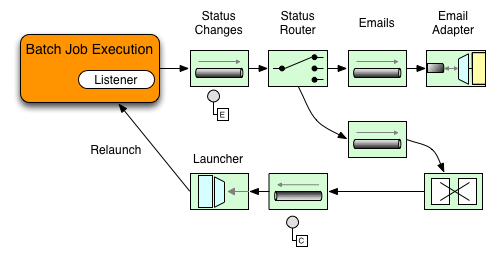
The following two-part example shows how a listener is configured to send a
message to a Gateway for a
StepExecution events and log its output to a
logging-channel-adapter.
First, create the notification integration beans:
<int:channel id="stepExecutionsChannel"/>
<int:gateway id="notificationExecutionsListener"
service-interface="org.springframework.batch.core.StepExecutionListener"
default-request-channel="stepExecutionsChannel"/>
<int:logging-channel-adapter channel="stepExecutionsChannel"/>@Bean
@ServiceActivator(inputChannel = "stepExecutionsChannel")
public LoggingHandler loggingHandler() {
LoggingHandler adapter = new LoggingHandler(LoggingHandler.Level.WARN);
adapter.setLoggerName("TEST_LOGGER");
adapter.setLogExpressionString("headers.id + ': ' + payload");
return adapter;
}
@MessagingGateway(name = "notificationExecutionsListener", defaultRequestChannel = "stepExecutionsChannel")
public interface NotificationExecutionListener extends StepExecutionListener {}
You will need to add the @IntegrationComponentScan annotation to your configuration.
|
Second, modify your job to add a step-level listener:
<job id="importPayments">
<step id="step1">
<tasklet ../>
<chunk ../>
<listeners>
<listener ref="notificationExecutionsListener"/>
</listeners>
</tasklet>
...
</step>
</job>public Job importPaymentsJob() {
return jobBuilderFactory.get("importPayments")
.start(stepBuilderFactory.get("step1")
.chunk(200)
.listener(notificationExecutionsListener())
...
}13.3.2. Asynchronous Processors
Asynchronous Processors help you to scale the processing of
items. In the asynchronous processor use case, an
AsyncItemProcessor serves as a dispatcher,
executing the logic of the ItemProcessor for an
item on a new thread. Once the item completes, the Future is passed to
the AsynchItemWriter to be written.
Therefore, you can increase performance by using asynchronous item
processing, basically allowing you to implement
fork-join scenarios. The
AsyncItemWriter gathers the results and
writes back the chunk as soon as all the results become available.
The following example shows how to configuration the AsyncItemProcessor:
<bean id="processor"
class="org.springframework.batch.integration.async.AsyncItemProcessor">
<property name="delegate">
<bean class="your.ItemProcessor"/>
</property>
<property name="taskExecutor">
<bean class="org.springframework.core.task.SimpleAsyncTaskExecutor"/>
</property>
</bean>@Bean
public AsyncItemProcessor processor(ItemProcessor itemProcessor, TaskExecutor taskExecutor) {
AsyncItemProcessor asyncItemProcessor = new AsyncItemProcessor();
asyncItemProcessor.setTaskExecutor(taskExecutor);
asyncItemProcessor.setDelegate(itemProcessor);
return asyncItemProcessor;
}The delegate property refers
to your ItemProcessor bean, and
the taskExecutor property
refers to the TaskExecutor of your choice.
The following example shows how to configure the AsyncItemWriter:
<bean id="itemWriter"
class="org.springframework.batch.integration.async.AsyncItemWriter">
<property name="delegate">
<bean id="itemWriter" class="your.ItemWriter"/>
</property>
</bean>@Bean
public AsyncItemWriter writer(ItemWriter itemWriter) {
AsyncItemWriter asyncItemWriter = new AsyncItemWriter();
asyncItemWriter.setDelegate(itemWriter);
return asyncItemWriter;
}Again, the delegate property is
actually a reference to your ItemWriter bean.
13.3.3. Externalizing Batch Process Execution
The integration approaches discussed so far suggest use cases where Spring Integration wraps Spring Batch like an outer-shell. However, Spring Batch can also use Spring Integration internally. Using this approach, Spring Batch users can delegate the processing of items or even chunks to outside processes. This allows you to offload complex processing. Spring Batch Integration provides dedicated support for:
-
Remote Chunking
-
Remote Partitioning
Remote Chunking
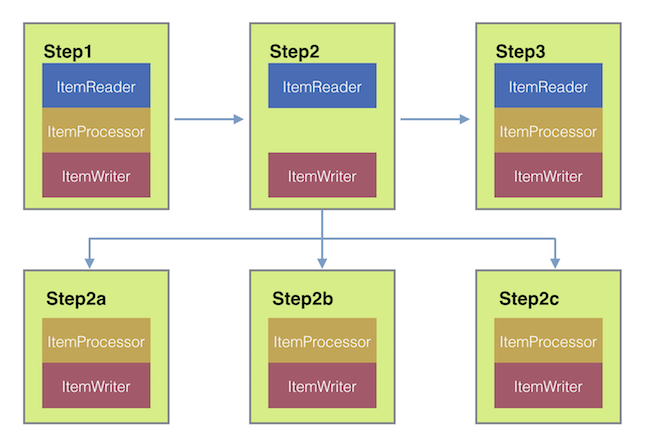
Taking things one step further, one can also externalize the
chunk processing by using the
ChunkMessageChannelItemWriter
(provided by Spring Batch Integration), which sends items out
and collects the result. Once sent, Spring Batch continues the
process of reading and grouping items, without waiting for the results.
Rather, it is the responsibility of the ChunkMessageChannelItemWriter
to gather the results and integrate them back into the Spring Batch process.
With Spring Integration, you have full
control over the concurrency of your processes (for instance, by
using a QueueChannel instead of a
DirectChannel). Furthermore, by relying on
Spring Integration’s rich collection of Channel Adapters (such as
JMS and AMQP), you can distribute chunks of a Batch job to
external systems for processing.
A simple job with a step to be remotely chunked might have a configuration similar to the following:
<job id="personJob">
<step id="step1">
<tasklet>
<chunk reader="itemReader" writer="itemWriter" commit-interval="200"/>
</tasklet>
...
</step>
</job>public Job chunkJob() {
return jobBuilderFactory.get("personJob")
.start(stepBuilderFactory.get("step1")
.<Person, Person>chunk(200)
.reader(itemReader())
.writer(itemWriter())
.build())
.build();
}The ItemReader reference points to the bean you want
to use for reading data on the manager. The ItemWriter reference
points to a special ItemWriter
(called ChunkMessageChannelItemWriter),
as described above. The processor (if any) is left off the
manager configuration, as it is configured on the worker. The
following configuration provides a basic manager setup. You
should check any additional component properties, such as
throttle limits and so on, when implementing your use case.
<bean id="connectionFactory" class="org.apache.activemq.ActiveMQConnectionFactory">
<property name="brokerURL" value="tcp://localhost:61616"/>
</bean>
<int-jms:outbound-channel-adapter id="jmsRequests" destination-name="requests"/>
<bean id="messagingTemplate"
class="org.springframework.integration.core.MessagingTemplate">
<property name="defaultChannel" ref="requests"/>
<property name="receiveTimeout" value="2000"/>
</bean>
<bean id="itemWriter"
class="org.springframework.batch.integration.chunk.ChunkMessageChannelItemWriter"
scope="step">
<property name="messagingOperations" ref="messagingTemplate"/>
<property name="replyChannel" ref="replies"/>
</bean>
<int:channel id="replies">
<int:queue/>
</int:channel>
<int-jms:message-driven-channel-adapter id="jmsReplies"
destination-name="replies"
channel="replies"/>@Bean
public org.apache.activemq.ActiveMQConnectionFactory connectionFactory() {
ActiveMQConnectionFactory factory = new ActiveMQConnectionFactory();
factory.setBrokerURL("tcp://localhost:61616");
return factory;
}
/*
* Configure outbound flow (requests going to workers)
*/
@Bean
public DirectChannel requests() {
return new DirectChannel();
}
@Bean
public IntegrationFlow outboundFlow(ActiveMQConnectionFactory connectionFactory) {
return IntegrationFlows
.from(requests())
.handle(Jms.outboundAdapter(connectionFactory).destination("requests"))
.get();
}
/*
* Configure inbound flow (replies coming from workers)
*/
@Bean
public QueueChannel replies() {
return new QueueChannel();
}
@Bean
public IntegrationFlow inboundFlow(ActiveMQConnectionFactory connectionFactory) {
return IntegrationFlows
.from(Jms.messageDrivenChannelAdapter(connectionFactory).destination("replies"))
.channel(replies())
.get();
}
/*
* Configure the ChunkMessageChannelItemWriter
*/
@Bean
public ItemWriter<Integer> itemWriter() {
MessagingTemplate messagingTemplate = new MessagingTemplate();
messagingTemplate.setDefaultChannel(requests());
messagingTemplate.setReceiveTimeout(2000);
ChunkMessageChannelItemWriter<Integer> chunkMessageChannelItemWriter
= new ChunkMessageChannelItemWriter<>();
chunkMessageChannelItemWriter.setMessagingOperations(messagingTemplate);
chunkMessageChannelItemWriter.setReplyChannel(replies());
return chunkMessageChannelItemWriter;
}The preceding configuration provides us with a number of beans. We
configure our messaging middleware using ActiveMQ and the
inbound/outbound JMS adapters provided by Spring Integration. As
shown, our itemWriter bean, which is
referenced by our job step, uses the
ChunkMessageChannelItemWriter for writing chunks over the
configured middleware.
Now we can move on to the worker configuration, as shown in the following example:
<bean id="connectionFactory" class="org.apache.activemq.ActiveMQConnectionFactory">
<property name="brokerURL" value="tcp://localhost:61616"/>
</bean>
<int:channel id="requests"/>
<int:channel id="replies"/>
<int-jms:message-driven-channel-adapter id="incomingRequests"
destination-name="requests"
channel="requests"/>
<int-jms:outbound-channel-adapter id="outgoingReplies"
destination-name="replies"
channel="replies">
</int-jms:outbound-channel-adapter>
<int:service-activator id="serviceActivator"
input-channel="requests"
output-channel="replies"
ref="chunkProcessorChunkHandler"
method="handleChunk"/>
<bean id="chunkProcessorChunkHandler"
class="org.springframework.batch.integration.chunk.ChunkProcessorChunkHandler">
<property name="chunkProcessor">
<bean class="org.springframework.batch.core.step.item.SimpleChunkProcessor">
<property name="itemWriter">
<bean class="io.spring.sbi.PersonItemWriter"/>
</property>
<property name="itemProcessor">
<bean class="io.spring.sbi.PersonItemProcessor"/>
</property>
</bean>
</property>
</bean>@Bean
public org.apache.activemq.ActiveMQConnectionFactory connectionFactory() {
ActiveMQConnectionFactory factory = new ActiveMQConnectionFactory();
factory.setBrokerURL("tcp://localhost:61616");
return factory;
}
/*
* Configure inbound flow (requests coming from the manager)
*/
@Bean
public DirectChannel requests() {
return new DirectChannel();
}
@Bean
public IntegrationFlow inboundFlow(ActiveMQConnectionFactory connectionFactory) {
return IntegrationFlows
.from(Jms.messageDrivenChannelAdapter(connectionFactory).destination("requests"))
.channel(requests())
.get();
}
/*
* Configure outbound flow (replies going to the manager)
*/
@Bean
public DirectChannel replies() {
return new DirectChannel();
}
@Bean
public IntegrationFlow outboundFlow(ActiveMQConnectionFactory connectionFactory) {
return IntegrationFlows
.from(replies())
.handle(Jms.outboundAdapter(connectionFactory).destination("replies"))
.get();
}
/*
* Configure the ChunkProcessorChunkHandler
*/
@Bean
@ServiceActivator(inputChannel = "requests", outputChannel = "replies")
public ChunkProcessorChunkHandler<Integer> chunkProcessorChunkHandler() {
ChunkProcessor<Integer> chunkProcessor
= new SimpleChunkProcessor<>(itemProcessor(), itemWriter());
ChunkProcessorChunkHandler<Integer> chunkProcessorChunkHandler
= new ChunkProcessorChunkHandler<>();
chunkProcessorChunkHandler.setChunkProcessor(chunkProcessor);
return chunkProcessorChunkHandler;
}Most of these configuration items should look familiar from the
manager configuration. Workers do not need access to
the Spring Batch JobRepository nor
to the actual job configuration file. The main bean of interest
is the chunkProcessorChunkHandler. The
chunkProcessor property of ChunkProcessorChunkHandler takes a
configured SimpleChunkProcessor, which is where you would provide a reference to your
ItemWriter (and, optionally, your
ItemProcessor) that will run on the worker
when it receives chunks from the manager.
For more information, see the section of the "Scalability" chapter on Remote Chunking.
Starting from version 4.1, Spring Batch Integration introduces the @EnableBatchIntegration
annotation that can be used to simplify a remote chunking setup. This annotation provides
two beans that can be autowired in the application context:
-
RemoteChunkingManagerStepBuilderFactory: used to configure the manager step -
RemoteChunkingWorkerBuilder: used to configure the remote worker integration flow
These APIs take care of configuring a number of components as described in the following diagram:
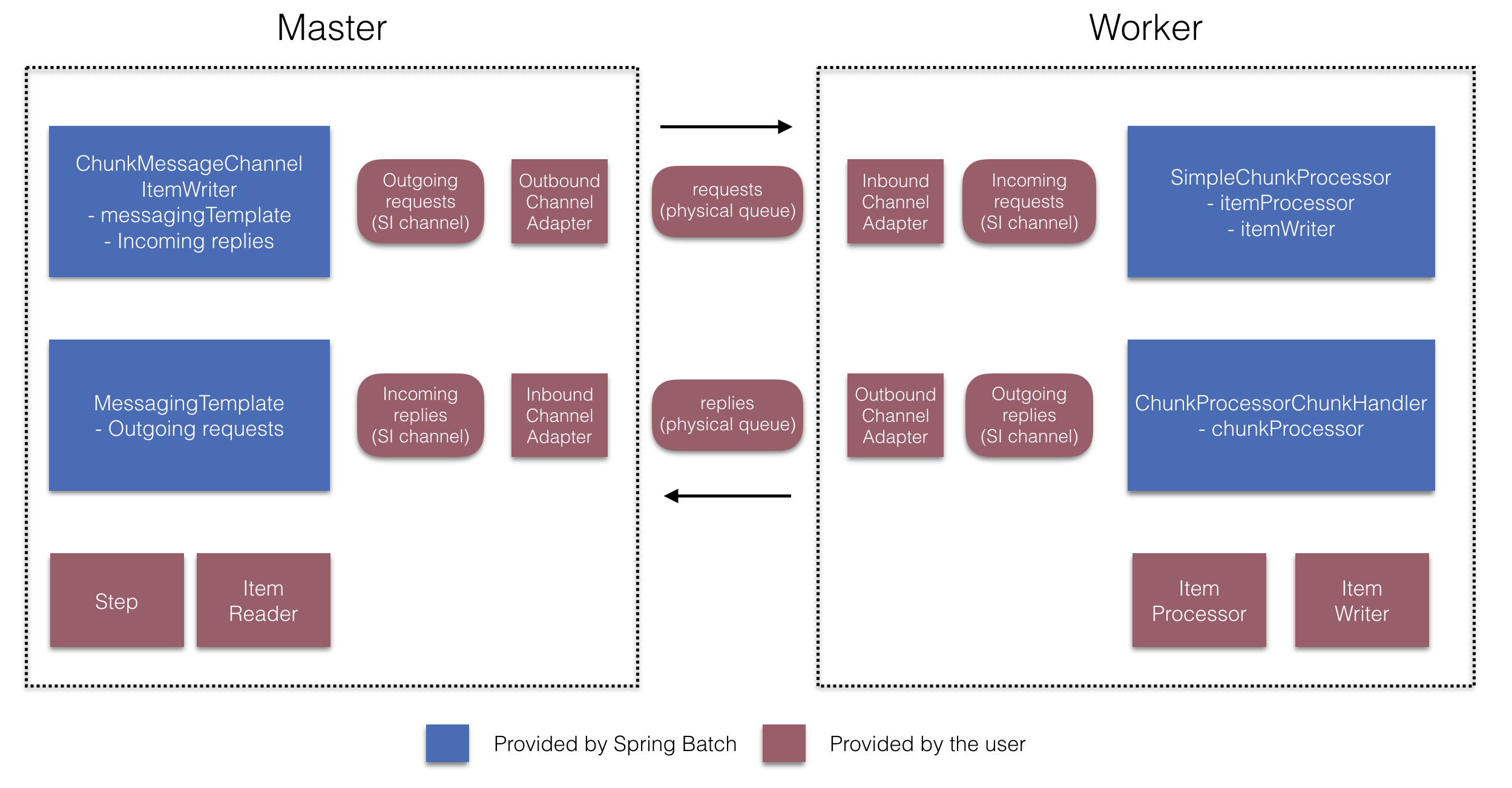
On the manager side, the RemoteChunkingManagerStepBuilderFactory lets you
configure a manager step by declaring:
-
the item reader to read items and send them to workers
-
the output channel ("Outgoing requests") to send requests to workers
-
the input channel ("Incoming replies") to receive replies from workers
A ChunkMessageChannelItemWriter and the MessagingTemplate are not needed to be explicitly configured
(Those can still be explicitly configured if required).
On the worker side, the RemoteChunkingWorkerBuilder allows you to configure a worker to:
-
listen to requests sent by the manager on the input channel ("Incoming requests")
-
call the
handleChunkmethod ofChunkProcessorChunkHandlerfor each request with the configuredItemProcessorandItemWriter -
send replies on the output channel ("Outgoing replies") to the manager
There is no need to explicitly configure the SimpleChunkProcessor
and the ChunkProcessorChunkHandler (Those can be explicitly configured if required).
The following example shows how to use these APIs:
@EnableBatchIntegration
@EnableBatchProcessing
public class RemoteChunkingJobConfiguration {
@Configuration
public static class ManagerConfiguration {
@Autowired
private RemoteChunkingManagerStepBuilderFactory managerStepBuilderFactory;
@Bean
public TaskletStep managerStep() {
return this.managerStepBuilderFactory.get("managerStep")
.chunk(100)
.reader(itemReader())
.outputChannel(requests()) // requests sent to workers
.inputChannel(replies()) // replies received from workers
.build();
}
// Middleware beans setup omitted
}
@Configuration
public static class WorkerConfiguration {
@Autowired
private RemoteChunkingWorkerBuilder workerBuilder;
@Bean
public IntegrationFlow workerFlow() {
return this.workerBuilder
.itemProcessor(itemProcessor())
.itemWriter(itemWriter())
.inputChannel(requests()) // requests received from the manager
.outputChannel(replies()) // replies sent to the manager
.build();
}
// Middleware beans setup omitted
}
}You can find a complete example of a remote chunking job here.
Remote Partitioning
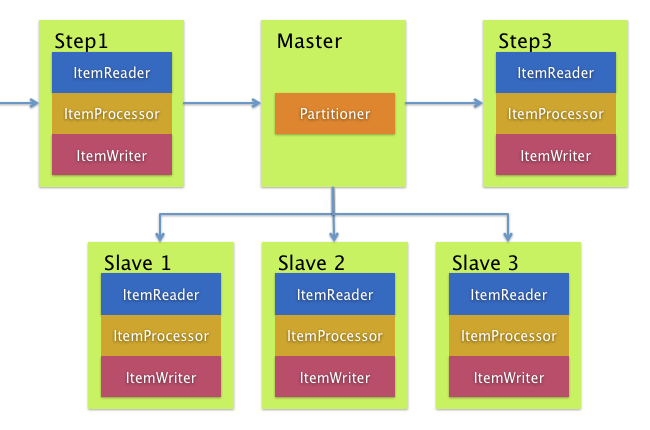
Remote Partitioning, on the other hand, is useful when it
is not the processing of items but rather the associated I/O that
causes the bottleneck. Using Remote Partitioning, work can
be farmed out to workers that execute complete Spring Batch
steps. Thus, each worker has its own ItemReader, ItemProcessor, and
ItemWriter. For this purpose, Spring Batch
Integration provides the MessageChannelPartitionHandler.
This implementation of the PartitionHandler
interface uses MessageChannel instances to
send instructions to remote workers and receive their responses.
This provides a nice abstraction from the transports (such as JMS
and AMQP) being used to communicate with the remote workers.
The section of the "Scalability" chapter that addresses
remote partitioning provides an overview of the concepts and
components needed to configure remote partitioning and shows an
example of using the default
TaskExecutorPartitionHandler to partition
in separate local threads of execution. For remote partitioning
to multiple JVMs, two additional components are required:
-
A remoting fabric or grid environment
-
A
PartitionHandlerimplementation that supports the desired remoting fabric or grid environment
Similar to remote chunking, JMS can be used as the "remoting
fabric". In that case, use a MessageChannelPartitionHandler instance as the PartitionHandler implementation,
as described above.
The following example
assumes an existing partitioned job and focuses on
the MessageChannelPartitionHandler and JMS
configuration:
<bean id="partitionHandler"
class="org.springframework.batch.integration.partition.MessageChannelPartitionHandler">
<property name="stepName" value="step1"/>
<property name="gridSize" value="3"/>
<property name="replyChannel" ref="outbound-replies"/>
<property name="messagingOperations">
<bean class="org.springframework.integration.core.MessagingTemplate">
<property name="defaultChannel" ref="outbound-requests"/>
<property name="receiveTimeout" value="100000"/>
</bean>
</property>
</bean>
<int:channel id="outbound-requests"/>
<int-jms:outbound-channel-adapter destination="requestsQueue"
channel="outbound-requests"/>
<int:channel id="inbound-requests"/>
<int-jms:message-driven-channel-adapter destination="requestsQueue"
channel="inbound-requests"/>
<bean id="stepExecutionRequestHandler"
class="org.springframework.batch.integration.partition.StepExecutionRequestHandler">
<property name="jobExplorer" ref="jobExplorer"/>
<property name="stepLocator" ref="stepLocator"/>
</bean>
<int:service-activator ref="stepExecutionRequestHandler" input-channel="inbound-requests"
output-channel="outbound-staging"/>
<int:channel id="outbound-staging"/>
<int-jms:outbound-channel-adapter destination="stagingQueue"
channel="outbound-staging"/>
<int:channel id="inbound-staging"/>
<int-jms:message-driven-channel-adapter destination="stagingQueue"
channel="inbound-staging"/>
<int:aggregator ref="partitionHandler" input-channel="inbound-staging"
output-channel="outbound-replies"/>
<int:channel id="outbound-replies">
<int:queue/>
</int:channel>
<bean id="stepLocator"
class="org.springframework.batch.integration.partition.BeanFactoryStepLocator" />/*
* Configuration of the manager side
*/
@Bean
public PartitionHandler partitionHandler() {
MessageChannelPartitionHandler partitionHandler = new MessageChannelPartitionHandler();
partitionHandler.setStepName("step1");
partitionHandler.setGridSize(3);
partitionHandler.setReplyChannel(outboundReplies());
MessagingTemplate template = new MessagingTemplate();
template.setDefaultChannel(outboundRequests());
template.setReceiveTimeout(100000);
partitionHandler.setMessagingOperations(template);
return partitionHandler;
}
@Bean
public QueueChannel outboundReplies() {
return new QueueChannel();
}
@Bean
public DirectChannel outboundRequests() {
return new DirectChannel();
}
@Bean
public IntegrationFlow outboundJmsRequests() {
return IntegrationFlows.from("outboundRequests")
.handle(Jms.outboundGateway(connectionFactory())
.requestDestination("requestsQueue"))
.get();
}
@Bean
@ServiceActivator(inputChannel = "inboundStaging")
public AggregatorFactoryBean partitioningMessageHandler() throws Exception {
AggregatorFactoryBean aggregatorFactoryBean = new AggregatorFactoryBean();
aggregatorFactoryBean.setProcessorBean(partitionHandler());
aggregatorFactoryBean.setOutputChannel(outboundReplies());
// configure other propeties of the aggregatorFactoryBean
return aggregatorFactoryBean;
}
@Bean
public DirectChannel inboundStaging() {
return new DirectChannel();
}
@Bean
public IntegrationFlow inboundJmsStaging() {
return IntegrationFlows
.from(Jms.messageDrivenChannelAdapter(connectionFactory())
.configureListenerContainer(c -> c.subscriptionDurable(false))
.destination("stagingQueue"))
.channel(inboundStaging())
.get();
}
/*
* Configuration of the worker side
*/
@Bean
public StepExecutionRequestHandler stepExecutionRequestHandler() {
StepExecutionRequestHandler stepExecutionRequestHandler = new StepExecutionRequestHandler();
stepExecutionRequestHandler.setJobExplorer(jobExplorer);
stepExecutionRequestHandler.setStepLocator(stepLocator());
return stepExecutionRequestHandler;
}
@Bean
@ServiceActivator(inputChannel = "inboundRequests", outputChannel = "outboundStaging")
public StepExecutionRequestHandler serviceActivator() throws Exception {
return stepExecutionRequestHandler();
}
@Bean
public DirectChannel inboundRequests() {
return new DirectChannel();
}
public IntegrationFlow inboundJmsRequests() {
return IntegrationFlows
.from(Jms.messageDrivenChannelAdapter(connectionFactory())
.configureListenerContainer(c -> c.subscriptionDurable(false))
.destination("requestsQueue"))
.channel(inboundRequests())
.get();
}
@Bean
public DirectChannel outboundStaging() {
return new DirectChannel();
}
@Bean
public IntegrationFlow outboundJmsStaging() {
return IntegrationFlows.from("outboundStaging")
.handle(Jms.outboundGateway(connectionFactory())
.requestDestination("stagingQueue"))
.get();
}You must also ensure that the partition handler attribute maps to the partitionHandler bean, as shown in the following example:
<job id="personJob">
<step id="step1.manager">
<partition partitioner="partitioner" handler="partitionHandler"/>
...
</step>
</job> public Job personJob() {
return jobBuilderFactory.get("personJob")
.start(stepBuilderFactory.get("step1.manager")
.partitioner("step1.worker", partitioner())
.partitionHandler(partitionHandler())
.build())
.build();
}You can find a complete example of a remote partitioning job here.
The @EnableBatchIntegration annotation that can be used to simplify a remote
partitioning setup. This annotation provides two beans useful for remote partitioning:
-
RemotePartitioningManagerStepBuilderFactory: used to configure the manager step -
RemotePartitioningWorkerStepBuilderFactory: used to configure the worker step
These APIs take care of configuring a number of components as described in the following diagram:
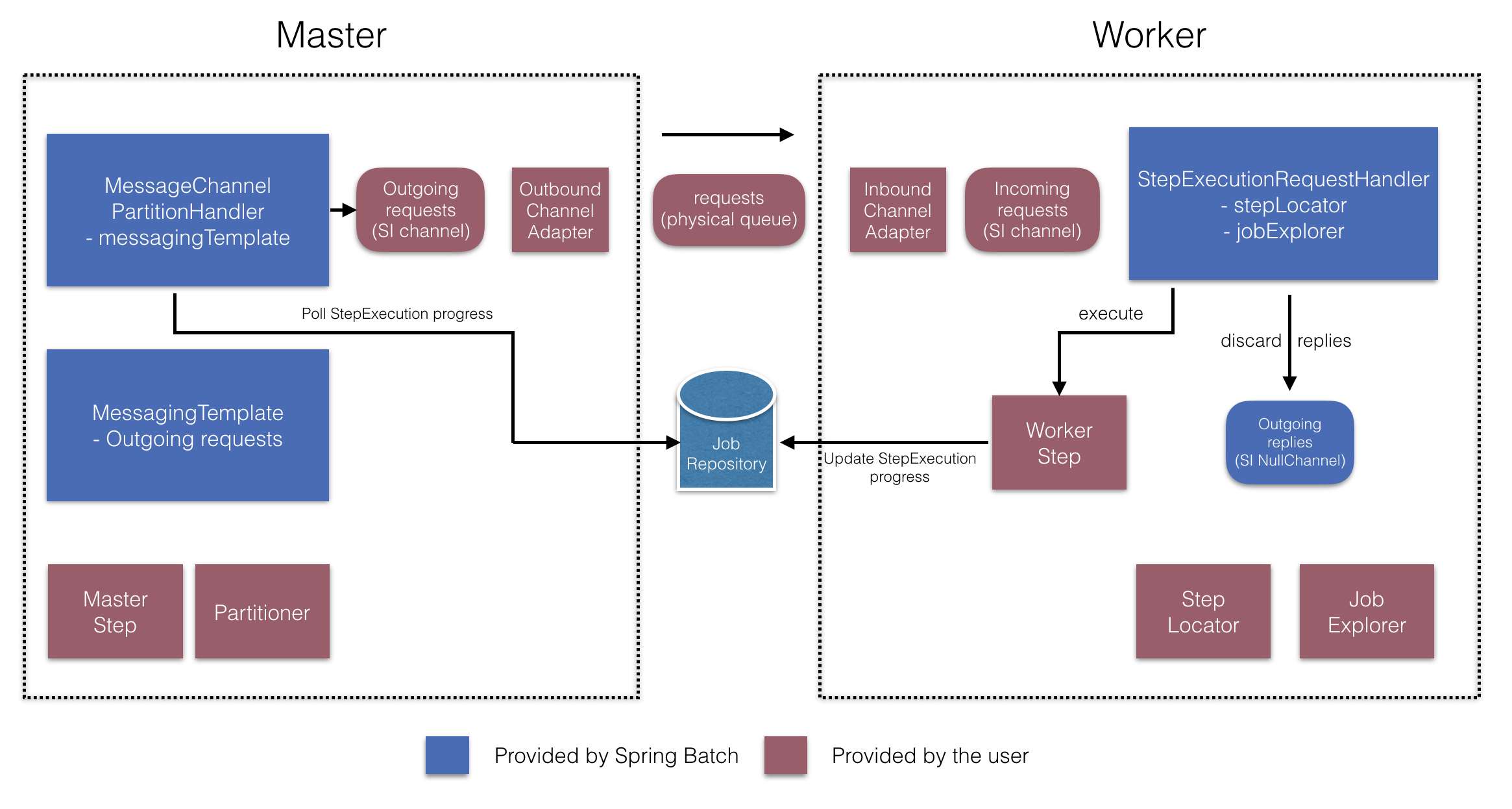
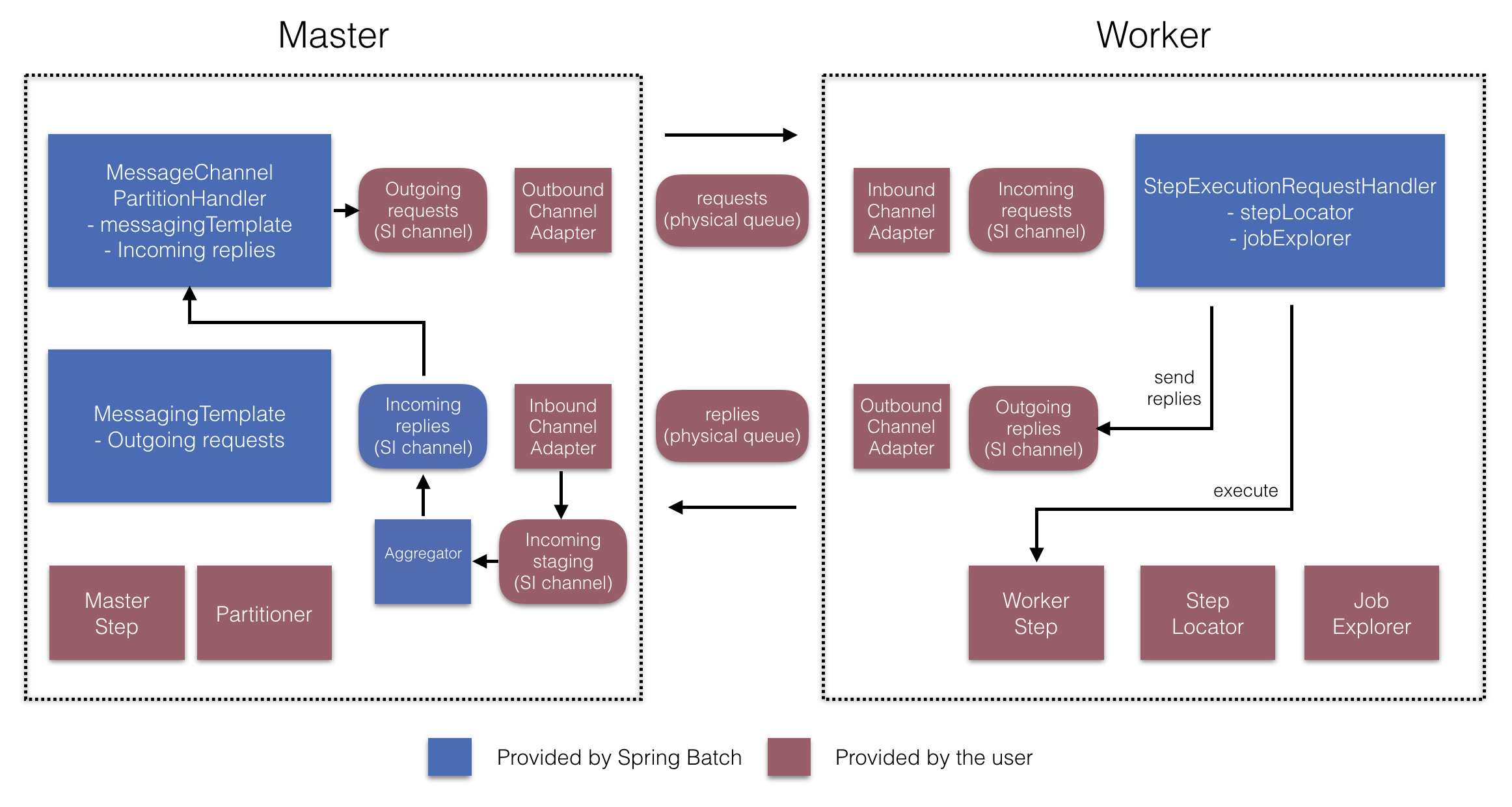
On the manager side, the RemotePartitioningManagerStepBuilderFactory allows you to
configure a manager step by declaring:
-
the
Partitionerused to partition data -
the output channel ("Outgoing requests") to send requests to workers
-
the input channel ("Incoming replies") to receive replies from workers (when configuring replies aggregation)
-
the poll interval and timeout parameters (when configuring job repository polling)
The MessageChannelPartitionHandler and the MessagingTemplate are not needed to be explicitly configured
(Those can still be explicitly configured if required).
On the worker side, the RemotePartitioningWorkerStepBuilderFactory allows you to configure a worker to:
-
listen to requests sent by the manager on the input channel ("Incoming requests")
-
call the
handlemethod ofStepExecutionRequestHandlerfor each request -
send replies on the output channel ("Outgoing replies") to the manager
There is no need to explicitly configure the StepExecutionRequestHandler (which can be explicitly configured if required).
The following example shows how to use these APIs:
@Configuration
@EnableBatchProcessing
@EnableBatchIntegration
public class RemotePartitioningJobConfiguration {
@Configuration
public static class ManagerConfiguration {
@Autowired
private RemotePartitioningManagerStepBuilderFactory managerStepBuilderFactory;
@Bean
public Step managerStep() {
return this.managerStepBuilderFactory
.get("managerStep")
.partitioner("workerStep", partitioner())
.gridSize(10)
.outputChannel(outgoingRequestsToWorkers())
.inputChannel(incomingRepliesFromWorkers())
.build();
}
// Middleware beans setup omitted
}
@Configuration
public static class WorkerConfiguration {
@Autowired
private RemotePartitioningWorkerStepBuilderFactory workerStepBuilderFactory;
@Bean
public Step workerStep() {
return this.workerStepBuilderFactory
.get("workerStep")
.inputChannel(incomingRequestsFromManager())
.outputChannel(outgoingRepliesToManager())
.chunk(100)
.reader(itemReader())
.processor(itemProcessor())
.writer(itemWriter())
.build();
}
// Middleware beans setup omitted
}
}14. Monitoring and metrics
Since version 4.2, Spring Batch provides support for batch monitoring and metrics based on Micrometer. This section describes which metrics are provided out-of-the-box and how to contribute custom metrics.
14.1. Built-in metrics
Metrics collection does not require any specific configuration. All metrics provided
by the framework are registered in
Micrometer’s global registry
under the spring.batch prefix. The following table explains all the metrics in details:
Metric Name |
Type |
Description |
|
|
Duration of job execution |
|
|
Currently active jobs |
|
|
Duration of step execution |
|
|
Duration of item reading |
|
|
Duration of item processing |
|
|
Duration of chunk writing |
14.2. Custom metrics
If you want to use your own metrics in your custom components, we recommend using
Micrometer APIs directly. The following is an example of how to time a Tasklet:
import io.micrometer.core.instrument.Metrics;
import io.micrometer.core.instrument.Timer;
import org.springframework.batch.core.StepContribution;
import org.springframework.batch.core.scope.context.ChunkContext;
import org.springframework.batch.core.step.tasklet.Tasklet;
import org.springframework.batch.repeat.RepeatStatus;
public class MyTimedTasklet implements Tasklet {
@Override
public RepeatStatus execute(StepContribution contribution, ChunkContext chunkContext) {
Timer.Sample sample = Timer.start(Metrics.globalRegistry);
String status = "success";
try {
// do some work
} catch (Exception e) {
// handle exception
status = "failure";
} finally {
sample.stop(Timer.builder("my.tasklet.timer")
.description("Duration of MyTimedTasklet")
.tag("status", status)
.register(Metrics.globalRegistry));
}
return RepeatStatus.FINISHED;
}
}Appendix A: List of ItemReaders and ItemWriters
A.1. Item Readers
| Item Reader | Description |
|---|---|
AbstractItemCountingItemStreamItemReader |
Abstract base class that provides basic
restart capabilities by counting the number of items returned from
an |
AggregateItemReader |
An |
AmqpItemReader |
Given a Spring |
KafkaItemReader |
An |
FlatFileItemReader |
Reads from a flat file. Includes |
HibernateCursorItemReader |
Reads from a cursor based on an HQL query. See
|
HibernatePagingItemReader |
Reads from a paginated HQL query |
ItemReaderAdapter |
Adapts any class to the
|
JdbcCursorItemReader |
Reads from a database cursor via JDBC. See
|
JdbcPagingItemReader |
Given an SQL statement, pages through the rows, such that large datasets can be read without running out of memory. |
JmsItemReader |
Given a Spring |
JpaPagingItemReader |
Given a JPQL statement, pages through the rows, such that large datasets can be read without running out of memory. |
ListItemReader |
Provides the items from a list, one at a time. |
MongoItemReader |
Given a |
Neo4jItemReader |
Given a |
RepositoryItemReader |
Given a Spring Data |
StoredProcedureItemReader |
Reads from a database cursor resulting from the
execution of a database stored procedure. See |
StaxEventItemReader |
Reads via StAX. see |
JsonItemReader |
Reads items from a Json document. see |
A.2. Item Writers
| Item Writer | Description |
|---|---|
AbstractItemStreamItemWriter |
Abstract base class that combines the
|
AmqpItemWriter |
Given a Spring |
CompositeItemWriter |
Passes an item to the |
FlatFileItemWriter |
Writes to a flat file. Includes |
GemfireItemWriter |
Using a |
HibernateItemWriter |
This item writer is Hibernate-session aware and handles some transaction-related work that a non-"hibernate-aware" item writer would not need to know about and then delegates to another item writer to do the actual writing. |
ItemWriterAdapter |
Adapts any class to the
|
JdbcBatchItemWriter |
Uses batching features from a
|
JmsItemWriter |
Using a |
JpaItemWriter |
This item writer is JPA EntityManager-aware
and handles some transaction-related work that a non-"JPA-aware"
|
KafkaItemWriter |
Using a |
MimeMessageItemWriter |
Using Spring’s |
MongoItemWriter |
Given a |
Neo4jItemWriter |
Given a |
PropertyExtractingDelegatingItemWriter |
Extends |
RepositoryItemWriter |
Given a Spring Data |
StaxEventItemWriter |
Uses a |
JsonFileItemWriter |
Uses a |
Appendix B: Meta-Data Schema
B.1. Overview
The Spring Batch Metadata tables closely match the Domain objects that represent them in
Java. For example, JobInstance, JobExecution, JobParameters, and StepExecution
map to BATCH_JOB_INSTANCE, BATCH_JOB_EXECUTION, BATCH_JOB_EXECUTION_PARAMS, and
BATCH_STEP_EXECUTION, respectively. ExecutionContext maps to both
BATCH_JOB_EXECUTION_CONTEXT and BATCH_STEP_EXECUTION_CONTEXT. The JobRepository is
responsible for saving and storing each Java object into its correct table. This appendix
describes the metadata tables in detail, along with many of the design decisions that
were made when creating them. When viewing the various table creation statements below,
it is important to realize that the data types used are as generic as possible. Spring
Batch provides many schemas as examples, all of which have varying data types, due to
variations in how individual database vendors handle data types. The following image
shows an ERD model of all 6 tables and their relationships to one another:
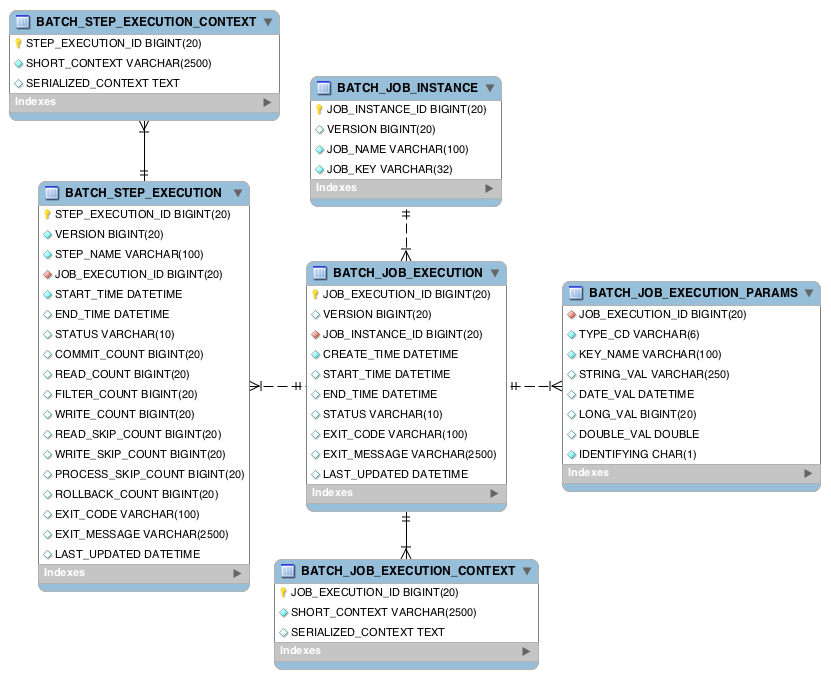
B.1.1. Example DDL Scripts
The Spring Batch Core JAR file contains example scripts to create the relational tables
for a number of database platforms (which are, in turn, auto-detected by the job
repository factory bean or namespace equivalent). These scripts can be used as is or
modified with additional indexes and constraints as desired. The file names are in the
form schema-*.sql, where "*" is the short name of the target database platform.
The scripts are in the package org.springframework.batch.core.
B.1.2. Migration DDL Scripts
Spring Batch provides migration DDL scripts that you need to execute when you upgrade versions.
These scripts can be found in the Core Jar file under org/springframework/batch/core/migration.
Migration scripts are organized into folders corresponding to version numbers in which they were introduced:
-
2.2: contains scripts needed if you are migrating from a version before2.2to version2.2 -
4.1: contains scripts needed if you are migrating from a version before4.1to version4.1
B.1.3. Version
Many of the database tables discussed in this appendix contain a version column. This
column is important because Spring Batch employs an optimistic locking strategy when
dealing with updates to the database. This means that each time a record is 'touched'
(updated) the value in the version column is incremented by one. When the repository goes
back to save the value, if the version number has changed it throws an
OptimisticLockingFailureException, indicating there has been an error with concurrent
access. This check is necessary, since, even though different batch jobs may be running
in different machines, they all use the same database tables.
B.1.4. Identity
BATCH_JOB_INSTANCE, BATCH_JOB_EXECUTION, and BATCH_STEP_EXECUTION each contain
columns ending in _ID. These fields act as primary keys for their respective tables.
However, they are not database generated keys. Rather, they are generated by separate
sequences. This is necessary because, after inserting one of the domain objects into the
database, the key it is given needs to be set on the actual object so that they can be
uniquely identified in Java. Newer database drivers (JDBC 3.0 and up) support this
feature with database-generated keys. However, rather than require that feature,
sequences are used. Each variation of the schema contains some form of the following
statements:
CREATE SEQUENCE BATCH_STEP_EXECUTION_SEQ;
CREATE SEQUENCE BATCH_JOB_EXECUTION_SEQ;
CREATE SEQUENCE BATCH_JOB_SEQ;Many database vendors do not support sequences. In these cases, work-arounds are used, such as the following statements for MySQL:
CREATE TABLE BATCH_STEP_EXECUTION_SEQ (ID BIGINT NOT NULL) type=InnoDB;
INSERT INTO BATCH_STEP_EXECUTION_SEQ values(0);
CREATE TABLE BATCH_JOB_EXECUTION_SEQ (ID BIGINT NOT NULL) type=InnoDB;
INSERT INTO BATCH_JOB_EXECUTION_SEQ values(0);
CREATE TABLE BATCH_JOB_SEQ (ID BIGINT NOT NULL) type=InnoDB;
INSERT INTO BATCH_JOB_SEQ values(0);In the preceding case, a table is used in place of each sequence. The Spring core class,
MySQLMaxValueIncrementer, then increments the one column in this sequence in order to
give similar functionality.
B.2. BATCH_JOB_INSTANCE
The BATCH_JOB_INSTANCE table holds all information relevant to a JobInstance, and
serves as the top of the overall hierarchy. The following generic DDL statement is used
to create it:
CREATE TABLE BATCH_JOB_INSTANCE (
JOB_INSTANCE_ID BIGINT PRIMARY KEY ,
VERSION BIGINT,
JOB_NAME VARCHAR(100) NOT NULL ,
JOB_KEY VARCHAR(2500)
);The following list describes each column in the table:
-
JOB_INSTANCE_ID: The unique ID that identifies the instance. It is also the primary key. The value of this column should be obtainable by calling thegetIdmethod onJobInstance. -
VERSION: See Version. -
JOB_NAME: Name of the job obtained from theJobobject. Because it is required to identify the instance, it must not be null. -
JOB_KEY: A serialization of theJobParametersthat uniquely identifies separate instances of the same job from one another. (JobInstanceswith the same job name must have differentJobParametersand, thus, differentJOB_KEYvalues).
B.3. BATCH_JOB_EXECUTION_PARAMS
The BATCH_JOB_EXECUTION_PARAMS table holds all information relevant to the
JobParameters object. It contains 0 or more key/value pairs passed to a Job and
serves as a record of the parameters with which a job was run. For each parameter that
contributes to the generation of a job’s identity, the IDENTIFYING flag is set to true.
Note that the table has been denormalized. Rather than creating a separate table for each
type, there is one table with a column indicating the type, as shown in the following
listing:
CREATE TABLE BATCH_JOB_EXECUTION_PARAMS (
JOB_EXECUTION_ID BIGINT NOT NULL ,
TYPE_CD VARCHAR(6) NOT NULL ,
KEY_NAME VARCHAR(100) NOT NULL ,
STRING_VAL VARCHAR(250) ,
DATE_VAL DATETIME DEFAULT NULL ,
LONG_VAL BIGINT ,
DOUBLE_VAL DOUBLE PRECISION ,
IDENTIFYING CHAR(1) NOT NULL ,
constraint JOB_EXEC_PARAMS_FK foreign key (JOB_EXECUTION_ID)
references BATCH_JOB_EXECUTION(JOB_EXECUTION_ID)
);The following list describes each column:
-
JOB_EXECUTION_ID: Foreign key from theBATCH_JOB_EXECUTIONtable that indicates the job execution to which the parameter entry belongs. Note that multiple rows (that is, key/value pairs) may exist for each execution. -
TYPE_CD: String representation of the type of value stored, which can be a string, a date, a long, or a double. Because the type must be known, it cannot be null.
-
KEY_NAME: The parameter key.
-
STRING_VAL: Parameter value, if the type is string.
-
DATE_VAL: Parameter value, if the type is date.
-
LONG_VAL: Parameter value, if the type is long.
-
DOUBLE_VAL: Parameter value, if the type is double.
-
IDENTIFYING: Flag indicating whether the parameter contributed to the identity of the related
JobInstance.
Note that there is no primary key for this table. This is because the framework has no use for one and, thus, does not require it. If need be, you can add a primary key may be added with a database generated key without causing any issues to the framework itself.
B.4. BATCH_JOB_EXECUTION
The BATCH_JOB_EXECUTION table holds all information relevant to the JobExecution
object. Every time a Job is run, there is always a new JobExecution, and a new row in
this table. The following listing shows the definition of the BATCH_JOB_EXECUTION
table:
CREATE TABLE BATCH_JOB_EXECUTION (
JOB_EXECUTION_ID BIGINT PRIMARY KEY ,
VERSION BIGINT,
JOB_INSTANCE_ID BIGINT NOT NULL,
CREATE_TIME TIMESTAMP NOT NULL,
START_TIME TIMESTAMP DEFAULT NULL,
END_TIME TIMESTAMP DEFAULT NULL,
STATUS VARCHAR(10),
EXIT_CODE VARCHAR(20),
EXIT_MESSAGE VARCHAR(2500),
LAST_UPDATED TIMESTAMP,
JOB_CONFIGURATION_LOCATION VARCHAR(2500) NULL,
constraint JOB_INSTANCE_EXECUTION_FK foreign key (JOB_INSTANCE_ID)
references BATCH_JOB_INSTANCE(JOB_INSTANCE_ID)
) ;The following list describes each column:
-
JOB_EXECUTION_ID: Primary key that uniquely identifies this execution. The value of this column is obtainable by calling thegetIdmethod of theJobExecutionobject. -
VERSION: See Version. -
JOB_INSTANCE_ID: Foreign key from theBATCH_JOB_INSTANCEtable. It indicates the instance to which this execution belongs. There may be more than one execution per instance. -
CREATE_TIME: Timestamp representing the time when the execution was created. -
START_TIME: Timestamp representing the time when the execution was started. -
END_TIME: Timestamp representing the time when the execution finished, regardless of success or failure. An empty value in this column when the job is not currently running indicates that there has been some type of error and the framework was unable to perform a last save before failing. -
STATUS: Character string representing the status of the execution. This may beCOMPLETED,STARTED, and others. The object representation of this column is theBatchStatusenumeration. -
EXIT_CODE: Character string representing the exit code of the execution. In the case of a command-line job, this may be converted into a number. -
EXIT_MESSAGE: Character string representing a more detailed description of how the job exited. In the case of failure, this might include as much of the stack trace as is possible. -
LAST_UPDATED: Timestamp representing the last time this execution was persisted.
B.5. BATCH_STEP_EXECUTION
The BATCH_STEP_EXECUTION table holds all information relevant to the StepExecution
object. This table is similar in many ways to the BATCH_JOB_EXECUTION table, and there
is always at least one entry per Step for each JobExecution created. The following
listing shows the definition of the BATCH_STEP_EXECUTION table:
CREATE TABLE BATCH_STEP_EXECUTION (
STEP_EXECUTION_ID BIGINT PRIMARY KEY ,
VERSION BIGINT NOT NULL,
STEP_NAME VARCHAR(100) NOT NULL,
JOB_EXECUTION_ID BIGINT NOT NULL,
START_TIME TIMESTAMP NOT NULL ,
END_TIME TIMESTAMP DEFAULT NULL,
STATUS VARCHAR(10),
COMMIT_COUNT BIGINT ,
READ_COUNT BIGINT ,
FILTER_COUNT BIGINT ,
WRITE_COUNT BIGINT ,
READ_SKIP_COUNT BIGINT ,
WRITE_SKIP_COUNT BIGINT ,
PROCESS_SKIP_COUNT BIGINT ,
ROLLBACK_COUNT BIGINT ,
EXIT_CODE VARCHAR(20) ,
EXIT_MESSAGE VARCHAR(2500) ,
LAST_UPDATED TIMESTAMP,
constraint JOB_EXECUTION_STEP_FK foreign key (JOB_EXECUTION_ID)
references BATCH_JOB_EXECUTION(JOB_EXECUTION_ID)
) ;The following list describes for each column:
-
STEP_EXECUTION_ID: Primary key that uniquely identifies this execution. The value of this column should be obtainable by calling thegetIdmethod of theStepExecutionobject. -
VERSION: See Version. -
STEP_NAME: The name of the step to which this execution belongs. -
JOB_EXECUTION_ID: Foreign key from theBATCH_JOB_EXECUTIONtable. It indicates theJobExecutionto which thisStepExecutionbelongs. There may be only oneStepExecutionfor a givenJobExecutionfor a givenStepname. -
START_TIME: Timestamp representing the time when the execution was started. -
END_TIME: Timestamp representing the time the when execution was finished, regardless of success or failure. An empty value in this column, even though the job is not currently running, indicates that there has been some type of error and the framework was unable to perform a last save before failing. -
STATUS: Character string representing the status of the execution. This may beCOMPLETED,STARTED, and others. The object representation of this column is theBatchStatusenumeration. -
COMMIT_COUNT: The number of times in which the step has committed a transaction during this execution. -
READ_COUNT: The number of items read during this execution. -
FILTER_COUNT: The number of items filtered out of this execution. -
WRITE_COUNT: The number of items written and committed during this execution. -
READ_SKIP_COUNT: The number of items skipped on read during this execution. -
WRITE_SKIP_COUNT: The number of items skipped on write during this execution. -
PROCESS_SKIP_COUNT: The number of items skipped during processing during this execution. -
ROLLBACK_COUNT: The number of rollbacks during this execution. Note that this count includes each time rollback occurs, including rollbacks for retry and those in the skip recovery procedure. -
EXIT_CODE: Character string representing the exit code of the execution. In the case of a command-line job, this may be converted into a number. -
EXIT_MESSAGE: Character string representing a more detailed description of how the job exited. In the case of failure, this might include as much of the stack trace as is possible. -
LAST_UPDATED: Timestamp representing the last time this execution was persisted.
B.6. BATCH_JOB_EXECUTION_CONTEXT
The BATCH_JOB_EXECUTION_CONTEXT table holds all information relevant to the
ExecutionContext of a Job. There is exactly one Job ExecutionContext per
JobExecution, and it contains all of the job-level data that is needed for a particular
job execution. This data typically represents the state that must be retrieved after a
failure, so that a JobInstance can "start from where it left off". The following
listing shows the definition of the BATCH_JOB_EXECUTION_CONTEXT table:
CREATE TABLE BATCH_JOB_EXECUTION_CONTEXT (
JOB_EXECUTION_ID BIGINT PRIMARY KEY,
SHORT_CONTEXT VARCHAR(2500) NOT NULL,
SERIALIZED_CONTEXT CLOB,
constraint JOB_EXEC_CTX_FK foreign key (JOB_EXECUTION_ID)
references BATCH_JOB_EXECUTION(JOB_EXECUTION_ID)
) ;The following list describes each column:
-
JOB_EXECUTION_ID: Foreign key representing theJobExecutionto which the context belongs. There may be more than one row associated with a given execution. -
SHORT_CONTEXT: A string version of theSERIALIZED_CONTEXT. -
SERIALIZED_CONTEXT: The entire context, serialized.
B.7. BATCH_STEP_EXECUTION_CONTEXT
The BATCH_STEP_EXECUTION_CONTEXT table holds all information relevant to the
ExecutionContext of a Step. There is exactly one ExecutionContext per
StepExecution, and it contains all of the data that
needs to be persisted for a particular step execution. This data typically represents the
state that must be retrieved after a failure, so that a JobInstance can 'start from
where it left off'. The following listing shows the definition of the
BATCH_STEP_EXECUTION_CONTEXT table:
CREATE TABLE BATCH_STEP_EXECUTION_CONTEXT (
STEP_EXECUTION_ID BIGINT PRIMARY KEY,
SHORT_CONTEXT VARCHAR(2500) NOT NULL,
SERIALIZED_CONTEXT CLOB,
constraint STEP_EXEC_CTX_FK foreign key (STEP_EXECUTION_ID)
references BATCH_STEP_EXECUTION(STEP_EXECUTION_ID)
) ;The following list describes each column:
-
STEP_EXECUTION_ID: Foreign key representing theStepExecutionto which the context belongs. There may be more than one row associated to a given execution. -
SHORT_CONTEXT: A string version of theSERIALIZED_CONTEXT. -
SERIALIZED_CONTEXT: The entire context, serialized.
B.8. Archiving
Because there are entries in multiple tables every time a batch job is run, it is common to create an archive strategy for the metadata tables. The tables themselves are designed to show a record of what happened in the past and generally do not affect the run of any job, with a few notable exceptions pertaining to restart:
-
The framework uses the metadata tables to determine whether a particular
JobInstancehas been run before. If it has been run and if the job is not restartable, then an exception is thrown. -
If an entry for a
JobInstanceis removed without having completed successfully, the framework thinks that the job is new rather than a restart. -
If a job is restarted, the framework uses any data that has been persisted to the
ExecutionContextto restore theJob’sstate. Therefore, removing any entries from this table for jobs that have not completed successfully prevents them from starting at the correct point if run again.
B.9. International and Multi-byte Characters
If you are using multi-byte character sets (such as Chinese or Cyrillic) in your business
processing, then those characters might need to be persisted in the Spring Batch schema.
Many users find that simply changing the schema to double the length of the VARCHAR
columns is enough. Others prefer to configure the
JobRepository with max-varchar-length half the
value of the VARCHAR column length. Some users have also reported that they use
NVARCHAR in place of VARCHAR in their schema definitions. The best result depends on
the database platform and the way the database server has been configured locally.
B.10. Recommendations for Indexing Meta Data Tables
Spring Batch provides DDL samples for the metadata tables in the core jar file for
several common database platforms. Index declarations are not included in that DDL,
because there are too many variations in how users may want to index, depending on their
precise platform, local conventions, and the business requirements of how the jobs are
operated. The following below provides some indication as to which columns are going to
be used in a WHERE clause by the DAO implementations provided by Spring Batch and how
frequently they might be used, so that individual projects can make up their own minds
about indexing:
Default Table Name |
Where Clause |
Frequency |
BATCH_JOB_INSTANCE |
JOB_NAME = ? and JOB_KEY = ? |
Every time a job is launched |
BATCH_JOB_EXECUTION |
JOB_INSTANCE_ID = ? |
Every time a job is restarted |
BATCH_EXECUTION_CONTEXT |
EXECUTION_ID = ? and KEY_NAME = ? |
On commit interval, a.k.a. chunk |
BATCH_STEP_EXECUTION |
VERSION = ? |
On commit interval, a.k.a. chunk (and at start and end of step) |
BATCH_STEP_EXECUTION |
STEP_NAME = ? and JOB_EXECUTION_ID = ? |
Before each step execution |
Appendix C: Batch Processing and Transactions
C.1. Simple Batching with No Retry
Consider the following simple example of a nested batch with no retries. It shows a common scenario for batch processing: An input source is processed until exhausted, and we commit periodically at the end of a "chunk" of processing.
1 | REPEAT(until=exhausted) {
|
2 | TX {
3 | REPEAT(size=5) {
3.1 | input;
3.2 | output;
| }
| }
|
| }
The input operation (3.1) could be a message-based receive (such as from JMS), or a file-based read, but to recover and continue processing with a chance of completing the whole job, it must be transactional. The same applies to the operation at 3.2. It must be either transactional or idempotent.
If the chunk at REPEAT (3) fails because of a database exception at 3.2, then TX (2)
must roll back the whole chunk.
C.2. Simple Stateless Retry
It is also useful to use a retry for an operation which is not transactional, such as a call to a web-service or other remote resource, as shown in the following example:
0 | TX {
1 | input;
1.1 | output;
2 | RETRY {
2.1 | remote access;
| }
| }
This is actually one of the most useful applications of a retry, since a remote call is
much more likely to fail and be retryable than a database update. As long as the remote
access (2.1) eventually succeeds, the transaction, TX (0), commits. If the remote
access (2.1) eventually fails, then the transaction, TX (0), is guaranteed to roll
back.
C.3. Typical Repeat-Retry Pattern
The most typical batch processing pattern is to add a retry to the inner block of the chunk, as shown in the following example:
1 | REPEAT(until=exhausted, exception=not critical) {
|
2 | TX {
3 | REPEAT(size=5) {
|
4 | RETRY(stateful, exception=deadlock loser) {
4.1 | input;
5 | } PROCESS {
5.1 | output;
6 | } SKIP and RECOVER {
| notify;
| }
|
| }
| }
|
| }
The inner RETRY (4) block is marked as "stateful". See the
typical use case for a description of a stateful retry. This means that if the
retry PROCESS (5) block fails, the behavior of the RETRY (4) is as follows:
-
Throw an exception, rolling back the transaction,
TX(2), at the chunk level, and allowing the item to be re-presented to the input queue. -
When the item re-appears, it might be retried depending on the retry policy in place, executing
PROCESS(5) again. The second and subsequent attempts might fail again and re-throw the exception. -
Eventually, the item reappears for the final time. The retry policy disallows another attempt, so
PROCESS(5) is never executed. In this case, we follow theRECOVER(6) path, effectively "skipping" the item that was received and is being processed.
Note that the notation used for the RETRY (4) in the plan above explicitly shows that
the input step (4.1) is part of the retry. It also makes clear that there are two
alternate paths for processing: the normal case, as denoted by PROCESS (5), and the
recovery path, as denoted in a separate block by RECOVER (6). The two alternate paths
are completely distinct. Only one is ever taken in normal circumstances.
In special cases (such as a special TranscationValidException type), the retry policy
might be able to determine that the RECOVER (6) path can be taken on the last attempt
after PROCESS (5) has just failed, instead of waiting for the item to be re-presented.
This is not the default behavior, because it requires detailed knowledge of what has
happened inside the PROCESS (5) block, which is not usually available. For example, if
the output included write access before the failure, then the exception should be
re-thrown to ensure transactional integrity.
The completion policy in the outer REPEAT (1) is crucial to the success of the above
plan. If the output (5.1) fails, it may throw an exception (it usually does, as
described), in which case the transaction, TX (2), fails, and the exception could
propagate up through the outer batch REPEAT (1). We do not want the whole batch to
stop, because the RETRY (4) might still be successful if we try again, so we add
exception=not critical to the outer REPEAT (1).
Note, however, that if the TX (2) fails and we do try again, by virtue of the outer
completion policy, the item that is next processed in the inner REPEAT (3) is not
guaranteed to be the one that just failed. It might be, but it depends on the
implementation of the input (4.1). Thus, the output (5.1) might fail again on either a
new item or the old one. The client of the batch should not assume that each RETRY (4)
attempt is going to process the same items as the last one that failed. For example, if
the termination policy for REPEAT (1) is to fail after 10 attempts, it fails after 10
consecutive attempts but not necessarily at the same item. This is consistent with the
overall retry strategy. The inner RETRY (4) is aware of the history of each item and
can decide whether or not to have another attempt at it.
C.4. Asynchronous Chunk Processing
The inner batches or chunks in the typical example can be executed
concurrently by configuring the outer batch to use an AsyncTaskExecutor. The outer
batch waits for all the chunks to complete before completing. The following example shows
asynchronous chunk processing:
1 | REPEAT(until=exhausted, concurrent, exception=not critical) {
|
2 | TX {
3 | REPEAT(size=5) {
|
4 | RETRY(stateful, exception=deadlock loser) {
4.1 | input;
5 | } PROCESS {
| output;
6 | } RECOVER {
| recover;
| }
|
| }
| }
|
| }
C.5. Asynchronous Item Processing
The individual items in chunks in the typical example can also, in principle, be processed concurrently. In this case, the transaction boundary has to move to the level of the individual item, so that each transaction is on a single thread, as shown in the following example:
1 | REPEAT(until=exhausted, exception=not critical) {
|
2 | REPEAT(size=5, concurrent) {
|
3 | TX {
4 | RETRY(stateful, exception=deadlock loser) {
4.1 | input;
5 | } PROCESS {
| output;
6 | } RECOVER {
| recover;
| }
| }
|
| }
|
| }
This plan sacrifices the optimization benefit, which the simple plan had, of having all the transactional resources chunked together. It is only useful if the cost of the processing (5) is much higher than the cost of transaction management (3).
C.6. Interactions Between Batching and Transaction Propagation
There is a tighter coupling between batch-retry and transaction management than we would ideally like. In particular, a stateless retry cannot be used to retry database operations with a transaction manager that does not support NESTED propagation.
The following example uses retry without repeat:
1 | TX {
|
1.1 | input;
2.2 | database access;
2 | RETRY {
3 | TX {
3.1 | database access;
| }
| }
|
| }
Again, and for the same reason, the inner transaction, TX (3), can cause the outer
transaction, TX (1), to fail, even if the RETRY (2) is eventually successful.
Unfortunately, the same effect percolates from the retry block up to the surrounding repeat batch if there is one, as shown in the following example:
1 | TX {
|
2 | REPEAT(size=5) {
2.1 | input;
2.2 | database access;
3 | RETRY {
4 | TX {
4.1 | database access;
| }
| }
| }
|
| }
Now, if TX (3) rolls back, it can pollute the whole batch at TX (1) and force it to roll back at the end.
What about non-default propagation?
-
In the preceding example,
PROPAGATION_REQUIRES_NEWatTX(3) prevents the outerTX(1) from being polluted if both transactions are eventually successful. But ifTX(3) commits andTX(1) rolls back, thenTX(3) stays committed, so we violate the transaction contract forTX(1). IfTX(3) rolls back,TX(1) does not necessarily (but it probably does in practice, because the retry throws a roll back exception). -
PROPAGATION_NESTEDatTX(3) works as we require in the retry case (and for a batch with skips):TX(3) can commit but subsequently be rolled back by the outer transaction,TX(1). IfTX(3) rolls back,TX(1) rolls back in practice. This option is only available on some platforms, not including Hibernate or JTA, but it is the only one that consistently works.
Consequently, the NESTED pattern is best if the retry block contains any database
access.
C.7. Special Case: Transactions with Orthogonal Resources
Default propagation is always OK for simple cases where there are no nested database
transactions. Consider the following example, where the SESSION and TX are not
global XA resources, so their resources are orthogonal:
0 | SESSION {
1 | input;
2 | RETRY {
3 | TX {
3.1 | database access;
| }
| }
| }
Here there is a transactional message SESSION (0), but it does not participate in other
transactions with PlatformTransactionManager, so it does not propagate when TX (3)
starts. There is no database access outside the RETRY (2) block. If TX (3) fails and
then eventually succeeds on a retry, SESSION (0) can commit (independently of a TX
block). This is similar to the vanilla "best-efforts-one-phase-commit" scenario. The
worst that can happen is a duplicate message when the RETRY (2) succeeds and the
SESSION (0) cannot commit (for example, because the message system is unavailable).
C.8. Stateless Retry Cannot Recover
The distinction between a stateless and a stateful retry in the typical example above is important. It is actually ultimately a transactional constraint that forces the distinction, and this constraint also makes it obvious why the distinction exists.
We start with the observation that there is no way to skip an item that failed and successfully commit the rest of the chunk unless we wrap the item processing in a transaction. Consequently, we simplify the typical batch execution plan to be as follows:
0 | REPEAT(until=exhausted) {
|
1 | TX {
2 | REPEAT(size=5) {
|
3 | RETRY(stateless) {
4 | TX {
4.1 | input;
4.2 | database access;
| }
5 | } RECOVER {
5.1 | skip;
| }
|
| }
| }
|
| }
The preceding example shows a stateless RETRY (3) with a RECOVER (5) path that kicks
in after the final attempt fails. The stateless label means that the block is repeated
without re-throwing any exception up to some limit. This only works if the transaction,
TX (4), has propagation NESTED.
If the inner TX (4) has default propagation properties and rolls back, it pollutes the
outer TX (1). The inner transaction is assumed by the transaction manager to have
corrupted the transactional resource, so it cannot be used again.
Support for NESTED propagation is sufficiently rare that we choose not to support recovery with stateless retries in the current versions of Spring Batch. The same effect can always be achieved (at the expense of repeating more processing) by using the typical pattern above.
Appendix D: 术语表
Spring Batch 术语表
- Batch
-
An accumulation of business transactions over time.
- Batch Application Style
-
Term used to designate batch as an application style in its own right, similar to online, Web, or SOA. It has standard elements of input, validation, transformation of information to business model, business processing, and output. In addition, it requires monitoring at a macro level.
- Batch Processing
-
The handling of a batch of many business transactions that have accumulated over a period of time (such as an hour, a day, a week, a month, or a year). It is the application of a process or set of processes to many data entities or objects in a repetitive and predictable fashion with either no manual element or a separate manual element for error processing.
- Batch Window
-
The time frame within which a batch job must complete. This can be constrained by other systems coming online, other dependent jobs needing to execute, or other factors specific to the batch environment.
- Step
-
The main batch task or unit of work. It initializes the business logic and controls the transaction environment, based on commit interval setting and other factors.
- Tasklet
-
A component created by an application developer to process the business logic for a Step.
- Batch Job Type
-
Job types describe application of jobs for particular types of processing. Common areas are interface processing (typically flat files), forms processing (either for online PDF generation or print formats), and report processing.
- Driving Query
-
A driving query identifies the set of work for a job to do. The job then breaks that work into individual units of work. For instance, a driving query might be to identify all financial transactions that have a status of "pending transmission" and send them to a partner system. The driving query returns a set of record IDs to process. Each record ID then becomes a unit of work. A driving query may involve a join (if the criteria for selection falls across two or more tables) or it may work with a single table.
- Item
-
An item represents the smallest amount of complete data for processing. In the simplest terms, this might be a line in a file, a row in a database table, or a particular element in an XML file.
- Logicial Unit of Work (LUW)
-
A batch job iterates through a driving query (or other input source, such as a file) to perform the set of work that the job must accomplish. Each iteration of work performed is a unit of work.
- Commit Interval
-
A set of LUWs processed within a single transaction.
- Partitioning
-
Splitting a job into multiple threads where each thread is responsible for a subset of the overall data to be processed. The threads of execution may be within the same JVM or they may span JVMs in a clustered environment that supports workload balancing.
- Staging Table
-
A table that holds temporary data while it is being processed.
- Restartable
-
A job that can be executed again and assumes the same identity as when run initially. In other words, it is has the same job instance ID.
- Rerunnable
-
A job that is restartable and manages its own state in terms of the previous run’s record processing. An example of a rerunnable step is one based on a driving query. If the driving query can be formed so that it limits the processed rows when the job is restarted, then it is re-runnable. This is managed by the application logic. Often, a condition is added to the
wherestatement to limit the rows returned by the driving query with logic resembling "and processedFlag!= true". - Repeat
-
One of the most basic units of batch processing, it defines by repeatability calling a portion of code until it is finished and while there is no error. Typically, a batch process would be repeatable as long as there is input.
- Retry
-
Simplifies the execution of operations with retry semantics most frequently associated with handling transactional output exceptions. Retry is slightly different from repeat, rather than continually calling a block of code, retry is stateful and continually calls the same block of code with the same input, until it either succeeds or some type of retry limit has been exceeded. It is only generally useful when a subsequent invocation of the operation might succeed because something in the environment has improved.
- Recover
-
Recover operations handle an exception in such a way that a repeat process is able to continue.
- Skip
-
Skip is a recovery strategy often used on file input sources as the strategy for ignoring bad input records that failed validation.